If you already work with a computer and monitor and want to keep desk space to a minimum, a compact graphics tablet is a natural place to start: you draw on the tablet and see your design on the monitor. If you’d rather draw directly on the image or sketch without a connected computer, consider a pen display or standalone tablet instead, taking into account the space it needs, its connections and the compatible stylus version.
Which drawing solution is right for you?
Sketching with limited desk space
If you already use a computer with a monitor and want to draw between your keyboard and costume notes, compare the overall dimensions, active area and cable routing. Wacom, XPPen and Huion offer compact graphics tablets in a range of sizes and working areas.
Drawing directly on screen
If you want to edit outlines and details directly on the visible design, consider a pen display and make room for it alongside your computer. XPPen describes the Artist 12 3rd as a pen display with an 11.9-inch screen.
Sketching on the go
If you want to capture costume ideas without a desktop computer, check that a standalone tablet, a suitable drawing app and the exact stylus version are compatible. Apple lists the Apple Pencil (USB‑C) and Apple Pencil (1st generation) as compatible with the iPad (A16).
What should you consider when choosing?
Compact graphics tablet without a display
Best for: You already use a suitable computer and monitor, and want to keep desk space free for your keyboard or sketching materials.
Things to consider: You draw on the tablet but see your strokes on a separate monitor, and the connection and driver need to work with your computer. Wacom describes One by Wacom Small as using a USB workflow on Mac or PC, with driver installation required.
Small pen display
Best for: You want to work on costume outlines directly on the visible design and have room for a display alongside your computer.
Things to consider: A pen display isn’t a standalone computer. Check the space it needs, the video connection, power supply and cables for the specific model. XPPen lists an 11.9-inch screen for the Artist 12 3rd.
Standalone tablet with a compatible stylus
Best for: You want to sketch in different places without a desktop computer connected.
Things to consider: Check the drawing app, the exact stylus version and what’s included. Apple lists two compatible Pencil versions for the iPad (A16), but doesn’t include a Pencil in the box.
When sketching costumes at a small desk, the key things to check depend on whether you prioritise free workspace, drawing directly on screen, setting up with a computer or working without one.
| What you need |
What to check before buying |
Who it matters most to |
| Desk space and drawing area |
Measure the available space, including room for cables, and consider the overall dimensions separately from the active area. XPPen lists the Deco mini7 as measuring 260,2 × 162,2 mm overall, with a 177,8 × 111,1 mm working area. |
If I need room on my small desk for a keyboard or costume notes as well as the device, the overall dimensions matter most; around 36% of consumers put available desk space first. |
| Drawing directly on the design |
Decide whether looking at a separate monitor works for you or whether you’d prefer a pen display; if so, check the space it needs and how it connects to your computer. |
If you want to trace outlines directly beneath the stylus tip, you’re more likely to prefer a visible drawing surface; around 29% of consumers prioritise drawing directly on the design. |
| Connection and workflow |
Check the operating system, connection, any adapters you may need and the driver for the exact model. Wacom describes One by Wacom Small as using USB with driver installation on Mac or PC. |
If you want to use your existing computer, a suitable connection and a smooth drawing workflow are important; around 21% of consumers put this setup first. |
| Sketching without a computer |
Check the drawing app, the exact stylus version and what’s included. Apple lists the Apple Pencil (USB‑C) and Apple Pencil (1st generation) as compatible with the iPad (A16), but doesn’t include a Pencil in the box. |
If I want to capture costume ideas without my desktop computer, I’ll check the tablet, app and stylus version; around 14% of consumers prioritise sketching without a connected computer. |
Common mistakes when choosing
-
Measuring only the active drawing area
The active area of the XPPen Deco mini7 is smaller than the tablet’s overall dimensions. If you plan for the working area alone, you may overlook the room needed for the device and its cable.
Measure the available desk space and compare it with the overall dimensions of the specific model. Remember to allow room for the cable, too.
-
Confusing a pen display with a standalone tablet
A pen display such as the XPPen Artist 12 3rd connects to another device. A standalone tablet, on the other hand, is a different option for sketching without a desktop computer connected.
First decide whether you want to draw using your existing computer or independently of it; then check the connections you’ll need and what’s included.
-
Assuming any “Apple Pencil” will be compatible
Apple lists the Apple Pencil (USB‑C) and Apple Pencil (1st generation) as compatible with the iPad (A16). A Pencil isn’t included in the listed contents.
Check the exact iPad model against the compatibility list, and confirm which stylus version is included with the specific offer.
Key brands to consider
Wacom
The One by Wacom Small and Wacom One Small are compact graphics tablets designed to be used with another screen. Wacom describes different connection options for the two models.
- Wacom describes the One by Wacom Small as connecting via USB to a Mac or PC, with driver installation required; the Wacom One Small is listed as offering wireless connections.
- These details apply to the models mentioned. Check the connection type and what’s included with the specific device.
Huion
The Inspiroy 2 S H641P is a small graphics tablet with controls designed to help with your drawing workflow.
- Huion lists a 6,3 × 3,9-inch active area, six press keys and a scroller. According to the manufacturer, you can adjust the scroller sensitivity in the driver.
- The active area isn’t the same as the overall dimensions. These details don’t provide an independent comparison of drawing quality.
XPPen
The Deco mini7 is a compact graphics tablet without a display; the Artist 12 3rd is a pen display for a different drawing workflow.
- XPPen publishes separate overall and working-area dimensions for the Deco mini7. For the Artist 12 3rd, it lists an 11.9-inch screen and customisable controls.
- The manufacturer’s specifications don’t confirm that a model will fit every small desk or establish independently measured superiority.
Apple
The iPad (A16) is a standalone tablet option for sketching without a connected computer.
- Apple lists the Apple Pencil (USB‑C) and Apple Pencil (1st generation) as compatible.
- Apple doesn’t list a Pencil among the included items with the iPad (A16). Check the exact stylus version and what’s included with the offer.
Graphics tablets and tablets at Joybuy
The Joybuy products below include an LCD drawing tablet and tablets suitable for sketching. Before buying a tablet, check that your chosen drawing app and stylus work with the specific model.
 No image available
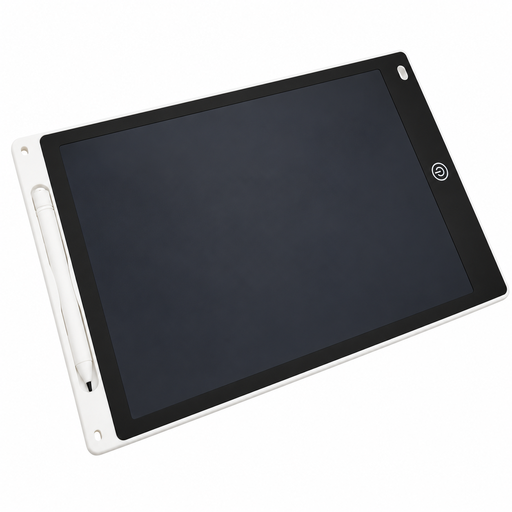
12-inch LCD drawing tablet with stylus and eraser function
The LCD drawing surface and included stylus are designed for sketching directly on screen.
Device dimensions: 285 × 190 × 5 mm. Drawing area: 230 × 165 mm.
View at Joybuy
 No image available
Xiaomi Pad 7, grey, 8 GB RAM, 128 GB ROM, with keyboard
This tablet could be suitable for costume sketches if your chosen drawing app and stylus work with this specific model.
The product name specifies a 3.2K display and 144 Hz.
View at Joybuy
 No image available
TECLAST ArtPad Pro 2025, 12.7-inch, 2K display, T-Pen
For sketching on a standalone tablet, the product name lists the T-Pen and 4096 pressure levels.
It also lists Android 15, 256 GB of storage and a Helio G99 processor.
View at Joybuy
 No image available
iFLYTEK AINOTE 2, 10.65-inch E Ink tablet, version with protective case
For handwritten designs, the product description lists a stylus, eight brush styles and locally stored notes.
The E Ink display is listed as 10.65 inches. Check that its features suit your chosen drawing app and workflow.
View at Joybuy
 No image available
TECLAST ArtPad Pro, 12.7-inch, 2K display, bundle with T-Pen, protective case and English Bluetooth keyboard
For sketching on a standalone tablet, the product name lists the T-Pen and 4096 pressure levels.
The bundle also includes a protective case and an English Bluetooth keyboard; Android 15 and 256 GB of storage are listed.
View at Joybuy
Frequently asked questions
Do I need a screen to use a graphics tablet?
With the workflow described for a graphics tablet, you view your sketch on a connected computer screen. Wacom describes One by Wacom Small as connecting via USB to a Mac or PC, with driver installation required. A pen display, on the other hand, has its own visible drawing surface, but isn’t automatically a standalone computer.
What should I check before setting it up with my computer?
Check that the connection, operating system and driver are compatible with the exact model, and allow room for the cable on your desk. Wacom describes One by Wacom Small as using USB with driver installation on Mac or PC.
Does a standalone tablet come with a stylus?
Not necessarily. Apple lists the iPad and USB‑C charging cable as included with the iPad (A16), and names the Apple Pencil (USB‑C) and Apple Pencil (1st generation) as compatible. Check the stylus version and what’s included with the specific offer.
What are my rights when shopping online in Germany?
For a standard online purchase from a business seller, you generally have a 14-day right to cancel from the date of delivery, although exceptions may apply. This is separate from claims for faulty goods: for new movable goods, § 438 BGB generally sets a limitation period of two years from delivery, subject to the legal requirements and exceptions. The European Union’s Your Europe website explains the right to cancel; § 438 BGB sets out the limitation period for claims relating to faulty goods.


