First, choose a controller that works with the console or PC you already own and the local mode in the platform game you want to play. Then count how many more player inputs you need. With supported Switch games, individual Joy-Con can turn one pair into two player controls, while a full gamepad gives one person a complete set of controls. For wireless and wired models, check the connection options for the exact version, as well as available ports and a safe cable route.
Who needs to think carefully about controller choice?
Switch flatshare with not enough player controls
If you’re checking whether your existing or additional Joy-Con can be used separately in your local platform game, look at the control options for that specific game and your console generation. Nintendo says that using a single Joy-Con depends on the software.
PC or Xbox gaming session on the sofa
If you’re looking for extra gamepads, check the wireless connection, compatible receiver or Bluetooth, and possible USB cable routing against the device you’ll be using. Microsoft and the controller manufacturers list the devices supported by each model.
PS5 gaming session with an extra controller
For another person to join you on PS5, consider a compatible controller. Also check whether your chosen platform game supports local multiplayer; Sony lists the DualSense as an additional controller for PS5.
What to look for when buying
Joy-Con used separately
A good fit if: You have a Switch or Switch 2 and the specific game supports individual Joy-Con for the number of players you want.
Consider: Two Joy-Con halves aren’t the same as two full gamepads in every game. Original Switch Joy-Con can’t be attached to or charged on a Switch 2.
Full wireless gamepad
A good fit if: Everyone wants a complete set of controls and the exact model is compatible with your console or PC.
Consider: One gamepad covers one player; the connection and power supply vary by model and device.
Wired controller
A good fit if: There’s a compatible USB port within reach and you can route the cable safely to your seat.
Consider: A wired controller doesn’t need a battery to work, but its cable could get in the way in a shared room.
| Priority |
What to check before buying |
Who it matters to |
| Platform and game |
Check that the exact model version supports your platform and that its controller layout works in the game’s local mode. |
If I want to avoid buying a new controller that won’t work with my existing device or preferred game mode, I check both first. Around 33% of consumers prioritise compatibility with their platform and game. |
| Separate player controls |
Count the player controls you have and need; check whether the specific game supports individual Joy-Con. |
I want everyone playing to have a control setup supported by the game, rather than just counting the number of controller boxes. Around 27% of consumers focus above all on having enough separate player controls. |
| Cables and ports |
Measure the route to your seat and check that you have a free USB port and the right type of connection. |
In a shared flat, I want to be able to move around the sofa without running a cable across the room or overlooking a USB port I need for something else. Around 20% of consumers prioritise seating distance and connection type. |
| Power and controls |
Plan for charging accessories or batteries for the exact version, and consider the button layout. |
If several people are going to try the controller, we want its power supply and controls to work for our group. Around 20% of consumers prioritise power and controls that suit everyone playing. |
Avoid common assumptions
-
A pair of Joy-Con always means two full controllers
According to Nintendo, whether one Joy-Con half is enough to control the game on its own depends on the game and the grip style it supports.
Check the control options for the specific local game mode first, then count how many more player controls you need.
-
“Bluetooth” or “wireless” works with every console
Connection types can vary by model and device. For the 8BitDo Ultimate 2C Wireless, the manufacturer lists Bluetooth for Android, while Windows uses 2.4 GHz with a USB receiver or a cable.
Compare the connection table for the exact version with your device, and don’t assume that similar model names mean it will work with other consoles.
-
Original Switch Joy-Con charge on Switch 2 as usual
Nintendo confirms that they can be used wirelessly with Switch 2, but not that original Joy-Con can be attached to or charged on this console.
Before continuing to use them, check whether you have an original Switch or suitable licensed charging accessories available.
-
A wired controller will fit without checking the distance to your seat
A detachable 3-m cable only helps if it can reach safely from the USB port to your seat.
Measure the actual route, including a safe way to run the cable, rather than just estimating the distance between your device and sofa.
Key brands at a glance
Nintendo
Joy-Con for separate player controls in compatible Switch games, and full gamepads for a complete set of controls.
- Nintendo describes different ways to hold the Joy-Con; according to the manufacturer, a Nintendo Switch Pro Controller can be used wirelessly with Switch 2.
- Using a single Joy-Con half depends on the game. Original Joy-Con can’t be attached to or charged on Switch 2.
Sony PlayStation
The DualSense is an option as an additional controller for PS5. Sony also lists PC as a compatible platform, depending on the game and its features.
- Sony describes haptic feedback and adaptive triggers as features of the DualSense.
- Check whether these features are available in your chosen platform game and on your device. An extra controller doesn’t add local multiplayer to a game that doesn’t support it.
Microsoft Xbox
The Xbox Wireless Controller is an option for gaming on Xbox or a supported Windows PC.
- Microsoft lists device switching and a hybrid D-pad as features of its controller.
- Remember to plan for power. Compatibility with Xbox and Windows doesn’t mean it works with PS5 or Switch.
8BitDo
According to the manufacturer, the Ultimate 2C Wireless is designed for Windows via 2.4 GHz or cable, and for Android via Bluetooth.
- The manufacturer says that a USB-A receiver and cable are included.
- For this model, “wireless” doesn’t mean a Bluetooth connection with Windows. This version isn’t listed as supporting Switch.
GameSir
The wired G7 HE is listed as compatible with Xbox Series X|S, Xbox One and Windows 10/11.
- For this model, GameSir lists a detachable 3-m USB-C cable, Hall Effect sticks and no battery.
- The cable needs to reach your seat safely. The manufacturer’s information doesn’t independently verify the controller’s lifespan.
PowerA
The Enhanced Wired Controller is a wired option for Xbox Series X|S, Xbox One and Windows.
- For this model, PowerA lists an official Xbox licence, two assignable extra buttons and a detachable 3-m cable.
- The cable length is only practical if the port and a safe route to your seat are within reach; these details apply to this model.
Controllers at Joybuy
This selection includes Joy-Con for compatible local Switch gaming, as well as full wireless and wired gamepads for the platforms they’re listed as supporting.
 No image available
Nintendo Switch 2 Joy-Con 2 2-piece set, Blue/Light Yellow
For a Switch 2 gaming session with two separate player controls; the product description says you can play locally with another person in compatible games.
The set contains two Joy-Con 2. The product description says they use a wireless connection.
Joybuy
 No image available
Microsoft Xbox Wireless Controller, Pulse Red
For an extra full gamepad with a listed Xbox console or supported Windows PC.
The product description lists Xbox One, Xbox Series X|S and Windows PC, as well as Xbox Wireless and Bluetooth. The controller requires two AA batteries, which are included according to the description.
Joybuy
 No image available
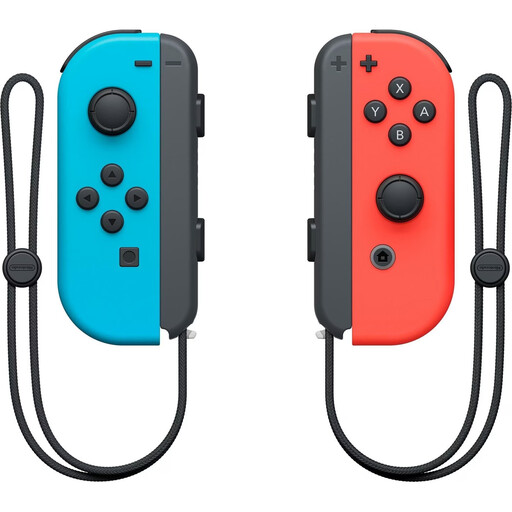
Nintendo Switch Joy-Con pair, Neon Red/Neon Blue
For Switch games that support individual Joy-Con as separate player controls; whether they work in your chosen local mode depends on the game.
According to the product description, the set contains one left and one right Joy-Con, wrist straps and built-in batteries.
Joybuy
 No image available
GameSir G7 HE, wired
For Xbox or Windows gaming when a wired connection works for you and you can route the cable safely from the USB port to your seat.
Listed as compatible with Xbox Series X|S, Xbox One and Windows 10/11. GameSir lists a detachable 3-m USB-C cable, Hall Effect sticks and no battery.
Joybuy
 No image available
PlayStation DualSense Wireless Controller, White
For an extra player on PS5; separately check whether your chosen platform game supports local multiplayer.
The product description lists Bluetooth and USB-C, and PS5, PC, Mac and mobile devices as compatible platforms. Use and features on PC may depend on the game.
Joybuy
Frequently asked questions
Is one pair of Joy-Con enough for two people on Switch?
Only if the specific game supports each player holding a single Joy-Con horizontally in the local mode you want to play. Nintendo says this grip style depends on the software; for Super Mario Bros. Wonder, Nintendo lists local games for up to four players.
Can I keep using original Joy-Con with Switch 2 and charge them there?
Nintendo confirms they can be used wirelessly, but not that original Joy-Con can be attached to or charged on Switch 2. Nintendo says you’ll need an original Switch or suitable licensed charging accessories to charge them.
How do I connect an 8BitDo Ultimate 2C Wireless to a Windows PC?
For Windows, 8BitDo lists the 2.4 GHz USB-A receiver or a wired connection. The manufacturer lists Bluetooth for this model with Android.
In Germany, who is responsible if a new controller is faulty: the retailer or the manufacturer?
Statutory claims for faulty goods are generally made against the seller; a voluntary manufacturer’s warranty is separate. Under § 438 BGB, the usual limitation period for a sale of goods is generally two years from delivery, subject to statutory exceptions. Verbraucherzentrale explains the difference between statutory consumer rights and a guarantee.
Can I simply cancel an online controller purchase in Germany?
For a consumer contract concluded at a distance where the rules apply, § 312g BGB generally gives you the right to withdraw from the contract; § 355 BGB sets out a 14-day period. Statutory exceptions and the start date of the period for the specific contract must be taken into account.


