For couch co-op platform games with players sitting to the side, start by matching your controller to your console or PC and the specific game. A wireless connection doesn’t guarantee a stable signal from every seat on the sofa. Also check whether the game supports individual Joy-Con as separate inputs, how many controllers can be used at once and how they’re charged. For connection issues with Joy-Con 2, Nintendo recommends, among other things, not placing the console behind the TV or under metal.
What matters to different players
Co-op players sitting to the side
If you’re not sitting directly in front of the TV, what matters is whether the connection works from your seat and whether enough controllers can be used at the same time. Nintendo notes that using Bluetooth audio limits the number of wireless controllers you can connect.
Switch co-op with your existing Joy-Con
If you want to keep using your Joy-Con, check whether the specific game supports holding one controller sideways and how the controllers are charged. Nintendo confirms that original Joy-Con can be used wirelessly with Switch 2, but can’t be charged directly on the console.
Platform game players switching between systems
If you want to use the same controller with a PC and a console, it needs to work with both the relevant platform and the specific game. Microsoft, PlayStation and 8BitDo list different connection methods and requirements for their controllers.
Key things to consider when buying
First, check that your platform and game are supported. Then consider where you’ll be sitting, how many separate inputs you need and how the controller is charged.
| What to consider |
What to check before buying |
Who it matters most to |
| Platform and game compatibility |
Check your console or PC, the exact controller version and whether the specific game supports it. |
If I switch between devices or games, I want to know whether my exact combination is supported. Around 29% of consumers put compatibility first. |
| Connection from your seat |
Test it from your usual side seat with your own setup, taking obstacles and possible wireless interference into account. |
If I sit to the side, I want to test the connection from that exact spot, rather than relying on the word “wireless”. Around 29% of consumers prioritise a connection that works from their seat. |
| Separate inputs |
Check the number of players and whether the game supports using one Joy-Con on its own. When using Bluetooth audio with Switch systems, bear in mind Nintendo’s limit of two wireless controllers. |
If several people are playing, I want to be sure everyone has the inputs they need and that the game supports the chosen controller position. Around 24% of consumers prioritise multiplayer controls and directional input. |
| Charging and accessories |
Check the power supply, what’s included and which USB ports you’ll need. If you’re using older Joy-Con with Switch 2, make sure you have a suitable way to charge them. |
If I want to keep using my existing controllers or accessories, I want to know in advance what else I’ll need to charge and connect them. Around 18% of consumers prioritise questions about accessories and cost. |
Common buying mistakes
-
Assuming “wireless” guarantees a connection from every seat on the sofa
Obstacles or wireless interference can affect the connection. For connection issues with Joy-Con 2, Nintendo recommends, among other things, not placing the console behind the TV or under metal.
Test the controller from the seats where you plan to play. If the connection drops out, first check the console’s position and look for possible sources of interference.
-
Assuming a pair of Joy-Con automatically counts as two full controllers
A single Joy-Con can only be used as a separate input if the specific game supports holding it sideways on its own. Nintendo doesn’t say this works with every game.
Check the player count and supported controller positions in the game details before deciding whether you need extra accessories.
-
Using older Joy-Con with Switch 2 without planning how to charge them
Nintendo says original Joy-Con can be used wirelessly with Switch 2, but can’t be charged directly on the console.
Make sure you have a suitable way to charge your existing Joy-Con.
You may need a compatible older Switch or suitable charging accessories.
-
Assuming Xbox compatibility means you can use it wirelessly with Xbox
Turtle Beach says the Stealth Pivot works wirelessly with PC, but must be connected by cable to Xbox.
Before choosing a wireless setup, check the connection type for your specific platform and controller version.
With the Stealth Pivot, you’ll need a cable that reaches your seat when playing on Xbox.
Key brands to consider
Nintendo
Joy-Con for supported single-player controller positions, and the Pro Controller for full controls across the Switch ecosystem.
- Nintendo confirms that original Joy-Con and the original Switch Pro Controller can be used wirelessly with Switch 2.
- Original Joy-Con can’t be charged directly on the console, while Joy-Con 2 don’t work with the original Switch.
Microsoft Xbox
Xbox Wireless Controller for Xbox consoles and supported Windows PC games. Microsoft specifies a hybrid D-pad.
- Microsoft lists USB, Bluetooth and the Xbox Wireless Adapter as connection options for Windows.
- These connection options don’t guarantee support in every PC game or a particular wireless connection from a seat at the side.
Sony PlayStation
DualSense as an additional controller for PS5 or compatible PC games.
- PlayStation explains how to use DualSense wirelessly with PS5 after pairing.
- According to PlayStation, haptic feedback on PC requires a USB connection and support from the specific game.
8BitDo
Pro 3 Bluetooth Gamepad for the systems listed by the manufacturer, including Switch, Switch 2 and Windows.
- 8BitDo lists features including a D-pad, as well as the system versions supported by the model.
- According to 8BitDo, the Pro 3 can’t wake Switch 2 from sleep mode; each adapter supports only one controller.
Turtle Beach
Stealth Pivot for PC players looking for a 2.4 GHz wireless connection and adjustable controls.
- Turtle Beach lists this model as supporting wireless use with PC.
- According to Turtle Beach, the model must be connected by cable to Xbox. Its wireless specification for PC doesn’t tell you how well it will connect from your seat.
Joybuy controller selection
This selection includes controllers for Nintendo Switch and Switch 2, Xbox, PlayStation 5 and compatible PC games. Whether a model is suitable also depends on the specific game and system version.
 No image available
Nintendo Switch Joy-Con Pair, Neon Blue/Neon Yellow
For Switch co-op, when the specific game supports using one controller sideways on its own.
Set of left and right Joy-Con with wireless Bluetooth connection, HD Rumble and an infrared camera on the right Joy-Con.
According to Nintendo, original Joy-Con can be used wirelessly with Switch 2, but can’t be charged directly on the console.
Joybuy
 No image available
Microsoft Xbox Wireless Controller, Pulse Red
For Xbox and supported Windows PC games if you’re looking for a hybrid D-pad.
Listed for Xbox One, Xbox Series X/S and PC; Bluetooth and Xbox Wireless are specified as connection options.
Features a hybrid D-pad and requires two AA batteries to operate.
Joybuy
 No image available
PlayStation DualSense Wireless Controller, White
For PS5 or PC games that support DualSense.
Bluetooth and USB are listed as connection options; the model has a four-way D-pad.
According to PlayStation, haptic feedback on PC requires a USB connection and support from the specific game.
Joybuy
 No image available
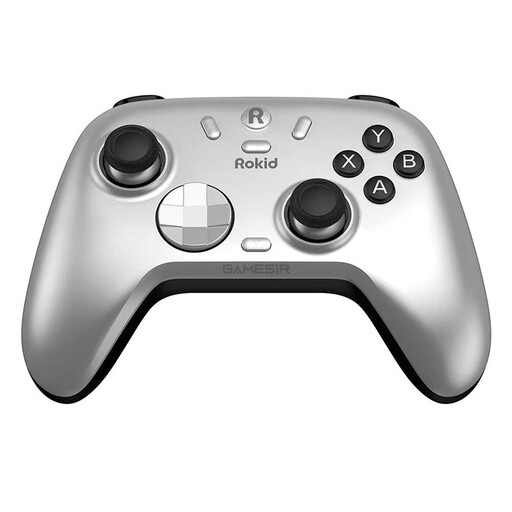
Rokid × GameSir co-branded controller
For Switch and PC, provided the game and system support the controller inputs.
Features a mechanical circular D-pad; Bluetooth and a wireless dongle are listed as connection options.
Before buying, check that your preferred connection method and the specific game are supported.
Joybuy
 No image available
Nintendo Switch 2 Pro Controller
For players using Switch 2 who prefer a full controller to a single Joy-Con.
Wireless use with Switch 2, with HD Rumble 2, motion controls and customisable GL and GR buttons.
Joybuy
Frequently asked questions
Can two people play with one pair of Joy-Con?
Yes, if the specific game supports using one Joy-Con sideways on its own. Nintendo explains how to use a single Joy-Con and how to confirm its position when syncing, but this doesn’t automatically apply to every platform game.
What should I check first if the connection drops from a seat at the side of the sofa?
Test the controller from the seat where you’ll actually be playing and check where the console is positioned. For connection dropouts with Joy-Con 2, Nintendo recommends, among other things, not placing the console behind the TV or under metal, and taking nearby wireless devices into account. This is manufacturer-specific troubleshooting advice, not a range guarantee for other controllers.
Why can’t I connect another controller when several people are playing?
If you’re using Bluetooth audio at the same time on Switch or Switch 2, Nintendo specifies a maximum of two wireless controllers. Each individual Joy-Con counts separately. Check whether this applies before assuming there’s a fault.
Can I keep using original Joy-Con with Switch 2?
Yes, Nintendo confirms that original Joy-Con can be used wirelessly with Switch 2. However, they can’t be charged directly on the console, so make sure you have a suitable way to charge them.


