Which controller is right for you?

Switch duo with shareable controllers

If you want to use your existing Joy-Con, or extra ones, as a pair, check whether the particular game recognises each controller individually. Nintendo says that Joy-Con and Joy-Con 2 can be used horizontally as individual controllers, provided the game supports this control style. Joy-Con 2 are not compatible with the original Switch.

PC player perched at the edge of the sofa

If you play on PC from a side seat, check the connection options and game support for the exact model. Microsoft lists USB, Bluetooth or the Xbox Wireless Adapter for the Xbox Wireless Controller on Windows; PlayStation says the DualSense connects to supported devices via USB and Bluetooth.

Console players who prefer a gamepad

If you prefer a full gamepad to holding a single Joy-Con, check the console generation and whether the game supports it. PlayStation says the DualSense is for PS5 and compatible games on supported PCs; the Nintendo Switch 2 Pro Controller is only compatible with Switch 2.

What should you look for when buying?

What matters when buying What to look for Who will find this most important?
Platform and second player Check that your console or PC, the multiplayer mode and the supported controller orientation all work with the specific game. Individual Joy-Con controls depend on the software. If I want to play a platform game with someone else, I first check that my device and the game recognise two separate inputs. Around 36% of shoppers put platform compatibility and having a second player first.
Connection from the edge of the sofa Check whether the exact model supports Bluetooth, the console’s wireless connection, USB or a USB receiver. If you’re using a cable, consider how far it needs to reach. If I’m sitting to the side, I want to play without an awkward cable and need a wireless connection supported by my device. Around 29% of shoppers prioritise a connection that works from a side seat.
Controls and comfort Check that you can easily reach the jump button, directional pad or stick in the intended orientation for the game. A Joy-Con held horizontally has a different button layout from a full gamepad. If I want precise control when jumping, I check that the important buttons are comfortable to reach. Around 21% of shoppers say controls and comfort are their main buying consideration.
Charging and accessories Check what’s included, how the exact model charges and whether you’ll need any extra accessories. Nintendo says that older Joy-Con need a Switch or suitable charging accessory to charge when used with Switch 2. If you use the extra controller regularly, you’ll want to know how to charge it and whether you already have the accessories you need. Around 14% of shoppers put power and accessories first.

Which buying mistakes should you avoid?

  • Assuming “Switch compatible” means every generation and every game

    Nintendo says Joy-Con 2 do not work with the original Switch. Whether Joy-Con can be used individually when held horizontally also depends on which controller orientations the particular game supports.

    Check the console generation, full model name and multiplayer controls for the platform game separately.

  • Assuming similarly named 8BitDo models use the same wireless connection

    8BitDo lists 2.4 GHz wireless or a cable for the Ultimate 2C Wireless on Windows. The differently named Ultimate 2C Bluetooth is the Switch version. Platforms and connection options vary by model.

    Look for the full “Wireless” or “Bluetooth” name and check the platform details for the exact version.

  • Assuming every game supports the extra features of a full gamepad

    Features depend on the controller, the game and the connection. PowerA says the Advantage Wireless for Switch 2 is not designed for Joy-Con games; PlayStation says haptic feedback on PC depends on game support and requires a USB connection.

    Only consider an extra feature a reason to buy if the game you want and your planned connection support it.

Which controller brands are worth considering?

Nintendo

A good fit for Joy-Con, Joy-Con 2 and full controllers for Nintendo consoles.

  • Nintendo confirms that Joy-Con and Joy-Con 2 can be used individually in a horizontal position with supported software.
  • Joy-Con 2 are not compatible with the original Switch; the Switch 2 Pro Controller is designed only for Switch 2.

Xbox

The Xbox Wireless Controller is a full gamepad for supported Xbox consoles and Windows PCs.

  • Microsoft lists USB, Bluetooth or the Xbox Wireless Adapter as connection options for Windows, and includes a hybrid directional pad.
  • Check that the connection method and any accessories you need work with your controller, PC and game.

PlayStation

The DualSense is a good fit for PS5 and compatible games on supported PCs.

  • PlayStation lists USB and Bluetooth for connecting to supported devices.
  • On PC, haptic feedback depends on game support and, according to PlayStation, requires USB. Not every PS5 feature is available on other devices.

8BitDo

The Ultimate 2C models vary by version, platform and connection.

  • For the Ultimate 2C Wireless, 8BitDo lists 2.4 GHz or a cable for Windows, and Bluetooth for Android.
  • The Ultimate 2C Bluetooth is the Switch version. According to the manufacturer, it can work with Switch 2 after a firmware update.

PowerA

According to the manufacturer, the Advantage Wireless is designed for Switch 2 and other listed Switch models.

  • PowerA lists Hall Effect sticks, two mappable buttons and an included 3-m USB-C cable for this model.
  • According to PowerA, it does not have HD Rumble, an IR camera or amiibo NFC, and should not be used with Joy-Con games. Durability and precision claims are the manufacturer’s own.

Joybuy products for an extra player

The Joybuy products below include wireless controllers for PC, PS3 and Nintendo Switch or Switch 2, including shareable Joy-Con and full gamepads.

The G-Lab K-PAD-HELIUM-WL wireless gaming controller with 2 back paddles

The G-Lab K-PAD-HELIUM-WL Wireless Gaming Controller

For an extra player on PC or PS3, if you want to connect using a 2.4 GHz USB receiver.

The product name specifies 2.4 GHz wireless and two back paddles.

View at Joybuy

BEITONG PanGu Modular Wireless Gaming Controller

BEITONG PanGu Modular Wireless Gaming Controller

A full gamepad for an extra player, with a choice of the listed connection options to suit your device.

Product details list PC, Nintendo Switch, Switch 2, Steam and Android, with wired, wireless and Bluetooth connections. The product name says that the joysticks, buttons and directional pads are interchangeable.

View at Joybuy
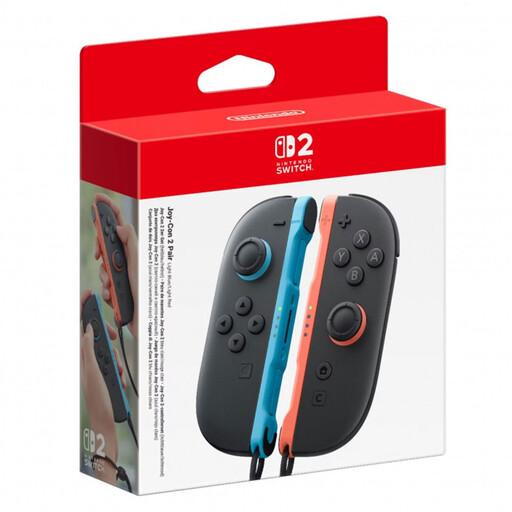
Nintendo Switch 2 Joy-Con 2 pair, L and R, light blue and light red

Nintendo Switch 2 Joy-Con 2 pair (L+R), Light Blue/Light Red

For two separate inputs on a Switch 2, if the platform game supports Joy-Con held horizontally as individual controllers.

The set includes one left and one right Joy-Con 2 and is listed as wireless. Nintendo notes that the available controller orientations vary between games.

For Nintendo Switch 2 only; not compatible with the original Switch.

View at Joybuy

Nintendo Switch 2 Pro Controller

Nintendo Switch 2 Pro Controller

For a player who prefers a full gamepad to a single Joy-Con on Switch 2.

Product details list a wireless connection and mappable GL and GR buttons.

Compatible with Nintendo Switch 2 only.

View at Joybuy
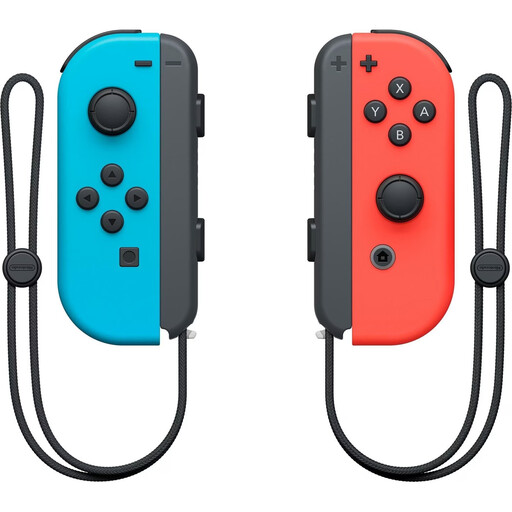
Nintendo Switch Joy-Con controller pair, neon red and neon blue

Nintendo Switch Joy-Con controller pair, Neon Red/Neon Blue

For two separate inputs on an original Switch, if the particular game supports Joy-Con held horizontally as individual controllers.

The pair includes one left and one right Joy-Con; product details list Bluetooth and built-in batteries.

According to Nintendo, using a single Joy-Con depends on whether the game supports that play style.

View at Joybuy

Frequently asked questions

Can each player use one Joy-Con on a Switch?

Yes, if the particular game supports a Joy-Con held horizontally as an individual controller. The same applies to Joy-Con 2 on Switch 2; Nintendo notes that the available controller orientations can vary depending on the software.

Can I use Joy-Con 2 with the original Switch?

No. Nintendo does not support Joy-Con 2 on the original Switch. Older Joy-Con can be used wirelessly with Switch 2, but cannot be attached to the console. Nintendo lists a Switch or suitable charging accessory as options for charging them.

How do I set up a PC controller for the side of the sofa?

Choose a connection method supported by both your controller and PC, then check the multiplayer controls in the specific game. Microsoft lists USB, Bluetooth or the Xbox Wireless Adapter for the Xbox Wireless Controller on Windows; for the Ultimate 2C Wireless on Windows, 8BitDo lists a 2.4 GHz receiver or a cable.

What should I check when charging an extra controller?

Check how the exact version charges and what’s included in the box. The DualSense offer described by PlayStation includes a built-in battery but no USB cable; older Joy-Con cannot be attached to Switch 2 and need a Switch or suitable charging accessory to charge.

What are my rights if I buy a faulty controller online in Germany?

Statutory consumer rights are separate from a voluntary guarantee, as explained by the Verbraucherzentrale (German Consumer Advice Centre). The German Civil Code generally provides a right of withdrawal for distance sales contracts with consumers; the statutory period is 14 days. When the period starts and whether any exceptions apply depend on the legal requirements in each case (§§ 312g and 355 BGB).