Choose an extra controller based on the device running the game and the number of local player inputs it supports – not the TV input you happen to have selected. In supported Switch games, individual Joy-Con controllers can provide separate inputs for two people. A full-size gamepad, on the other hand, is a control setup for one person and won’t necessarily work with other consoles. Then check the connection, any accessories you’ll need and the power supply.
Who is this guide for?
Switch co-op group
You want to get several people playing the same Switch game and decide whether individual Joy-Con controllers will do or everyone needs a full-size gamepad. Nintendo Germany explains that Super Mario Bros. Wonder supports local multiplayer with individual Joy-Con controllers.
PC connected to the TV
You’re playing a platform game on a Windows PC on the big screen and need to make sure extra controllers and their connection type work with the game. Xbox Support lists USB, Bluetooth and, where applicable, Xbox Wireless as connection options for the Xbox Wireless Controller on Windows PC.
A household with different gaming devices
You switch between consoles and a PC on the TV and don’t want to assume that a controller will work with every device just because they share a screen. Nintendo, Xbox Support and PlayStation Support each specify requirements for particular devices or connections.
What should you consider when choosing a controller?
Switch 2 with individual Joy-Con 2 controllers
A good fit if: The game supports individual Joy-Con 2 controllers and you need extra, separate inputs.
Consider: The smaller single-controller setup needs to suit the controls for the specific game; Joy-Con 2 controllers are designed for Switch 2.
Switch 2 with Pro Controller
A good fit if: One of the players prefers a full-size gamepad with extra mappable buttons.
Consider: The Pro Controller is for one player and, according to Nintendo, can only be used with Switch 2.
Xbox Wireless Controller on Windows PC
A good fit if: The game runs on a Windows PC and supports an additional player using a controller.
Consider: Depending on the connection, you may need USB, Bluetooth or an Xbox Wireless Adapter. You’ll also need AA batteries or a compatible battery pack.
DualSense with PS5 or a compatible PC game
A good fit if: You’re playing on PS5 or want to use a DualSense with a supported PC game.
Consider: On PC, extra features depend on the game and sometimes require a USB connection. Check whether a cable is included, too.
8BitDo Ultimate 2C Wireless for Windows
A good fit if: You want to use the included 2.4 GHz USB receiver or a wired connection with your Windows PC.
Consider: For this model, 8BitDo lists Bluetooth for Android, not Windows.
PowerA Wired Controller for a docked Switch
A good fit if: You want an extra wired controller for a docked Switch or Switch 2.
Consider: The specific model described comes with a 3 m USB cable, but doesn’t have motion controls, HD Rumble or NFC.
| What matters |
What to check before buying |
Who is it important to? |
| Compatibility with your gaming device |
Check the console or PC, the exact controller model, supported connection and specific game. |
If I switch between gaming devices on the TV, I don’t want to assume a controller is compatible just because I’ve changed the TV input. Around 27% of consumers put checking the actual gaming device first. |
| Separate inputs for everyone playing |
Check the number of players and the controller configurations supported by the game; count the inputs you already have. |
If several people are playing at once, the game needs to support the number and type of inputs you want. Around 27% of consumers prioritise the number of game controls they need. |
| Connection from the sofa |
Check the connection to your gaming device, what’s included, cable length and whether the cable can be routed safely from your seat. |
If I’m playing from the sofa, I want to know whether a wired or wireless connection will work from where I’m sitting and reach the available ports. Around 20% of consumers focus first on seating position and connection. |
| Buttons and handling |
Check the game’s control mode and button requirements; compare the intended grip style if needed. |
If particular buttons or a full gamepad grip matter to me, the controller needs to suit the platform game. Around 13% of consumers prioritise handling and button layout. |
| Power and accessories |
Check what’s included, as well as whether you already have batteries, rechargeable batteries and charging cables for the exact model. |
If I want to keep using the charging accessories I already own, I want to know what power source and cables I’ll need before buying. Around 13% of consumers put accessory requirements first. |
Avoiding common assumptions
-
Confusing the TV input with controller compatibility
Using the same TV doesn’t make controllers for different gaming devices compatible with one another. According to Nintendo, the Switch 2 Pro Controller is designed for Switch 2; PC connections depend on the controller and connection type.
First, work out which device is running the game. Then check the exact controller model and the connections it supports.
-
Assuming a controller set automatically tells you how many people can play
Whether an individual Joy-Con counts as a separate game control depends on the game and the control mode it supports. A Pro Controller provides input for one person.
Check the local player limit and supported controls for the specific game, and count any controllers you already have.
If you don’t have enough inputs, you may need an extra full-size gamepad or a pair of Joy-Con for your planned session.
-
Assuming “wireless” automatically means Bluetooth on Windows PC
According to 8BitDo, the Ultimate 2C Wireless uses 2.4 GHz or a wired connection on Windows; Bluetooth is listed for Android.
Check the full model name, wireless standard and what’s included before planning how to connect it to your PC.
If you’re using a receiver, you’ll need an available, compatible USB port on your gaming device.
-
Overlooking the power supply and missing features
The Xbox Wireless Controller needs AA batteries or a compatible battery pack; according to Xbox, rechargeable AA batteries can’t be charged inside the controller. A USB cable isn’t included with one DualSense colour model described by Sony.
Check what’s included and which gaming features you actually need for the exact model.
Plan to use batteries, a battery pack or a suitable cable you already have, or buy what you need to get set up.
Key brands at a glance
Nintendo
A good choice for local Switch and Switch 2 sessions with Joy-Con or a Pro Controller.
- Nintendo Germany describes Super Mario Bros. Wonder as supporting both individual Joy-Con controllers and local multiplayer inputs.
- According to Nintendo, Joy-Con 2 and the Switch 2 Pro Controller aren’t designed for the original Switch. Existing Switch Pro Controllers can be used wirelessly with Switch 2. These are the manufacturer’s claims, not independent ergonomic tests.
Xbox
An option for Xbox and Windows PC when your PC is running the game on the TV.
- Xbox Support lists USB, Bluetooth and, where applicable, Xbox Wireless as connection options for the controller on Windows PC.
- You’ll need AA batteries or a compatible battery pack; rechargeable AA batteries can’t be charged inside the controller.
Sony PlayStation
The DualSense is an option for PS5 and compatible PC games.
- PlayStation Support lists USB and Bluetooth as PC connection options.
- According to PlayStation Support, haptic feedback on PC is limited to supported games and requires a USB connection. You can’t assume that all the features available on PS5 will also work on PC.
8BitDo
The Ultimate 2C Wireless is a documented option for Windows, using a 2.4 GHz receiver or a cable.
- 8BitDo lists a 2.4 GHz USB receiver as included and explains how to connect it to a Windows device.
- Bluetooth is listed for Android with this model, not Windows. Manufacturer claims about polling rate and battery life don’t prove a measured gaming advantage on a TV.
PowerA
One specific wired model is designed for a docked Switch or Switch 2.
- PowerA lists a detachable 3 m USB cable for this Wired model and says it supports Switch 2.
- According to PowerA, this model doesn’t have motion controls, HD Rumble or NFC. These details apply to the model described, not every PowerA controller.
Joybuy controllers for couch co-op
This selection includes controllers for Switch 2, PS5 and compatible PC games, as well as other gaming devices named in the product listings. Before choosing, check that the exact model works with the device and game you’ll be using.
 No image available
Nintendo Switch 2 Joy-Con 2, 2-piece set (Blue/Light Yellow)
An option for extra, separate inputs in compatible local Switch 2 games.
Set of 2 Joy-Con 2 controllers; according to the product description, designed for Nintendo Switch 2.
Joybuy
 No image available
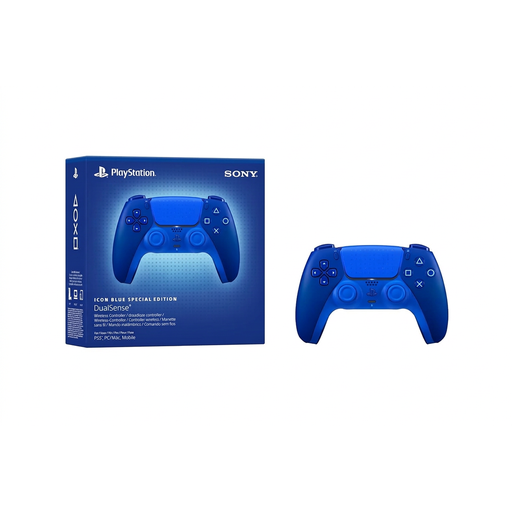
PlayStation DualSense Wireless Controller CFI-ZCT2WZBX Icon Blue Special Edition
A good choice if you need an extra controller for PS5 or a compatible PC game.
The product description lists USB and Bluetooth, along with a built-in rechargeable battery. A USB cable isn’t included, according to the description.
Joybuy
 No image available
BIGBIG WON Rainbow 3 Wireless Controller
An option for households that want to switch between several gaming devices listed in the product title.
The product title lists PC, Switch 2, iOS and Android, as well as a 3.5 mm audio jack.
Joybuy
 No image available
BIGBIG WON Rainbow 2 Pro Wired
A wired option for use with one of the gaming devices listed in the product title.
Described as a wired model; the product title lists PC, Switch, Switch Lite and PS4.
Joybuy
 No image available
Nintendo Switch 2 Pro Controller
A good choice if one person prefers a full-size gamepad with extra mappable buttons on Switch 2.
Nintendo lists this controller for use with Switch 2.
Joybuy
Frequently asked questions
Should I connect the controller to the TV or the gaming device?
For the gaming setups described here, connect the controller to the Switch, PS5 or PC running the game. Sharing a TV doesn’t make controllers for different systems compatible with one another.
Is one pair of Joy-Con 2 enough for two people?
Yes, if the specific game supports individual Joy-Con 2 controllers. Nintendo says that in Super Mario Bros. Wonder, each player can use one Joy-Con 2 held horizontally. For other games, check which controls are supported.
How do I connect the 8BitDo Ultimate 2C Wireless to Windows?
According to 8BitDo, you can use the included 2.4 GHz USB receiver or a USB cable. This model is listed as supporting Bluetooth on Android, not Windows.
What should I check about accessories and your legal rights?
Check whether batteries, a battery pack or any cables are missing from the box for the exact model. In Germany, purchases from a retailer are generally covered by a two-year statutory guarantee against the seller. The Verbraucherzentrale distinguishes this from a voluntary manufacturer’s warranty.


