
Lieferung heute & morgen

Qualitätsgarantie

Willkommens-Angebote freischalten: KOSTENLOSE Lieferung | Bis zu 80 % RABATT | Kostenlose 30-Tage-JoyPlus-Testphase
App herunterladen
Choosing the right CPU cooler is crucial for the performance and longevity of a PC. However, the market is filled with marketing promises that often create more confusion than clarity. Many users invest in models that are unsuitable for their system, oversized, or unnecessarily loud. This guide will help you understand the essential criteria and avoid common purchasing pitfalls to make an informed decision.
Before we dive into the technical details, it's important to be aware of three common misconceptions that often lead to a bad purchase.
To find the right CPU cooler, focus on the following three objective criteria.
The first fundamental choice is between air and liquid cooling.
Physical compatibility is non-negotiable. Check these three points carefully:
A cooler's performance is often indicated by its TDP (Thermal Design Power), measured in watts. This value serves as a rough guideline for the amount of heat the cooler can handle. For quiet operation, the fans are crucial. A quiet CPU cooler requires fans with PWM (Pulse Width Modulation) control, which adjust their speed based on the CPU temperature. Look for a wide RPM range and high static pressure, especially for AIO radiators.
Here are some models tailored to specific user profiles and their requirements.
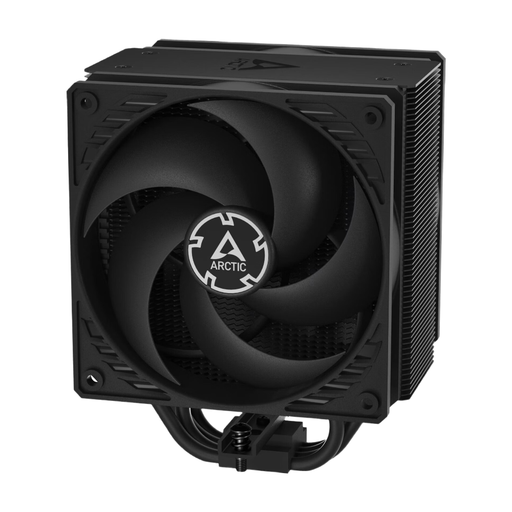
Why This Fits Their Persona: Ideal for users seeking a reliable and high-performance cooling solution without unnecessary frills. The focus is on function and a great price-to-performance ratio for gaming and everyday PCs.
This model avoids the RGB trap by forgoing elaborate lighting and instead investing in two pressure-optimised fans and an efficient heatsink design.
Push-pull configuration with two 120mm P-fans for efficient airflow. Compatible with current Intel and AMD platforms.
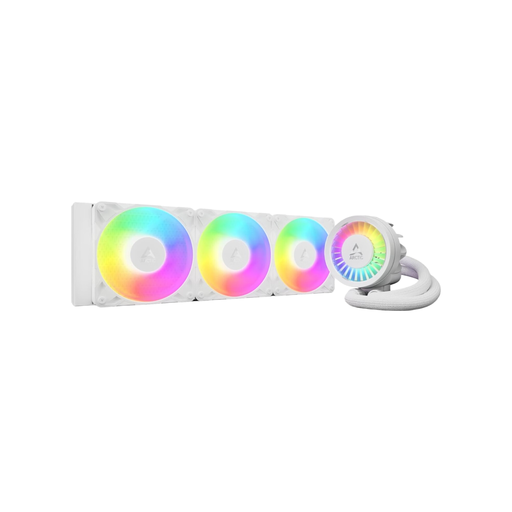
Why This Fits Their Persona: For enthusiasts and gamers who need maximum cooling performance for high-end CPUs and overclocking, while also valuing customisable aesthetics.
This model escapes the size illusion by combining a large 360mm radiator with powerful P12 fans, a PWM-controlled pump, and an additional VRM fan.
High cooling performance from a 360mm radiator and three A-RGB fans. Integrated VRM fan for cooling the motherboard's voltage regulators.

Why This Fits Their Persona: Perfect for users who want to build a clean, visually appealing system with synchronised ARGB lighting without compromising on cooling performance.
This model avoids the compatibility nightmare through a simplified installation. The direct motherboard connection makes additional controllers redundant and simplifies cable management.
Three RS120 ARGB fans for strong cooling performance and vibrant lighting. Broad compatibility with the latest Intel and AMD sockets, including LGA1851 and AM5.
We have compiled a complete, up-to-date list of products that fully meet these strict selection criteria and German safety regulations.
1. How often should I clean my CPU cooler? It is recommended to clean the CPU cooler and fans of dust every 6 to 12 months. In dusty environments or households with pets, more frequent cleaning (every 3-6 months) may be necessary. Dust buildup obstructs airflow and significantly reduces cooling performance. Canned air is a suitable tool for this task.
2. Is an AIO liquid cooler really better than an air cooler? Not necessarily. High-end AIOs generally offer greater cooling potential, which is particularly beneficial for heavily overclocked CPUs. However, a high-quality air cooler can match or even exceed the performance of many entry-level and mid-range AIOs, while offering higher reliability and often lower idle noise levels. The choice depends on the use case, budget, and personal preference.
3. What does TDP mean for a CPU cooler? TDP stands for "Thermal Design Power" and is measured in watts (W). For a CPU, this value indicates the maximum amount of heat it generates under full load. For a CPU cooler, the TDP rating specifies the maximum amount of heat the cooler can dissipate. It is advisable to choose a cooler with a TDP specification significantly higher than the TDP of your CPU to have thermal headroom for high ambient temperatures or future upgrades.