
Lieferung heute & morgen

Qualitätsgarantie

Willkommens-Angebote freischalten: KOSTENLOSE Lieferung | Bis zu 80 % RABATT | Kostenlose 30-Tage-JoyPlus-Testphase
App herunterladen
Choosing the right CPU cooler is crucial for the performance and longevity of any PC. An inadequate cooler can lead to thermal throttling, where the CPU reduces its performance to avoid overheating. However, the market is flooded with marketing promises and technical specs that confuse more than they help. Many users invest in oversized or incompatible solutions. This guide will help you navigate the most common pitfalls and make an informed decision.
The 3 Most Common Traps When Buying a PC Cooler:
To avoid a bad purchase, you should focus on three core aspects. These will help you see through the marketing hype and interpret the technical data correctly.
The first fundamental decision is the type of cooling. Both systems have specific advantages and disadvantages.
CPU Air Coolers: This traditional solution uses a metal heat sink (usually aluminium and copper heat pipes) and one or more fans to dissipate heat directly from the CPU.
AIO (All-in-One) Liquid Coolers: A closed-loop system that uses a liquid to transport heat from the CPU to a radiator, where it is dissipated by fans. Common sizes include 240mm liquid coolers and 360mm AIOs.
Compatibility is non-negotiable. Be sure to check these three points before buying:
Once compatibility is confirmed, it's time for the fine-tuning.
Here are some recommendations tailored to different user profiles that take the above criteria into account.
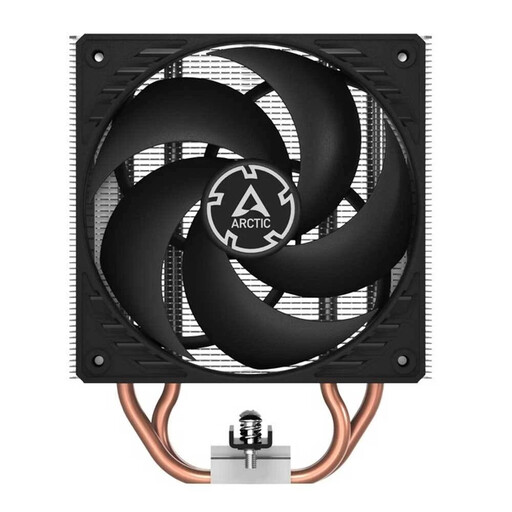
Why it's a great fit: Ideal for users seeking a significant upgrade over the stock cooler without a large budget. It offers solid cooling performance for mid-range CPUs and is a sensible, durable choice for gaming and office PCs.
This model sidesteps the "bigger is better" trap. It proves that a well-designed air cooler is perfectly sufficient for most systems, saving you from overspending on an oversized AIO liquid cooler.
The push-pull configuration with two fans from the factory ensures highly efficient airflow through the heat sink. Installation is straightforward thanks to the screw-based mounting system.
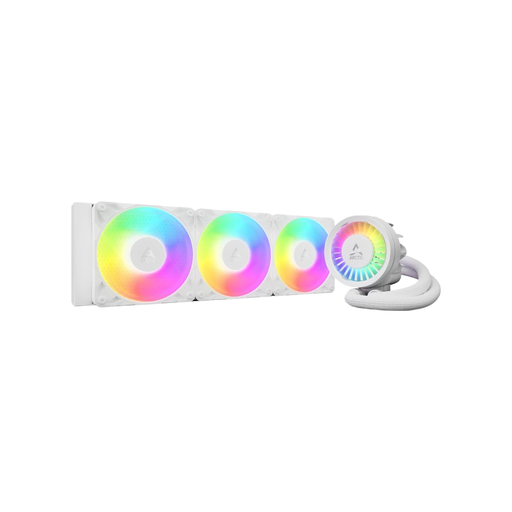
Why it's a great fit: For users with high-end CPUs who need maximum cooling performance for demanding gaming or content creation. The 360mm radiator surface provides enormous thermal headroom, while the A-RGB lighting ensures an appealing look.
This model addresses an often-ignored drawback of AIOs: the lack of cooling for the voltage regulator modules (VRMs) on the motherboard. The integrated VRM fan provides additional cooling for these critical components.
The combination of a thick 38mm radiator and a dedicated VRM fan delivers cooling performance designed even for overclocked processors. The offset mounting system for AMD CPUs improves heat absorption.
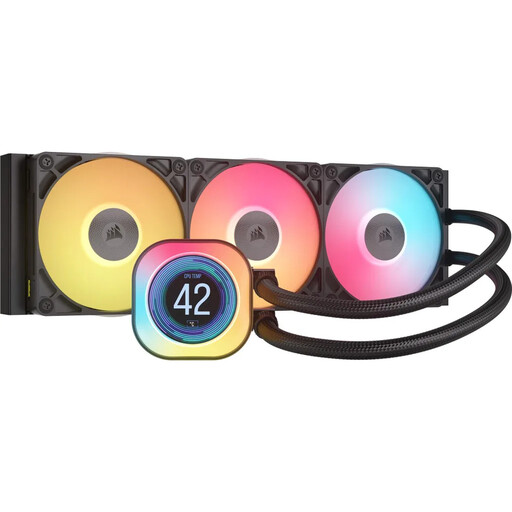
Why it's a great fit: For PC builders who want to make a visual statement and use cutting-edge features. The integrated LCD for displaying system stats or animated GIFs is a clear differentiator, offering both utility and a unique aesthetic.
This model avoids the trap of high performance coming with a boring look. It integrates a functional display that goes beyond simple RGB lighting, providing real value for system monitoring.
The 2.1-inch IPS LCD screen is fully customizable. Combined with iCUE LINK technology, it drastically simplifies cable management, leading to an exceptionally clean system build.
If you want to compare more models that meet our selection criteria, you can find a comprehensive and up-to-date selection here.
A modern AIO liquid cooler has an expected lifespan of about 5 to 7 years. The most common point of failure is the pump. Additionally, a small amount of coolant can escape over the years through permeation (natural diffusion through the tubing material), which can minimally affect performance. The manufacturer's warranty period is often a good indicator of expected durability.
There's no one-size-fits-all answer. At idle or low loads, high-quality air coolers are often inaudible, as only the slow-spinning fans are a source of noise. An AIO also has a pump, which can produce a constant, low hum. Under full load, however, an AIO with a large radiator surface can be quieter because its fans can spin slower to dissipate the same amount of heat. The perceived noise level heavily depends on the specific models and individual fan settings.
Most CPU coolers come with either pre-applied thermal paste or a small tube for manual application. If the paste is already applied to the cooler's contact plate, you can install it directly. If a tube is included, you'll need to apply a small amount to the CPU yourself. Buying separate thermal paste isn't strictly necessary at first, but for high-end models, it can improve cooling performance by a few degrees.