
Lieferung heute & morgen

Qualitätsgarantie

Willkommens-Angebote freischalten: KOSTENLOSE Lieferung | Bis zu 80 % RABATT | Kostenlose 30-Tage-JoyPlus-Testphase
App herunterladen
Modern processors offer impressive performance, but they also generate a significant amount of heat. Inadequate processor cooling can lead to thermal throttling, where the CPU reduces its performance to prevent overheating. This not only impacts performance in gaming or demanding applications but can also shorten the component's lifespan.
Selecting the right CPU cooler is therefore a crucial step when building or upgrading a PC. This guide provides objective criteria and a selection of models to make your decision easier and ensure stable, quiet, and high-performance cooling for your system.
Before you decide on a model, several fundamental technical aspects should be considered. These factors ensure that the cooler is not only powerful but also compatible with your system.
The most fundamental decision concerns the type of cooling. Both technologies have specific advantages and disadvantages.
A cooler is useless if it doesn't fit in your system. Therefore, check three key compatibility aspects:
A cooler's performance is often indicated by its TDP (Thermal Design Power), measured in watts. This value should ideally be higher than your CPU's TDP to provide performance headroom for demanding tasks or warm ambient temperatures.
The noise level primarily depends on the installed fans. A quiet CPU cooler typically uses larger fans that can move the same amount of air at a lower speed (RPM) as smaller, faster fans. PWM-controlled fans (Pulse-Width Modulation) dynamically adjust their speed based on the CPU temperature, enabling a good compromise between cooling and noise. For a custom look, many models also offer customisable RGB CPU cooler lighting.
Based on the criteria mentioned, we have compiled a selection of models suitable for various use cases.
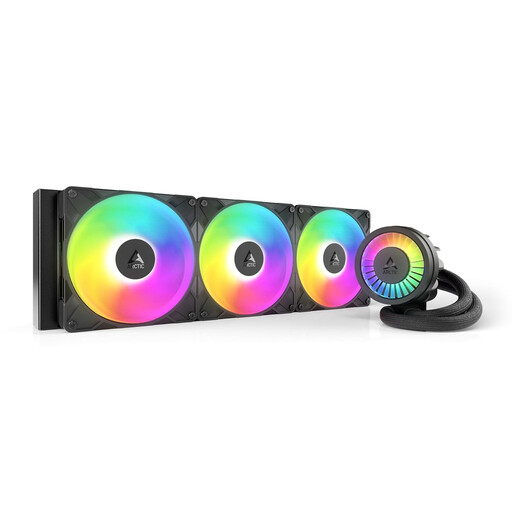
The ARCTIC Liquid Freezer III Pro 420 A-RGB is an AIO liquid cooler designed for maximum cooling performance. The large 420mm radiator, equipped with three 140mm fans, provides an enormous surface area for heat dissipation. A special feature is the integrated VRM fan on the pump unit, which additionally cools the voltage regulators on the motherboard, further enhancing system stability.
This model is aimed at enthusiasts and overclockers who want to get the most out of their high-end CPUs. It is ideal for large PC cases that can accommodate a 420mm radiator and where uncompromising cooling performance is required.
View Product: ARCTIC Liquid Freezer III Pro 420 A-RGB
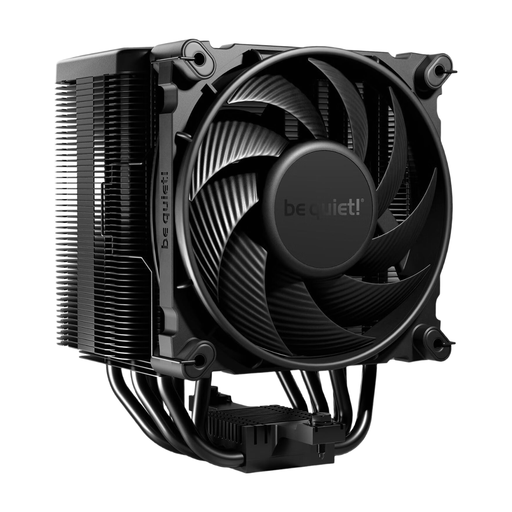
The be quiet! Dark Rock 5 is an air cooler that combines high cooling performance with near-silent operation. This is achieved through six copper heatpipes, a dense fin stack, and the Silent Wings 4 120mm PWM fan. Its asymmetrical design ensures high compatibility with RAM modules and VRM heatsinks.
The Dark Rock 5 is the ideal choice for users looking for a powerful yet quiet CPU cooler. It fits perfectly in silent builds, audio workstations, or gaming PCs where a low noise level is a priority.
View Product: be quiet! Dark Rock 5
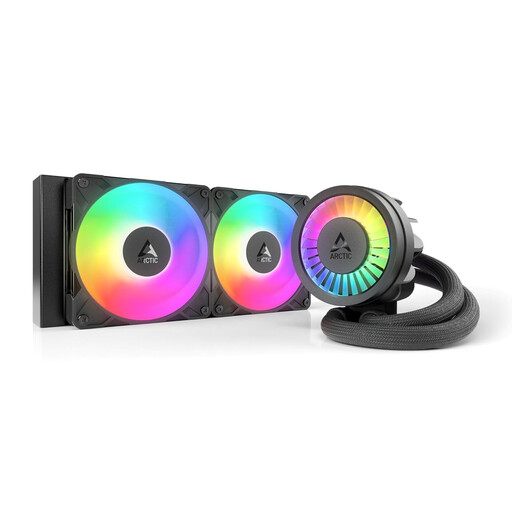
The ARCTIC Liquid Freezer III Pro 240 A-RGB offers many of the advanced features of its larger sibling in a more compact form factor. With a 240mm radiator and two 120mm fans, it fits into most common mid-tower cases while still delivering excellent cooling performance for gaming and high-performance systems.
This model is an excellent all-rounder for PC builders who want to leverage the benefits of AIO liquid cooling and an appealing RGB look in a mid-tower case. It offers a well-rounded balance of performance, compatibility, and aesthetics.
View Product: ARCTIC Liquid Freezer III Pro 240 A-RGB
If the models presented here don't exactly meet your requirements or if you prefer a different aesthetic, there is a wide range of other options available. Especially for builds that aim for a uniform look, a specific colour scheme can be crucial.
Discover our selection of black PC coolers to find the right component for your system.
AIO liquid coolers are closed, maintenance-free systems. The coolant is designed to last for the entire lifespan of the product and does not need to be changed or refilled.
Not necessarily. The right cooler depends on your CPU's TDP, the use case (e.g., gaming, office work), and case compatibility. For a mid-range CPU with no overclocking ambitions, a solid mid-range cooler is often perfectly adequate. The cooling performance should match the processor.
No. It is essential to check the cooler's specifications to ensure compatibility with your motherboard's CPU socket. Common sockets like Intel Socket 1700 or AMD AM5 are supported by most modern coolers, and appropriate mounting kits are often included. However, checking before you buy is always necessary.