
Lieferung heute & morgen

Qualitätsgarantie

Willkommens-Angebote freischalten: KOSTENLOSE Lieferung | Bis zu 80 % RABATT | Kostenlose 30-Tage-JoyPlus-Testphase
App herunterladen
Choosing the right CPU cooler is a critical step when building or upgrading a PC. Inadequate cooling can lead to performance throttling, system instability, and a shortened component lifespan. With a vast array of models on the market—from classic PC air coolers to complex AIO liquid coolers—making the right choice isn't always easy.
This article serves as your guide. We'll explain the most important criteria for selecting a CPU cooler and present a selection of models for different needs and budgets. Our goal is to provide you with an informed basis for your decision, ensuring your system runs cool, quiet, and stable, even under load.
Before you decide on a model, several fundamental aspects should be considered. These factors ensure that the cooler is not only powerful but also compatible with your system.
The most basic decision concerns the type of cooling. Both systems have specific pros and cons.
Compatibility is a critical factor. Be sure to check three aspects before purchasing:
For many users, a quiet CPU cooler is just as important as raw cooling performance. The noise level is largely determined by the quality and speed of the fans. Models with PWM (Pulse Width Modulation) control can dynamically adjust their fan speed based on the CPU temperature, ensuring quiet operation at idle.
Aesthetics also play an increasingly important role. A white CPU cooler can add an elegant touch to a light-themed build, while an RGB CPU cooler offers customisable lighting that can be synchronised with other components.
Here is a selection of coolers that cover a range of needs—from high-performance AIO solutions to efficient air coolers.
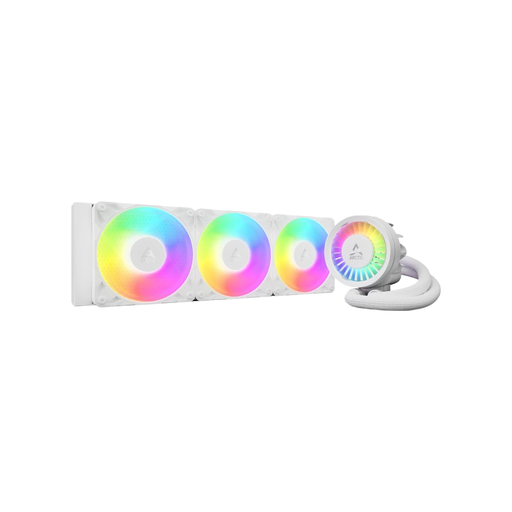
Why it stands out: This all-in-one liquid cooler combines a 360mm radiator with three A-RGB fans, delivering high cooling capacity. A special feature is the integrated VRM fan, which provides additional cooling for the motherboard's voltage regulators, thus contributing to overall system stability. The integrated cable management ensures a clean look with only one visible connection cable.
Pros:
Who it's for: PC enthusiasts and overclockers looking for a powerful and visually appealing AIO solution for high-end CPUs who also value a tidy system interior.
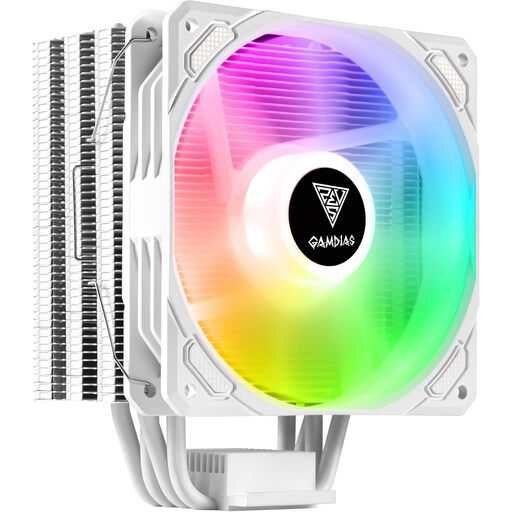
Why it stands out: The Gamdias Boreas E1-410 WH is a PC air cooler that combines solid cooling performance with appealing aesthetics. Its snow-white design and customisable ARGB lighting make it an eye-catcher. The Heatpipe Direct Touch Contact (DTC) technology ensures the heat pipes make direct contact with the CPU, improving heat transfer.
Pros:
Who it's for: Budget-conscious PC builders who want a reliable air cooler for mid-range CPUs and don't want to compromise on a white design and RGB lighting.
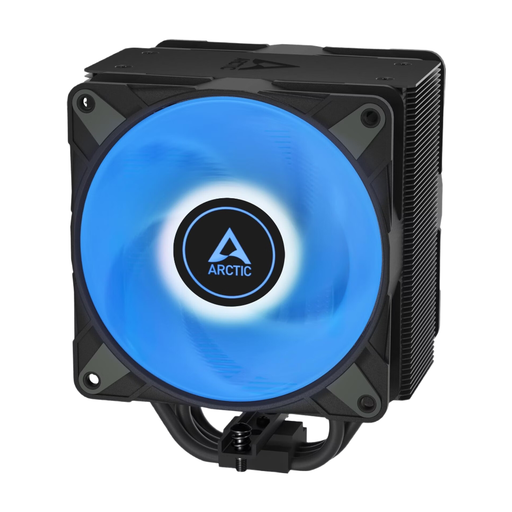
Why it stands out: This single-tower air cooler is designed for high efficiency. Four offset heat pipes quickly transfer heat to the heatsink, where two pressure-optimised 120mm fans in a push-pull configuration ensure effective heat dissipation. An innovative click system significantly simplifies fan installation and replacement.
Pros:
Who it's for: Users seeking a powerful and easy-to-maintain air cooler for demanding CPUs who appreciate a straightforward installation process.
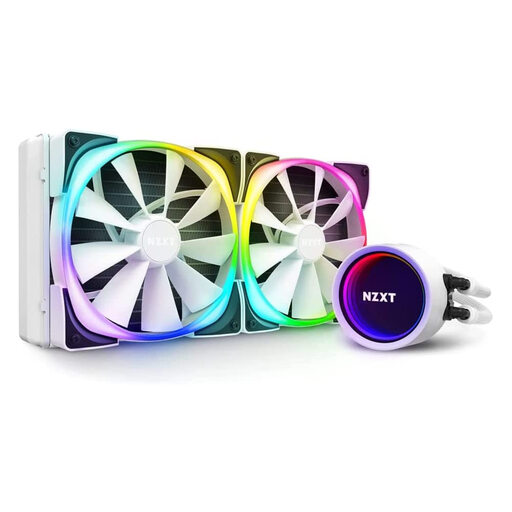
Why it stands out: The NZXT Kraken X63 RGB is known for its unique aesthetic, created by an infinity mirror effect on the pump cap. The CAM software allows for precise control over both cooling performance and RGB lighting, which can be synchronised with other NZXT products. The 280mm radiator offers a good balance between cooling surface area and compatibility with many cases.
Pros:
Who it's for: PC builders who prioritise aesthetics and seamless software integration without compromising on the cooling performance of a 280mm AIO liquid cooler.
Were your needs not fully met here, or are you looking for more models with specific lighting options? You can find a wider selection of cooling components in our RGB Fans category.
1. Will any CPU cooler fit my motherboard? No, compatibility is not universal. You must ensure the cooler supports your motherboard's CPU socket (e.g., AM5 or LGA 1700). Also, check the cooler's dimensions to make sure it fits in your case and does not interfere with tall RAM modules.
2. Is an air cooler or an AIO liquid cooler quieter? There's no one-size-fits-all answer. A high-quality quiet CPU cooler (air) can be quieter at idle and under light loads than a budget AIO, as there is no pump noise. Under full load, the noise level heavily depends on the quality of the fans and the pump control.
3. How often should thermal paste be replaced? As a general guideline, it is recommended to replace thermal paste every 2 to 4 years. However, if you notice an increase in CPU temperatures during normal use, an earlier replacement may be beneficial. High-quality thermal pastes typically maintain their conductivity for longer.