
Lieferung heute & morgen

Qualitätsgarantie

Willkommens-Angebote freischalten: KOSTENLOSE Lieferung | Bis zu 80 % RABATT | Kostenlose 30-Tage-JoyPlus-Testphase
App herunterladen
Choosing the right CPU cooler is crucial for a PC's performance and longevity. However, the market is flooded with marketing promises that often create more confusion than clarity. Many users invest in models that either don't fit their system, are unnecessarily loud, or simply fail to deliver the promised cooling performance. This guide will help you navigate the most common pitfalls and make an informed decision.
Before we dive into the technical details, let's highlight three common issues that can lead to a poor purchase:
To avoid the mistakes mentioned above, focus on the following three objective criteria. These will determine if a processor cooler is right for your system.
The most fundamental choice is between air and liquid cooling. Both have specific advantages and disadvantages.
Before purchasing, you must check compatibility with your CPU socket. Current standards are Intel LGA1700 (and the upcoming LGA1851) and AMD AM5. The product description always lists the supported sockets.
Also, measure the available space in your case:
The Thermal Design Power (TDP) indicates the maximum amount of heat a cooler can dissipate. Choose a model with a TDP rating significantly higher than your CPU's TDP to have thermal headroom for demanding applications or future upgrades.
Pay attention to the following fan features:
Here are some recommendations tailored to specific user profiles that take the above criteria into account.
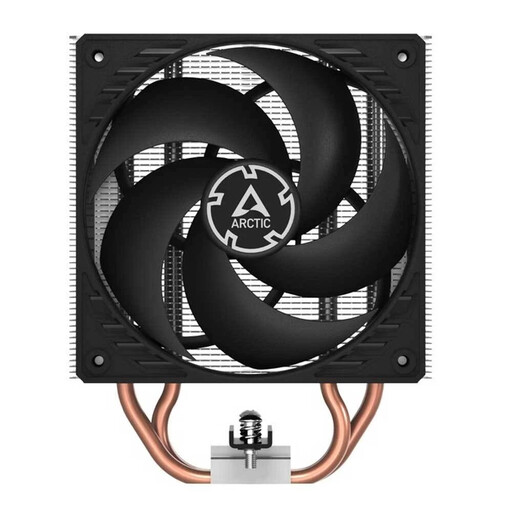
Why This Fits Their Persona: Ideal for users seeking a reliable and high-performance cooling solution for mid-range CPUs without spending a large budget. It is designed for the common AM4, AM5, and LGA 1700 sockets.
This model bypasses the RGB trap by focusing on its core function: cooling. The clear compatibility list also prevents a bad purchase due to the wrong socket.
Two fans in a push-pull configuration are already included, which maximises airflow through the fins. The mounting system is straightforward and robust.
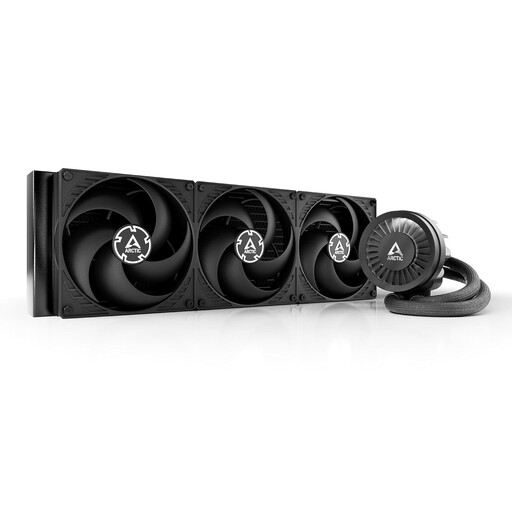
Why This Fits Their Persona: Designed for users who need maximum cooling performance for high-end CPUs and overclocking. The massive 420mm radiator provides enormous thermal headroom.
It resolves the conflict between noise and performance by allowing the three 140mm fans to dissipate more heat at lower speeds, thanks to the large radiator surface area. An additional VRM fan cools the motherboard's voltage regulators, an often-overlooked detail.
Extreme cooling capacity for the most demanding processors. Integrated VRM cooling to stabilise the entire system under load. Simplified cable management with only one visible cable.
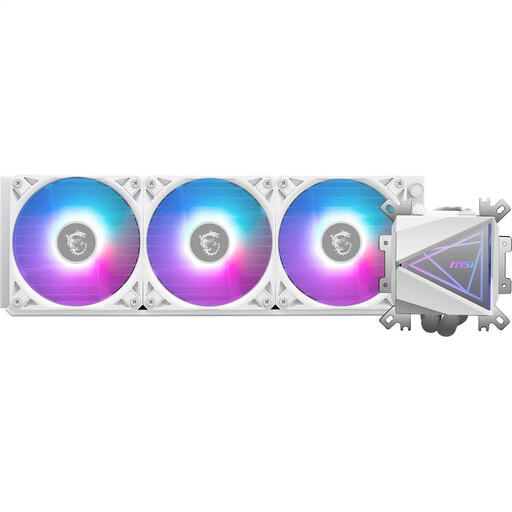
Why This Fits Their Persona: Perfect for users who want to build a visually stunning system in white. The "Infinity Mirror" pump head with ARGB lighting is a central design element.
Although the focus is on aesthetics, the fundamentals are not neglected. A 360mm radiator and an enlarged copper baseplate ensure that cooling performance is not sacrificed for looks.
Unique Infinity Mirror design for a stunning visual. The pre-installed universal bracket and simplified cable system make installation significantly easier.
We have compiled a complete, real-time updated list of products that fully meet these strict selection criteria and UK safety regulations.
There's no one-size-fits-all rule, but a good rule of thumb is to replace it every 3 to 5 years. However, if you notice a significant increase in CPU temperatures at idle or under load, replacing the thermal paste sooner may be a good idea. High-quality pastes generally maintain their conductivity for longer.
It depends on the specific model and the workload. A large AIO liquid cooler with a 360mm radiator can be quieter under load than a compact air cooler because the fans can spin slower to dissipate the same amount of heat. However, an AIO's pump produces a constant, low-level operational noise that might be audible in a very quiet system at idle.
No. You must check your PC case's specifications. It needs to explicitly support the mounting of a 360mm radiator, either in the front, top, or side. Also, pay attention to the maximum thickness (radiator + fans) and any potential conflicts with tall RAM modules or motherboard heatsinks.