
Lieferung heute & morgen

Qualitätsgarantie

Willkommens-Angebote freischalten: KOSTENLOSE Lieferung | Bis zu 80 % RABATT | Kostenlose 30-Tage-JoyPlus-Testphase
App herunterladen
The right CPU cooler affects the temperature, noise levels and long-term stability of a desktop PC. Even so, many buyers first focus on RGB lighting, high fan speeds or general cooling performance figures. These figures alone do not show whether a PC cooler will fit your case or work effectively with your processor.
“Suitable for Intel and AMD” does not automatically mean that every platform is supported. The specific sockets are what matter, such as Intel LGA 1700, LGA 1851, AMD AM4 or AM5. The included mounting accessories may also vary depending on the model and platform.
Before buying, compare your motherboard’s socket with the processor cooler manufacturer’s specifications. With an older PC, a cooler may not include the required mounting bracket.
A 360-mm liquid cooler requires considerably more space than a compact air cooler. As well as radiator length, you need to consider the width, mounting position and clearance around the RAM, motherboard and graphics card. With a 240-mm liquid cooler, case compatibility is often easier, but the designated mounting points must still be available.
For air coolers, the maximum cooler height is particularly important. A model that is 159 mm high may already touch the side panel in a narrow case.
A maximum fan speed does not automatically indicate operating noise. A high-speed fan can run quietly under light loads if it is regulated using PWM control. Conversely, a small fan can be clearly audible when running at high speed.
You should therefore consider the combination of fan size, speed range, bearing type and noise rating. Even a quiet CPU cooler also needs controlled airflow within the case. Suitable PC case fans are important for this.
An air cooler uses heatpipes, fins and one or more fans. It does not require a pump or liquid tubing. This simplifies installation and reduces the number of moving parts. Compact models are suitable for smaller cases and processors with moderate power consumption.
An AIO liquid cooler combines a pump unit, radiator and fans in a closed system. It can be a sensible choice for high-performance processors and longer periods under load. However, you need to take the available radiator space, pump connection and correct installation into account. Specifications such as “240 mm” or “360 mm” refer to the radiator size, not directly to a guaranteed CPU temperature.
Check at least the following:
An Intel CPU cooler may be designed for use with a special contact or mounting frame. With an AMD CPU cooler, check whether the existing retention module is used or whether a separate backplate is required.
As well as the height of an air cooler, radiator dimensions and fan width are important. A 120-mm fan is a common format; 140-mm models can generate greater airflow at lower speeds, but require more space.
For lighting, remember that 5V 3-pin A-RGB must not be confused with a 12V 4-pin RGB connector. Using the wrong connector can damage the LEDs. Fan speed control, on the other hand, is often handled via a 4-pin PWM connector.
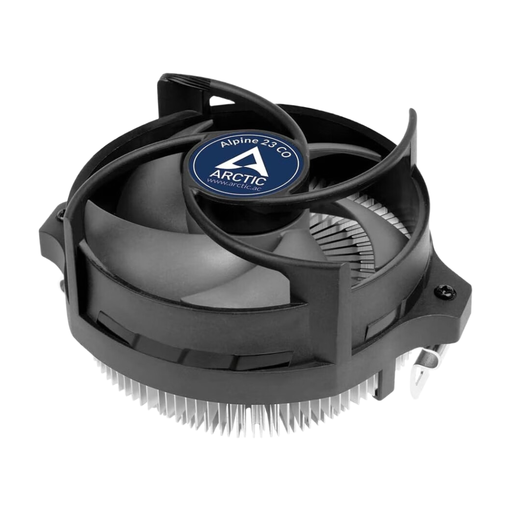
Why this product suits this profile: This compact air cooler is designed for AMD AM4, AM5 and AM3(+) and requires at least 65 mm of vertical clearance. It is suitable for straightforward desktop configurations and small cases.
Its clearly defined AMD compatibility prevents you from buying a universally advertised model for an unsupported socket. Its low profile also reduces the risk of clearance problems.
90-mm fan, 4-pin PWM connector, pre-applied MX-2 thermal paste and dual ball bearing for continuous operation.
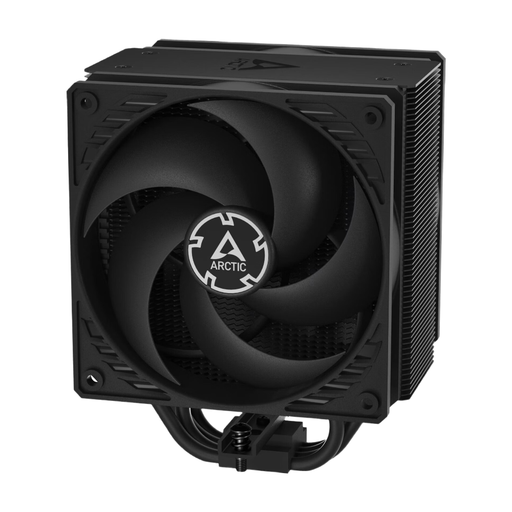
Why this product suits this profile: This single-tower processor cooler is aimed at users who prefer low-maintenance CPU cooling for Intel and AMD systems.
The push-pull design with two 120-mm fans distributes airflow across the heatsink rather than relying solely on extremely high fan speeds.
Two pressure-optimised 120-mm P fans, 200–1800 rpm, copper heatpipes and aluminium fins. The product dimensions are 10.39 × 12.6 × 15.88 cm.
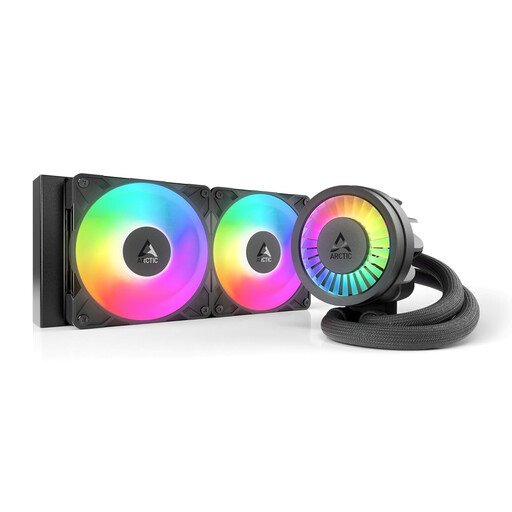
Why this product suits this profile: This 240-mm AIO is suitable for users with longer periods under load, such as gaming, rendering or compiling, provided the case has space for a compatible radiator.
The selection specifies the radiator size, connectors and supported platforms. This allows you to check before buying whether Intel LGA1851/LGA1700 or AMD AM5/AM4 are supported.
Two 120-mm S12-PRO fans, PWM-controlled pump, integrated VRM fan and A-RGB lighting. The stated maximum speed is 3000 rpm.
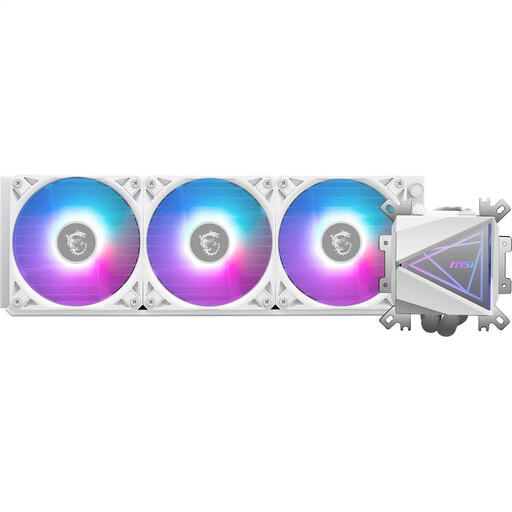
Why this product suits this profile: This 360-mm AIO is designed for large PC cases with a suitable radiator mount, combining broad socket compatibility with ARGB components.
The radiator dimensions of 394 × 119.2 × 27 mm make the required installation space clear. Before buying, check that the three fans and radiator can be installed in your case.
Three pre-installed 120-mm ARGB PWM fans, copper cold plate, dual-chamber pump and support for Intel LGA 1700/1200 and AMD AM5/AM4.
We have put together a complete, regularly updated list of products that fully meet these strict selection criteria and the safety regulations applicable in the EU.
Before installation, switch off the PC completely and disconnect it from the mains. If necessary, remove the protective film from the cold plate and apply thermal paste according to the instructions. Tighten screws evenly and diagonally so that the mounting pressure is distributed evenly.
For balanced Gaming PC cooling, a directed airflow is recommended: cool air should be drawn in at the front and bottom, while warm air is expelled at the rear and top. Fans and fins should be regularly cleared of dust. With an AIO liquid cooler, the tubes must not be kinked or routed under tension. Any moisture or leak requires the system to be switched off immediately.
A larger air cooler with a 120- or 140-mm fan can operate at moderate speed. A controllable PWM connector, sufficient case airflow and a suitable processor power level are important. A low decibel rating should always be considered in relation to the relevant fan speed.
A 240-mm liquid cooler can be a sensible choice for high-performance processors and longer periods under load, provided the case supports the radiator. A 360-mm liquid cooler requires more space and is primarily suitable for larger cases. For an energy-efficient or compact PC, an air cooler is often easier to install and maintain.
Its lifespan depends on the bearing, pump, dust levels and usage profile. Air coolers generally only require cleaning and, if necessary, a fan replacement later on. With an AIO, regularly check the pump, tubes and connectors for unusual noises or moisture. The specific warranty and manufacturer’s information are decisive when choosing what to buy.