
Lieferung heute & morgen

Qualitätsgarantie

Willkommens-Angebote freischalten: KOSTENLOSE Lieferung | Bis zu 80 % RABATT | Kostenlose 30-Tage-JoyPlus-Testphase
App herunterladen
A CPU cooler needs to do more than just boast a high fan speed or flashy RGB lighting on the spec sheet. For gamers, content creators and professional users, what really matters is socket compatibility, case size, heat dissipation and noise levels. If you don't check these points, you could easily end up with a cooler that doesn't fit your motherboard, blocks your RAM, or runs much louder under load than you expected.
Statements like "suitable for Intel and AMD" aren't enough to make a safe choice. What matters is the specific socket: modern systems use, for example, Intel LGA1851, Intel LGA1700, AMD AM5 or AMD AM4. The mounting hardware supplied can also vary depending on the model.
So before you buy, you should check your CPU and motherboard specifications. A cooler with the right form factor isn't automatically compatible with every Intel or AMD socket.
A large air cooler can collide with tall RAM modules or the side of your case. With an AIO liquid cooler, you need to make sure the radiator, fans and tubing all fit inside your case. A 240 mm liquid cooler needs less mounting space than a 360 mm version. A 360 mm liquid cooler offers more radiator surface area thanks to three 120 mm fans, but requires a suitably compatible case.
Check the following before you buy:
A low noise figure looks convincing at first glance. In practice, however, noise levels depend on fan speed, measurement conditions, case ventilation and the fan curve. Figures like 20 dB, 32 dB or a rating in sones should therefore be taken as a guide, not as a direct comparison across all brands.
For a quiet CPU cooler, PWM control, a suitable heatsink and a well-balanced fan curve are key. ARGB lighting doesn't affect cooling performance, so it should only be a priority if it fits with your planned PC build.
An air cooler for a processor usually consists of a heatsink with heatpipes and one or more fans. It doesn't need a pump or any liquid loops. Compact models are ideal for Mini-ITX and µATX systems, while larger tower coolers can dissipate more heat through additional fins and heatpipes.
An AIO liquid cooler, or liquid cooler for a CPU, uses a closed loop made up of a pump unit, tubing and a radiator. The radiator size – for example 240 mm or 360 mm – affects the surface area available for heat dissipation. However, you'll need to carefully plan the mounting space, pump connection and airflow inside your case.
Look for a clear list of supported sockets. The ARCTIC Alpine 23 CO, for example, is designed for AMD AM5 and AM4. The ARCTIC Alpine 17 supports Intel LGA1700 and LGA1851 and is intended for compact systems. For a new build, you should cross-reference the manufacturer's compatibility list with your motherboard manual.
The stated TDP or a comparable manufacturer recommendation is an important guide. A compact cooler for processors with moderate power draw isn't automatically suitable for sustained high loads, overclocking or powerful workstations.
For a gaming CPU cooler, you should also consider your case ventilation. Two front fans and one rear fan can affect the temperature of the whole system. For content creator PCs with long rendering or export tasks, a sufficiently large cooling surface area is especially important.
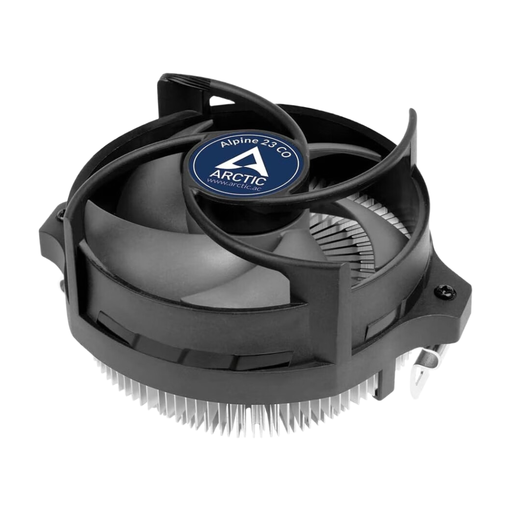
Why this product fits the profile: This compact air cooler is designed for AMD AM5, AM4 and AM3(+) and requires at least 65 mm of vertical clearance according to the product specs. That makes it ideal for small cases and simple AMD upgrades.
The specific AMD compatibility and low profile reduce the risk of a wrong purchase in compact systems. Thermal paste is pre-applied.
90 mm fan, 4-pin PWM connector and dual ball bearing. Recommended for CPUs up to 65 W.
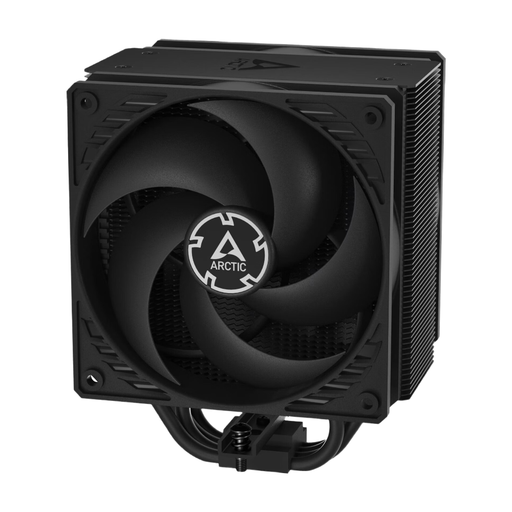
Why this product fits the profile: This single-tower cooler combines two 120 mm P-Fans in a push-pull configuration. It's aimed at users who want a well-balanced air cooler for gaming, productivity and longer load periods.
The maximum height of 159 mm must be checked before purchase. The 4-pin PWM control allows an adjustable fan curve instead of a constantly high speed.
Two 120 mm fans, four copper heatpipes and a speed range of 200 to 1800 RPM.
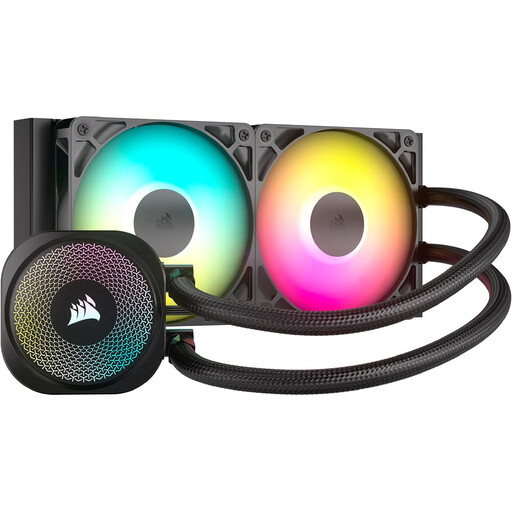
Why this product fits the profile: This 240 mm AIO is suitable for powerful desktop PCs, provided your case has room for a 277 × 120 × 27 mm radiator. It supports Intel LGA1851/LGA1700 as well as AMD AM5/AM4.
The radiator size and socket list are clearly stated. For ARGB, you must use a 5 V 3-pin header, not a 12 V RGB header.
Two RS120 ARGB fans, PWM control and direct motherboard connection without an extra controller.
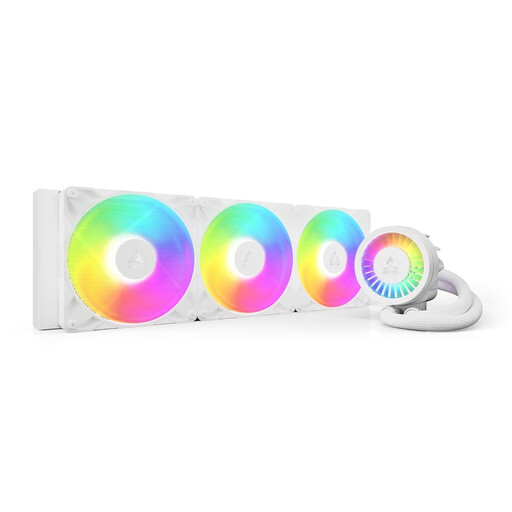
Why this product fits the profile: This 420 mm AIO is aimed at large cases and systems with long compute loads. It supports Intel LGA1851/LGA1700 as well as AMD AM5/AM4 and features three 140 mm A-RGB fans.
The large radiator surface area isn't mistaken for a compact design: the radiator measures 458 × 138 × 38 mm and the height with fans is 68 mm – so it must fit inside your case.
PWM-controlled P14 Pro fans, integrated VRM fan and 450 mm tubing for larger PC cases.
We've put together a full, regularly updated list of products that fully meet these strict selection criteria and the safety regulations in force in the EU.
That depends on the specific model. The ARCTIC Alpine 17 is listed for LGA1851 and LGA1700. Corsair models like the Nautilus 240 RS ARGB and the Nautilus 360 RS ARGB also support these sockets. Before installation, always check the included bracket and the manufacturer's specifications.
The lifespan depends on factors including the pump, seals, fans, dust exposure and operating time. A closed loop must not be opened or refilled unless the manufacturer explicitly allows it. If you notice unusual noises, visible liquid or rising temperatures, you should switch off the PC and check the cooling.
An AIO needs additional power for the pump and usually several fans. The exact consumption depends on the model and fan speed. A simple air cooler generally has fewer active components. However, for running costs, you also need to consider operating hours, the fan curve and the overall power draw of your PC.