
Lieferung heute & morgen

Qualitätsgarantie

Willkommens-Angebote freischalten: KOSTENLOSE Lieferung | Bis zu 80 % RABATT | Kostenlose 30-Tage-JoyPlus-Testphase
App herunterladen
A CPU cooler needs to do more than just fit your processor. You also need to consider the clearance inside your case, the fan connection and the amount of heat your CPU produces. If you focus only on large fans, RGB lighting or the stated fan speed, you could miss important technical details.
Three common buying mistakes are particularly relevant for PC builders, gamers and users of Intel or AMD desktop PCs:
Before buying, check your motherboard’s socket. For Intel, LGA1700 and LGA1851 are examples of relevant sockets. For AMD systems, AM4 and AM5 play a key role. An Intel CPU cooler or AMD CPU cooler is only suitable for a range of systems if it includes the required mounting hardware.
You should also check the manufacturer’s specifications against your motherboard manual. Some AMD coolers use the existing AMD retention module, while other models require their own bracket or backplate.
A top-flow cooler directs air towards the motherboard and is often well suited to compact systems. Models with a 92 mm fan generally need less space than a large tower cooler. For example, a cooler measuring 77 mm high with a 92 mm fan could be a good option for a small case.
A tower cooler, on the other hand, usually directs warm air horizontally towards the case fan. A 120 mm CPU cooler typically offers more cooling surface and can use larger fins, but it needs more space. Before buying, check at least the following measurements:
A 4-pin PWM connector allows the motherboard to adjust the fan speed according to the CPU temperature. This can reduce noise when the system is idle and automatically increase airflow under heavier loads. A 3-pin connector may also work, but depending on the motherboard, it can offer fewer options for fan control.
Bearing type, fan diameter and fan curve are also important when choosing a quiet CPU cooler. Double ball bearings may be a good choice for systems that are used frequently or run continuously. On certain models, the “CO” designation indicates that the cooler is designed for Continuous Operation. However, this does not replace regular cleaning or good system ventilation.
With an AIO liquid cooler, you’ll need to check the radiator size, pump connection, installation position and case compatibility. A 360 mm radiator needs considerably more mounting space than an air cooler. Display and ARGB features are extras; they shouldn’t take the place of checking socket compatibility, dimensions and connections.
The recommendations below group products according to specific use cases. Technical details are based on the product information provided and should be checked again on the relevant product page before you buy.
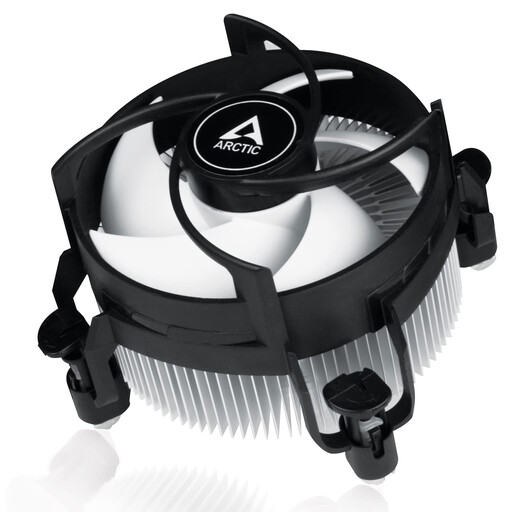
Why this product suits this profile: This compact top-flow cooler is designed for Intel LGA1700 and LGA1851 and measures 77 mm high. That makes it a good fit for many small desktop and SFF cases.
Socket compatibility and dimensions are clearly specified. The pre-applied MX-4 thermal paste and push pins also cut down on extra installation steps.
92 mm PWM fan, 77 mm height and a stated maximum noise level of 26.5 dB.
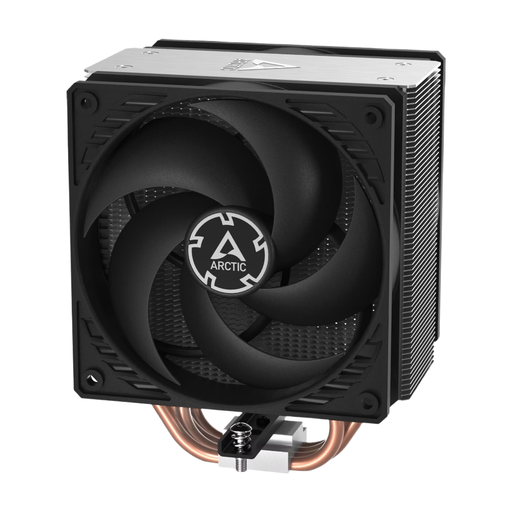
Why this product suits this profile: This single-tower cooler uses four heatpipes, two 120 mm P fans and a push-pull layout, and is compatible with Intel and AMD platforms.
Check the required case clearance of 159 mm and supported sockets before installation. The specifications help you avoid choosing a cooler based on brand name alone.
AM4, AM5 and LGA1700 compatibility, plus two fans with speeds of up to 1800 rpm and double ball bearings.
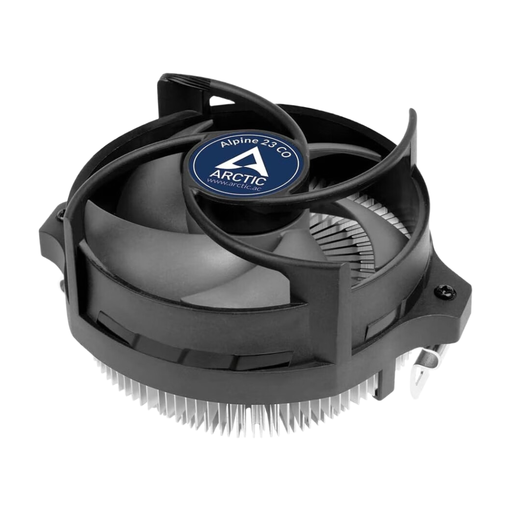
Why this product suits this profile: This compact AMD cooler supports AM4 and AM5. It’s a good option for systems that run regularly or for long periods.
The stated compatibility and minimum clearance of 65 mm help you plan a compact AMD system.
90 mm fan, 4-pin PWM connector, pre-applied MX-2 thermal paste and double ball bearings.
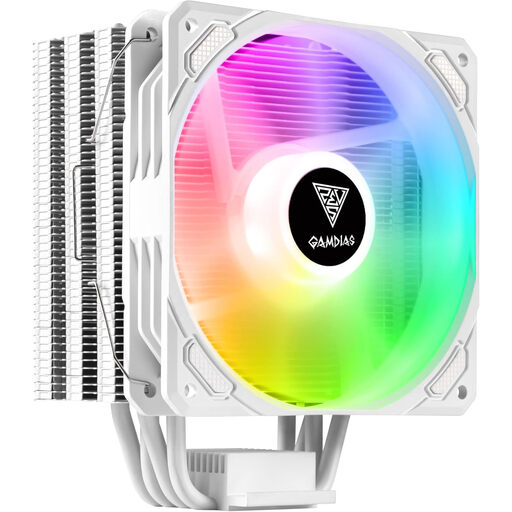
Why this product suits this profile: Its white finish and customisable ARGB lighting will appeal to anyone who wants to combine standout looks with air cooling in a gaming PC.
Lighting doesn’t replace the need to check the technical requirements: your motherboard needs a 5 V 3-pin RGB connector, and you’ll also need to allow for the cooler’s 160 mm height.
Heatpipe Direct Touch technology, universal mounting kit, ARGB support and a stated maximum noise level of 31 dB.
We’ve put together a complete, regularly updated list of products that meet these strict selection criteria and fully comply with the safety regulations applicable in the EU.
Before installation, switch off your PC completely and unplug it from the mains. Remove any old thermal paste with a suitable cleaner and make sure the pressure is applied evenly. Tower cooler screws are typically tightened in a cross pattern; applying too much pressure can damage the motherboard or socket.
The following steps can also help keep your CPU cool consistently:
It depends on the mounting kit and the manufacturer’s compatibility information. Look for explicit support for LGA1700 or LGA1851. The cooler’s height must also fit your case.
A 92 mm model may suit compact systems and processors that produce a moderate amount of heat. For heavy, sustained workloads or high-performance gaming processors, a larger tower cooler or an AIO liquid cooler may be a better choice. Base your decision on the CPU specifications and the airflow through your case.
Its lifespan depends on the fan bearings, dust levels, operating hours and ambient temperature. There’s no single set lifespan for a cooler itself. Fans can become noisy as they wear and may need replacing, depending on the model. Regular cleaning helps keep it running smoothly.