For a magazine subscription, the first thing to check is whether the specific app works on your device and whether you can open the issue you want offline before take-off – a colour display alone isn’t enough. Onleihe’s help pages state that e-magazines aren’t available on e-readers through Onleihe 3 (as of June 2026). A colour e-reader may work for your own PDFs or EPUBs that you’re entitled to transfer. For small, fixed-layout pages, a tablet with a larger screen may be more practical, though it’s less portable.
Which option is right for you?
Readers who use a magazine app
If you get magazines through a subscription or library app, check that specific app and download your issues before the flight. What matters is whether you can then open them without an internet connection. Onleihe’s help pages list smartphones and tablets, but not e-readers, as compatible with Onleihe 3.
Readers with patterns and PDFs
For colourful instructions, charts and fixed-layout PDF pages, view a representative page on the display you’re planning to use. tolino and PocketBook list PDF support for their respective colour e-readers, but whether small details are easy to read still depends on the page and how much you need to zoom in.
Readers short on hand-luggage space
If you’re planning to read for a long time on a long-haul flight, compare the weight and screen size with the issues you’ve actually downloaded. Also check your airline’s rules on using devices on board.
What should you look for when buying?
First, check where your magazine comes from and whether you can read it offline. Then compare a typical page on the display you’re considering, and think about how important low weight and flexible access are to you.
| What matters when buying |
What to check |
Who is it important to? |
| App access and offline reading |
Install the app, download a specific issue and open it without an internet connection. Onleihe’s help pages state that e-magazines aren’t available on e-readers through Onleihe 3. |
If I get my magazine through a subscription or library app, I want to make sure I can access the issue offline before take-off. Around 33% of consumers put app access and offline reading first. |
| Colour and fixed-layout pages |
Test a sample page with a key and small labels. tolino lists the vision color as having a 7-inch display and 150 ppi for colour; PocketBook lists the InkPad Color 3 as having a 7.8-inch display and the same 150 ppi for colour. |
If I need to make out colour codes and detailed patterns, I check the full page and how much I need to zoom in. Around 27% of consumers prioritise the readability of colour magazine pages. |
| Portability on a flight |
Compare the weight and screen size with a typical issue. tolino lists the vision color at 200 g with a 7-inch display, while PocketBook lists the Verse Pro Color at 182 g with a 6-inch display. Remember to check your airline’s rules too. |
If I want to read for a long time in my seat and hold the device comfortably, I weigh its weight against how much of the page I can read. Around 20% of consumers prioritise portability when travelling. |
| Access options and accessories |
Check how you can access the specific issue you want, whether through a subscription or a file. Compare supported formats and any accessories you’ll need. tolino states that the stylus for the vision color is sold separately. |
If I want to choose between a subscription, an app and my own files, I check in advance which access method and accessories I’ll need for my issues. Around 20% of consumers first look at flexible access options and potential extra costs. |
Avoiding buying pitfalls with magazine e-readers
-
Buying a colour e-reader just because it mentions ‘magazines’
PDF support doesn’t automatically mean that a subscription or library issue will work on the device. Onleihe’s help pages state that e-magazines aren’t available on e-readers through Onleihe 3.
First, check the specific magazine service and which devices it supports. Treat your own PDF files separately from issues that are only available in an app.
If the service doesn’t work on your e-reader, you may need a compatible second device or another way to access your magazines.
-
Assuming a colour display means patterns will be easy to read
Small labels stay small on fixed-layout pages. When you zoom in on a PDF, the tolino vision color only shows part of the page.
Before you decide, view a typical page with its key and colour codes both at full-page size and zoomed in.
-
Waiting until you’re on the plane to try downloading issues
A magazine app’s offline feature is only useful if you’ve downloaded the issue you want beforehand and can open it without an internet connection.
Download several issues you plan to read before take-off and test them in offline mode.
Without this check, you may not be able to access the reading material you had planned to enjoy during the flight.
Brands worth considering
tolino
The vision color is a 7-inch colour e-reader for supported e-books and your own PDFs.
- According to tolino, the device supports PDF and EPUB, as well as PDF annotations using a stylus sold separately.
- For fixed-layout pages, check whether the details are easy to read on a 7-inch display. PDF support doesn’t automatically give you access to a magazine app subscription.
PocketBook
According to the manufacturer, the InkPad Color 3 has a 7.8-inch display; the Verse Pro Color is a more compact 6-inch alternative.
- The manufacturer lists PDF and EPUB support, as well as 150 ppi for colour content.
- A larger display and a more compact design suit different needs. Check separately whether your specific subscription app is supported.
BOOX
BOOX describes the Go Color 7 (Gen II) as a 7-inch colour E-Ink device with Google Play.
- Access to Android apps may be useful if the magazine you want is available through one of them.
- Google Play doesn’t guarantee that a particular magazine app will be easy to use on E-Ink or that downloads will work on this specific device. Test the app and offline issues before you travel.
Devices for magazine apps and E-Ink
This selection from Joybuy includes Android tablets and Android E-Ink devices that could give you access to magazine apps. Before buying, check that your specific app and downloaded issues work offline on the device you’re considering.
 No image available
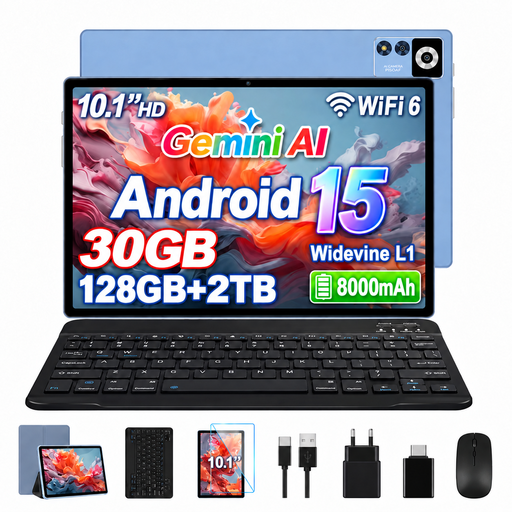
YESTEL T13 tablet, Android 15, 10.1 inches, 128 GB
A tablet alternative for magazine pages; check that your specific app works and open downloaded issues offline before your flight.
10.1-inch IPS display with 1280 × 800 pixels and 128 GB ROM, according to the product name.
View at Joybuy
 No image available
Bigme HiBreak Pro, 6.13-inch colour E-Ink display, Android 14
An option for accessing Android apps; test the magazine app you want and its offline issues on the device before relying on it.
Android 14, 6.13-inch colour E-Ink display and 8 GB + 256 GB, according to the product name.
View at Joybuy
 No image available
iFLYTEK AINOTE 2, 10.65-inch E-Ink tablet with protective case
For E-Ink reading on a larger screen; check in advance that your specific magazine app and offline issues work on the device.
10.65-inch E-Ink display, according to the product name; a protective case is also listed in the product name.
View at Joybuy
 No image available
Microsoft Surface Pro 12 Snapdragon Plus, 24 GB, 1 TB, Platinum
A tablet alternative for detailed, fixed-layout pages; remember to check app access and that you can open your issues offline.
24 GB and 1 TB, according to the product name. The stated weight of 686 g may make it less comfortable to hold for long periods on a flight.
View at Joybuy
Frequently asked questions
Is ‘PDF-compatible’ enough to let me read my magazine subscription on a plane?
No. PDF support applies to a file you can access; it doesn’t automatically cover an issue in a subscription app or the rights to transfer it. Onleihe’s help pages specifically state that e-magazines aren’t available on e-readers through Onleihe 3. For other services, check how you’re meant to access the issues and test that you can open them offline.
What should I set up before boarding?
Install the app you need, download your issues and try opening them without an internet connection. If you’re using your own PDFs, check a full sample page and how much you need to zoom in. Charge your device before travelling too.
Can I use an e-reader on a plane, and where should I pack it?
The EASA points out that each airline decides during which stages of a flight electronic devices may be used. Follow the airline’s rules and the crew’s instructions. The EASA recommends carrying portable devices with lithium batteries in your hand luggage rather than your checked baggage. Spare batteries and power banks should also go in your hand luggage.
What if my device develops a fault after I buy it in Germany?
For purchases from a business seller in the EU, you’re generally entitled to a minimum two-year legal guarantee from the date you receive the goods. This is separate from any voluntary warranty; if there’s a fault, contact the seller about your legal rights. Your Europe, the European Union’s consumer portal, explains these rules for purchases made in the EU.
Will I need extra accessories for magazines or notes?
That depends on how you access your magazines and which accessories you want. Readly requires a subscription to access its content; tolino states that the stylus for the vision color is sold separately. Check the terms of your specific subscription and what’s included with the device.


