
Lieferung heute & morgen

Qualitätsgarantie

Willkommens-Angebote freischalten: KOSTENLOSE Lieferung | Bis zu 80 % RABATT | Kostenlose 30-Tage-JoyPlus-Testphase
App herunterladen
A Creality Hi Combo 3D printer combines automated filament feeding, high print throughput and a comparatively large build volume. For beginners, model makers, designers, schools and small businesses, the combination of multicolour printing and speeds of up to 500 mm/s sounds particularly appealing. However, before you buy, it is worth taking a closer look at the technical specifications. Not every advertised feature is equally relevant under all conditions.
The 500 mm/s figure for the Creality Hi Combo describes the maximum print speed. The typical print speed is quoted as 300 mm/s. The actual usable speed depends on factors including model geometry, layer height, material, acceleration and cooling.
For your buying decision, therefore, it is not just the peak value that matters. Also pay attention to:
The Creality Hi Combo works with the Creality CFS Filament System. One CFS module can automatically select, change and feed filament. According to the product specifications, up to four CFS units can be connected, making a 3D printer with 16 colours possible.
This does not mean that 16 colours are necessarily included in every configuration as standard. So before ordering, check:
The airtight storage of the CFS can simplify filament storage. Nevertheless, filaments such as PLA, ABS or PETG should be kept dry, as moisture can affect print quality and material feeding.
A 3D printer with automatic bed levelling can make preparation easier. On the Creality Hi Combo, an integrated strain gauge creates a levelling grid; additionally, two independently motorised screws support the alignment of the X-axis.
This reduces the manual adjustment effort, but does not automatically guarantee a perfect first layer every time. The print bed must be clean, the printer should stand on a stable, heat-resistant surface, and the nozzle must be free of material residue.
This FDM 3D printer offers a build volume of 260 × 260 × 300 mm. This allows you to produce larger individual parts and multi-part models in a single operation. For the footprint, you should also take into account the overall dimensions of approximately 483 × 379 × 390 mm.
Plan enough space around the device for:
According to the product data, Hyper-PLA, PLA, ABS, PETG and PLA-CF are supported. The maximum nozzle temperature is 300 °C, and the heated bed can reach up to 100 °C. Your material choice should be guided by the requirements of your model:
Only use compatible FDM filaments and follow the manufacturer's instructions as well as the recommendations of the Creality Print 6.0 slicing software.
Creality states a noise level of up to 48 dB. This can be relevant for a study or hobby room, but it is no guarantee of complete silence. Fans, movements and filament changes may be audible to varying degrees depending on the print profile.
Operation features include a 3.2-inch touchscreen, USB and Wi-Fi connectivity, a filament run-out sensor, power-loss recovery, and an integrated camera with a privacy cover. The printer is delivered approximately 95 percent pre-assembled, which can make getting started easier for beginners.
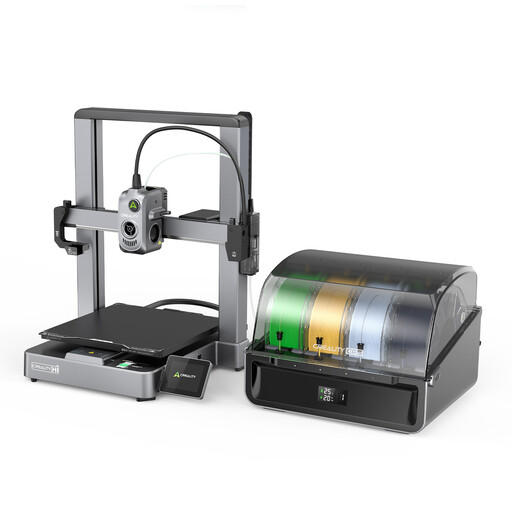
Why this product suits the profile: The pre-assembled setup, automatic bed levelling and touchscreen make it easier to get started with multicolour FDM printing.
The technical specifications distinguish between a maximum of 500 mm/s and a typical 300 mm/s. The expansion to 16 colours is also described as an upgrade using up to four CFS units.
260 × 260 × 300 mm build volume, automatic levelling, Wi-Fi, filament run-out sensor and support for PLA, PETG and ABS.
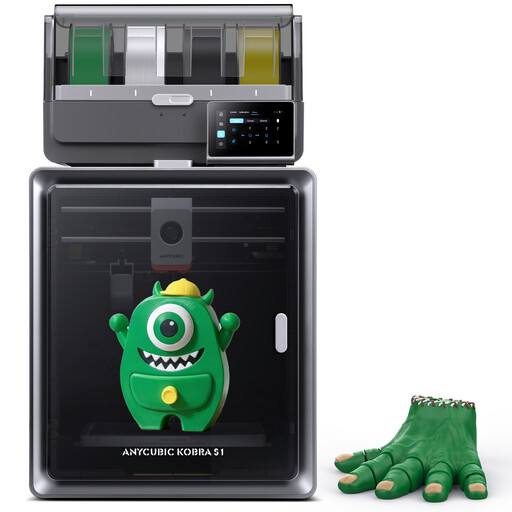
Why this product suits the profile: The combination of a CoreXY design, automatic calibration and optional multicolour feeding is aimed at users who focus on structured workflows.
The recommended 300 mm/s is stated alongside the maximum value of 600 mm/s. Filament detection and automatic calibration functions are also specified.
250 × 250 × 250 mm build volume, 320 °C maximum nozzle temperature, PEI spring steel plate and a stated noise level of no more than 46 dB in standard mode.
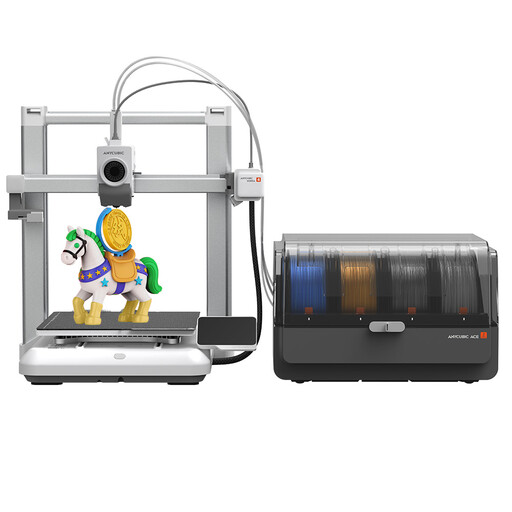
Why this product suits the profile: For batches of small parts, coloured models and networked workstations, the specified monitoring and automation functions are relevant.
The specification explicitly mentions a recommended speed of 300 mm/s as well as functions such as filament detection, object exclusion and automatic levelling.
260 × 260 × 260 mm build volume, support for up to eight colours, dual-band Wi-Fi, camera monitoring and a maximum nozzle temperature of 300 °C.
We have put together a complete, regularly updated list of products that fully meet these strict selection criteria and the safety regulations in force in the EU.
Place the printer on a stable, heat-resistant surface and ensure adequate ventilation. The nozzle and heated bed can reach high temperatures during operation. Children should not have unsupervised access to the device. With ABS and similar materials, suitable room ventilation is particularly important.
Regular tasks include:
Running costs depend mainly on filament consumption, print duration, heated bed, nozzle temperature and your electricity tariff. A higher speed does not automatically shorten every print, as colour changes, cooling times and complex movements require additional time.
The largely pre-assembled design, the touchscreen and the automatic bed levelling can make getting started easier. Beginners should start with PLA, use the recommended profiles in Creality Print, and follow the safety and maintenance instructions.
According to the product specifications, the system can be expanded to up to 16 colours when up to four CFS units are connected. Check the exact scope of delivery before purchasing and factor in additional costs for modules and filament spools.
The Creality Hi Combo is rated at up to 48 dB. This makes it an option for a study or hobby room, but fans, axis movements and automatic colour changes remain audible. The actual noise level can depend on the print profile and the location of the printer.