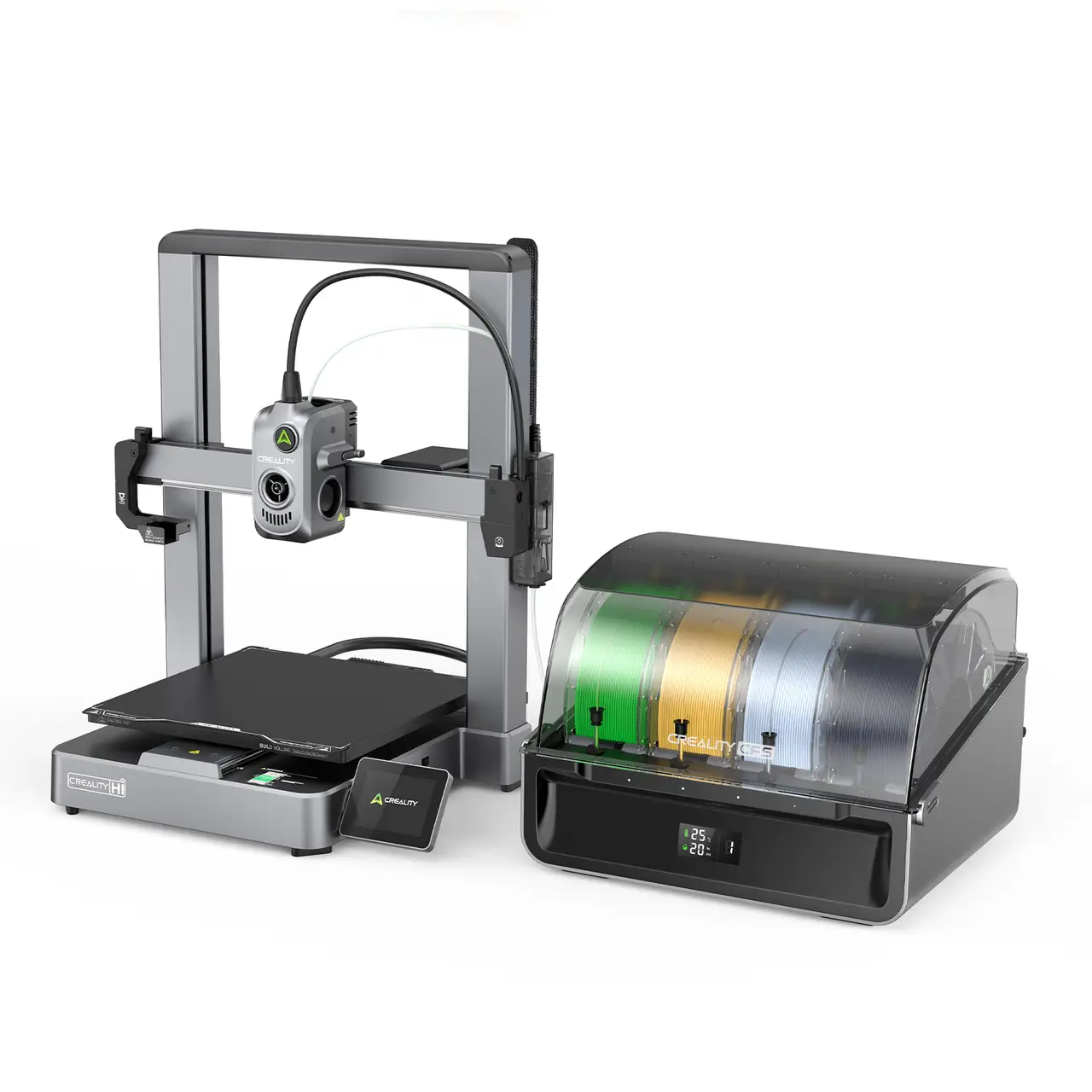
The Creality Hi Combo Core-XZ is a versatile FFF 3D printer for detailed projects at home or in a workshop. Its 260 x 260 x 300 mm build volume, speeds of up to 500 mm/s and CFS filament handling support practical single- and multi-colour printing, with up to 16 colours when connected to four CFS units. Automatic bed levelling, power-loss recovery and 95% preassembly make it a useful choice for makers and experienced hobbyists looking to create prototypes, models and functional parts with less setup.
How to Choose the Right 3D Printer
Start with what you plan to make, how often you will print and where the machine will sit. Comparing print technology, usable build space and day-to-day requirements will help you choose a 3D printer that suits your projects and budget.
Key Features to Consider
Use these criteria to compare printers before deciding which features are worth paying for.
- Print technology and materials: For general-purpose parts and larger objects, compare FDM 3D printers and check which filament types and diameters they support. Resin printers can capture fine detail, but factor in resin handling, washing and curing when assessing whether they suit your workspace.
- Build volume and printer size: Check the stated build volume against the largest objects you expect to print, allowing for parts that may need to be split into sections. Also measure the printer’s full footprint, including room for access, ventilation and routine maintenance.
- Ease of use, upkeep and running costs: Features such as automatic bed levelling, a clear display and compatible slicing software can make setup and repeat prints more manageable; check what calibration still needs to be done manually. Compare replacement parts, consumables, noise and safety guidance, including suitable ventilation and CE marking for use in Germany.
Bring Your Ideas to Life in Colour
Smart Filament Handling for Multi-Colour Creations
The CFS system brings a streamlined approach to multi-colour printing, automatically selecting and switching filament as your project progresses. Its airtight storage environment helps keep filament ready for your next design, while support for up to 16 colours with as many as four connected CFS units opens up a broad creative palette. From expressive prototypes to colourful display pieces, the Creality Hi Combo makes it easier to explore detailed, varied prints with a more hands-off filament workflow.
Fast Core-XZ Printing with Steady Movement
Built around a Core-XZ motion system, the Hi Combo is designed to bring speed and precision together across a wide range of projects. Print speeds of up to 500 mm/s help ideas take shape efficiently, while the robust metal frame and linear rails support stable movement throughout the printing process. Automatic bed levelling helps prepare the first layer, giving each print a reassuring start and helping you move from digital design to finished creation with confidence.
A Smooth Start, with Helpful Tools Close at Hand
With the printer supplied 95% preassembled, getting started feels refreshingly straightforward. A 3.2-inch colour touchscreen provides an accessible way to navigate key controls, and USB and Wi-Fi file transfer offer flexible ways to send projects to the printer. Practical features support a confident workflow too: power-loss recovery helps resume a project, the filament runout sensor keeps you informed, and the webcam with its privacy cover adds a helpful view of your prints. It is a capable setup designed to make everyday 3D printing feel approachable.
Creality Hi Combo 3D Printer: Who It Suits
Makers Creating Multicolour Prints
When colour is part of your model rather than an afterthought,
use the CFS system to select and switch filament
automatically, with support for up to 16-colour printing when
connected to as many as four CFS units. Airtight filament
storage helps keep your materials stored between jobs, so you
can make colourful prints with fewer manual filament changes.
Rapid Prototypers Refining Designs
When you’re testing several versions of a design, print at
speeds of up to 500 mm/s to move through iterations faster.
The metal frame and linear rails support stable movement as
you print, helping you get from a digital revision to a
physical test piece sooner.
First-Time 3D Printer Owners
If you’re getting started with 3D printing, the printer
arrives 95% preassembled to reduce the work before your first
job. Automatic bed levelling helps prepare the first layer,
while the colour touchscreen gives you a direct way to control
the printer, making it easier to get printing with less setup.
People Managing Prints Around a Busy Workspace
When you need to fit printing around other tasks, send files
over Wi-Fi or USB and use the webcam to check progress without
staying beside the printer. Power-loss recovery helps you
resume after an interruption, while filament runout sensing
helps identify when material has run out; the webcam’s privacy
cover lets you block the camera when it’s not in use, so print
jobs are easier to manage with fewer interruptions.
Frequently Asked Questions
How big can I print on the Creality Hi Combo?
The Creality Hi Combo has a build volume of 260 × 260 × 300 mm, giving you room to print models up to 26 cm wide, 26 cm deep and 30 cm tall. Its FFF printing system supports common materials including PLA, ABS and PETG, so you can create models within that size range using a suitable filament.
Can the Creality Hi Combo print in multiple colours?
Yes, the Creality Hi Combo’s CFS automatically selects, switches and feeds filament for multi-colour printing. Connect up to four CFS units to support prints with as many as 16 colours. The RFID reader can identify the colour and type of Creality RFID filament, helping make filament changes more straightforward.
Is the Creality Hi Combo safe to use at home?
Use the Creality Hi Combo in a well-ventilated area, on a stable, heat-resistant surface, and keep it away from children and flammable materials. The nozzle and heated bed become hot during printing, so let them cool before removing a model. These steps help you set up the printer thoughtfully at home.
Don't just buy, Joybuy
Discover more of your favourite brands on Joybuy and enjoy great offers.