
Lieferung heute & morgen

Qualitätsgarantie

Willkommens-Angebote freischalten: KOSTENLOSE Lieferung | Bis zu 80 % RABATT | Kostenlose 30-Tage-JoyPlus-Testphase
App herunterladen
A Creality K2 3D printer is aimed at makers, model builders, creatives, educational institutions and small businesses who want to combine high-speed FDM printing with optional multi-colour capability. At first glance, the K2, K2 Combo and K2 Plus Combo models look similar. However, the differences in what’s included, build volume and material support determine whether the printer is right for your particular use case.
The specification up to 600 mm/s describes a technical maximum under suitable conditions. In everyday use, model geometry, filament, layer height, nozzle temperature, acceleration and cooling all affect the actual print time. For large or highly detailed models, a lower speed can be sensible to achieve stable print results.
The standard K2 can be used with a compatible CFS expansion for multi-colour printing. The Creality K2 Combo already includes one CFS unit. The K2 Plus Combo combines the larger build volume with CFS support. So before buying, you should check whether the configuration you want actually includes the colour-changing system.
A 3D printer with 350 x 350 x 350 mm offers significantly more room for large parts than a model with 260 x 260 x 260 mm. However, weight, external dimensions and requirements for the installation location also increase. According to the product specifications, the Creality K2 Plus Combo measures 495 x 515 x 640 mm and weighs 32 kg net. A stable, heat-resistant surface is therefore more important than finding the most compact spot.
The K2 and K2 Combo have a build volume of 260 x 260 x 260 mm. That’s enough for figures, spare parts, technical prototypes and many everyday objects. If you want to produce larger enclosures, model-building parts or several components in a single run, you can consider the K2 Plus Combo with 350 x 350 x 350 mm.
A 3D printer with CFS can change filaments automatically. According to the available product information, up to four CFS units can be combined to give up to 16 colours. This reduces the need for manual painting, but colour changes can cause additional material consumption and longer print times. You should also check filament diameter, material compatibility and the settings in the slicer software you use.
The K2 Combo includes one CFS unit in the box. The K2 Plus Combo also supports up to 16 colours with CFS. The K2 without the Combo designation, on the other hand, is the better choice if a single-colour printer is sufficient to start with.
According to the specifications, the K2 and K2 Combo variants support PLA, PETG, PET, ABS and PLA-CF. The K2 Plus Combo additionally lists PA-CF, ASA and PPA-CF, among others. Suitability always depends on the specific print settings and the manufacturer’s recommendations for the filament.
A heated print bed, an enclosed build chamber and suitable ventilation are important for materials that are sensitive to temperature. The K2 Plus Combo is specified with a nozzle temperature of up to 350 °C and a chamber temperature of up to 60 °C. Users should observe the safety information, keep the printer away from children and flammable materials, and avoid touching the hot print head and print bed.
Other practical features include:
An AI camera can provide indications of certain print problems, but it does not replace checking the filament feed, adhesion and environment.
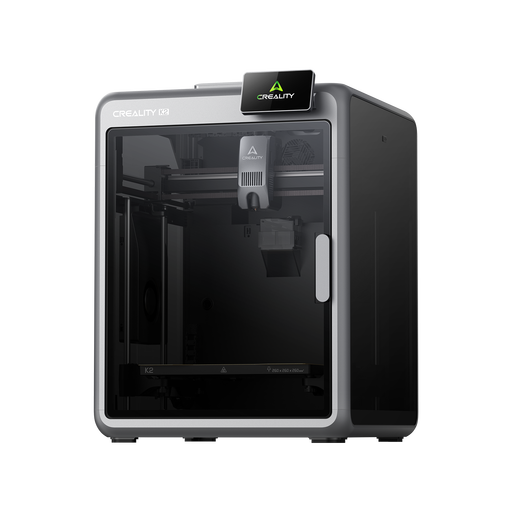
Why this product fits the profile: The K2 offers a 260×260×260 mm build volume, automatic levelling and an AI camera, without a CFS unit being a compulsory part of the base model. That makes sense for users who want to start with PLA or PETG.
The product description clearly identifies the configuration as a K2/K2 Combo model with 260×260×260 mm. Before buying, you should check the exact contents of the offer.
Up to 600 mm/s, automatic levelling, AI camera, enclosed build chamber and support for PLA, PETG, ABS and PLA-CF.
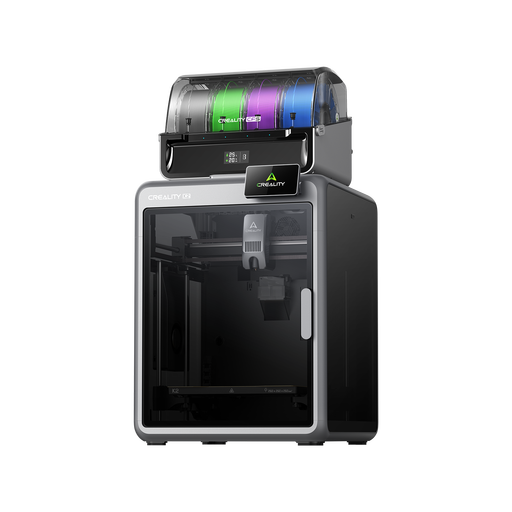
Why this product fits the profile: The K2 Combo combines the 260×260×260 mm build volume with a CFS unit. That suits users who want to use multi-colour printing straight away, without having to plan for a separate expansion.
The Combo configuration makes the included CFS the central buying criterion. This means the colour-changing function is not just an optional marketing claim.
One CFS unit, up to 16 colours with up to four CFS units, AI camera, automatic levelling and support for several FDM filaments.
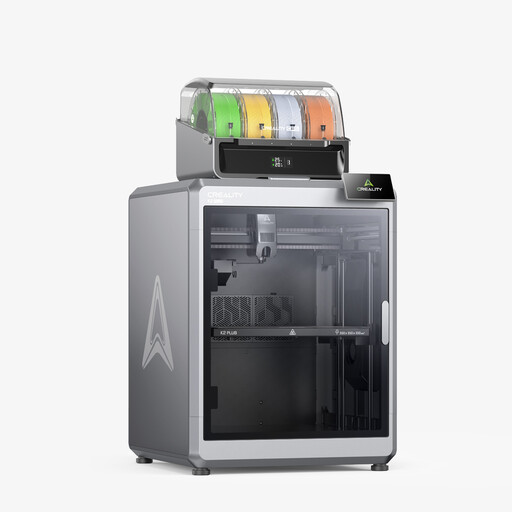
Why this product fits the profile: The large build volume is aimed at model builders, small-series users and those who want to produce larger objects or several parts in a single print run.
The stated build volume of 350×350×350 mm and the device weight make the space requirements clear. Before buying, you should plan for table surface, door width and ventilation.
350×350×350 mm build volume, CFS multi-colour support, two AI cameras, up to 350 °C nozzle temperature and support for PLA, ABS, PETG, PA-CF, PLA-CF, ASA and other materials.
We have put together a complete, regularly updated list of products that fully meet these strict selection criteria and the safety regulations in force in the EU.
In addition to the price of the machine, the CFS unit, replacement nozzles, build plates and filament all contribute to ongoing costs. With multi-colour printing, flushing processes can use up extra filament. For frequent print jobs, it is worth comparing the cost per model rather than just the purchase price.
Power consumption also depends on print temperature, heated bed, chamber and print duration. A precise cost calculation is only possible with your local electricity tariff and actual usage. Filaments should be stored dry and sealed, as moisture can affect processing.
The K2 comes pre-assembled and features automatic levelling, a touchscreen and remote control. However, beginners should still acquire basic knowledge of filament temperature, print bed adhesion and slicer profiles. PLA is an accessible starting point for many first projects.
The K2 Combo offers a build volume of 260 x 260 x 260 mm and is supplied with one CFS unit. The K2 Plus Combo has a 350 x 350 x 350 mm build volume, CFS multi-colour support, two AI cameras and a wider material selection. It is therefore designed for larger print objects and more extensive applications.
The lifespan depends on print frequency, material, maintenance and environment. Regularly cleaning the nozzle and print bed, storing filament in a dry place, and checking belts, screws and moving parts can help support reliable operation. There is no general rule for a specific time period.