For filming stitch details
You want to show individual insertion points and the path of the yarn. Check the close-focus capability and framing from the position where you’ll actually place the camera.


If you mainly film at your desk, first check the distance between the lens and your stitches, the framing with both hands in view, and whether you can position the camera securely overhead. A webcam is better suited to a computer-based setup, while a camera that records independently offers a different way of working. You’ll still need a suitable position to film from above. Manufacturers’ stated focus ranges don’t guarantee that fine stitches will be clearly visible in your lighting.
You want to show individual insertion points and the path of the yarn. Check the close-focus capability and framing from the position where you’ll actually place the camera.
You need room for both hands beneath the camera and a mount that can be positioned securely in a small room.
You’d like to start with a smartphone or computer you already own, then buy a dedicated camera only if a different setup would work better for you.
A good fit if: you want to try out framing and lighting before buying another camera.
Consider: You’ll need a suitable, stable mount for an overhead view. Close-focus capability and connectivity depend on the device and setup you choose.
A good fit if: your computer will be running while you film anyway, and you can position the webcam above your work surface.
Consider: Check the focus distance and connection for the specific model. Elgato lists a fixed-focus range of 30–120 cm for the Facecam MK.2, while Logitech specifies autofocus for the Brio 4K.
A good fit if: you want to record without keeping your computer running and have room for a suitable camera mount.
Consider: Sony lists a focus range starting at around 5 cm for the ZV-1F, but it doesn’t have an optical zoom. Canon’s tabletop stand doesn’t automatically provide an overhead position.
A good fit if: you want to film moving shots as well as fixed views of your stitches.
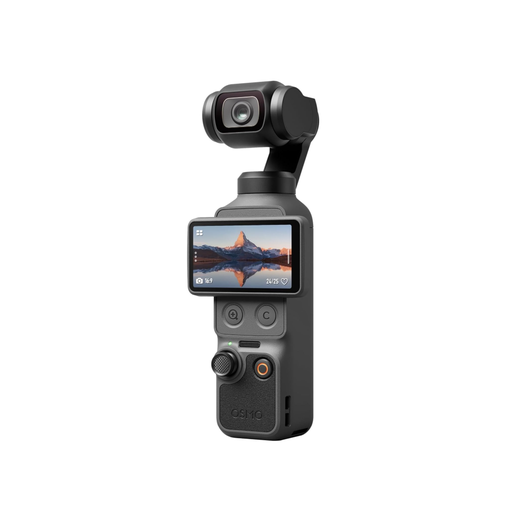
Consider: DJI lists a focus range starting at 0.2 m for the Osmo Pocket 3. You’ll also need to check that the position and required memory card work for a fixed overhead shot.
When filming crochet stitches in a small room, the key things to consider are distance, clear workspace, lighting and the effort involved in setting up mounts, connections or storage.
| What matters | What to check before buying | Who is it most important to? |
|---|---|---|
| Seeing fine stitches clearly | Measure the lens-to-subject distance and the area covered in the frame; test the focus range of the specific model with your yarn and crochet hook. | If you want to show individual insertion points and the path of the yarn, check the framing from the position where you’ll actually place the camera. Around 33% of consumers put seeing fine stitches clearly first. |
| A secure overhead view | Check the work surface, the mount’s reach and how securely it attaches to your desk. | If you want both hands and your crochet piece to stay in shot, choose a mount that suits your desk. Around 27% of consumers prioritise a stable overhead view. |
| Lighting and contrast | Test your preferred yarn in your usual room lighting; check the exposure and colour settings. | If you usually film in your everyday room lighting, check that the yarn is easy to distinguish from the background. Around 20% of consumers prioritise a clear picture in their lighting. |
| Easy set-up | Check that the mount, connections and storage you’ll need suit your planned setup. | If you want to get started without too many extra steps, compare how the setup works with a smartphone, computer or standalone camera. Around 20% of consumers prioritise a straightforward set-up. |
Resolution doesn’t tell you whether the focus distance and framing will work from where you mount the camera.
Compare the focus range of the specific model with your setup, then test the smallest detail you want to show in the video.
A camera can sit on your desk and still cut your hands or crochet piece out of the overhead view you want.
Plan the camera position and how it will be secured together before choosing a model.
Available modes on a webcam depend on its connection. DJI specifies a microSD card for recording with the Osmo Pocket 3.
Check what’s included, the storage medium and your computer’s connections against the setup you have planned.
The ZV-1F is a compact vlogging camera that records independently, for anyone looking to explore close-focus performance and camera controls rather than use a dedicated computer webcam.
The Facecam MK.2 is a webcam for a dedicated computer-based workspace.
The Brio 4K is a webcam option for computer users who want autofocus and a choice of fields of view.
The PowerShot V10 combines independent recording in a compact camera with a built-in tabletop stand.
The Osmo Pocket 3 is a gimbal camera for anyone who wants to film moving shots as well as scenes at a fixed workspace.
The Joybuy products below include pocket cameras and webcams for video recording. When choosing, pay particular attention to focus distance, camera position and the computer or storage setup you’ll need.
 No image available
If you’re considering a pocket camera that records independently, check first whether you can position it securely above your work surface.
The title lists a 1-inch sensor and a 20 mm lens. According to the product description, 4K/240 fps is supported only in slow-motion mode.
 No image available
If you’re looking for a compact video camera, check first whether you can position the lens to get the view of your stitches and hands that you want.
The product title lists 2K video and a lens that rotates through 360 degrees.
 No image available
This could be an option as a computer webcam if the included tabletop tripod can be positioned to suit your work surface.
The title lists PDAF autofocus and a 75° field of view. The description includes USB-A and USB-C connections, as well as a tabletop tripod.
 No image available
If you’re considering a pocket camera that records independently, check the focus distance and overhead positioning with your own workspace.
The product title lists a 1-inch CMOS sensor, three-axis stabilisation, 107 GB of built-in storage, 2× lossless zoom and a rotating 2-inch screen.
 No image available
This webcam could be worth considering if the clip mount suits the position you have in mind on your laptop or desktop monitor.
The description lists 2560 × 1440 at 30 fps and a clip mount for laptop and desktop screens. The title lists a microphone with noise reduction.
No. First check the focus range and framing from the camera position you’re considering, then test with your yarn and crochet hook to see whether the smallest details you want to show stay in frame.
Lay out your crochet piece and both hands on your work surface, then check the framing with the mount you plan to use. A clamp-on arm is one option. Test how securely it attaches to your desk before positioning the camera above it.
Yes, as long as your smartphone and connection method work together. The OBS Project explains how to use a smartphone as a video source; you’ll also need to position it suitably for an overhead view.
Check that the storage medium and connections suit your planned setup. DJI specifies a microSD card for recording with the Osmo Pocket 3. For a webcam, check the connection on the specific model and your computer.
In Germany, under Section 22 of the KunstUrhG, images of people may generally be shared or displayed publicly only with the consent of the person shown; statutory exceptions must be considered separately. The legislation is published by the Federal Ministry of Justice and the Federal Office of Justice.