
Lieferung heute & morgen

Qualitätsgarantie
App herunterladen
Kategorien
A Curved Gaming Monitor is characterized by a concave curvature of the screen surface. This design aims to more fully engage the user's peripheral vision and ensure a uniform viewing distance to all points on the screen. The result is a more immersive viewing experience, particularly for applications like gaming or film playback. However, choosing the right model requires careful consideration of specific technical parameters tailored to your individual use case.
Choosing a curved monitor involves balancing resolution, refresh rate, curvature radius, and other key features.
Resolution defines the level of detail in the image. Common standards include:
The refresh rate, measured in Hertz (Hz), indicates how many frames per second the monitor can display.
The curvature radius is specified in millimeters (R) and describes the degree of the curve. Common values are 1500R or 3000R. A smaller R-value means a more pronounced curve.
Color gamut coverage (e.g., sRGB) indicates what portion of a standardized color spectrum the monitor can display. A value of 99% sRGB or higher is crucial for color-accurate work like photo editing and media consumption. VA (Vertical Alignment) panels, often used in curved monitors, typically offer high contrast ratios for deep blacks.
A VESA mount (e.g., 100x100 mm) allows the monitor to be mounted on a wall or a monitor arm. This frees up desk space and allows for flexible ergonomic positioning. Ensure there are enough HDMI and DisplayPort connections to connect all your desired devices, such as PCs, laptops, and gaming consoles. A frameless monitor (three-side narrow bezel) maximizes the visible screen area and is ideal for multi-monitor setups.
Based on these technical criteria, we're highlighting two models that cater to different user needs.
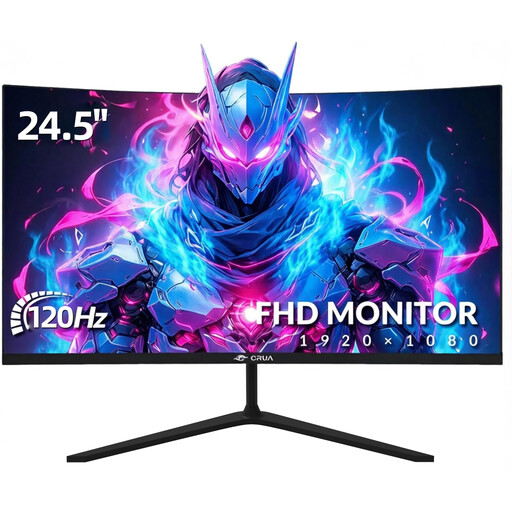
Why We Recommend This Product This model combines a compact 24.5-inch screen with a subtle 3000R curvature. Its Full HD resolution and 120 Hz refresh rate provide a solid foundation for smooth gaming on PC and current-gen consoles. With 99% sRGB color gamut coverage, the monitor is also suitable for basic visual tasks in the home office or for entry-level content creation.
Pros
Who It's For This model is a practical choice for budget-conscious users looking for a versatile 24-inch PC monitor for gaming, home office, and multimedia. It is particularly suitable as a console monitor or for gaming setups that don't have the high-end graphics power required for resolutions above 1080p.
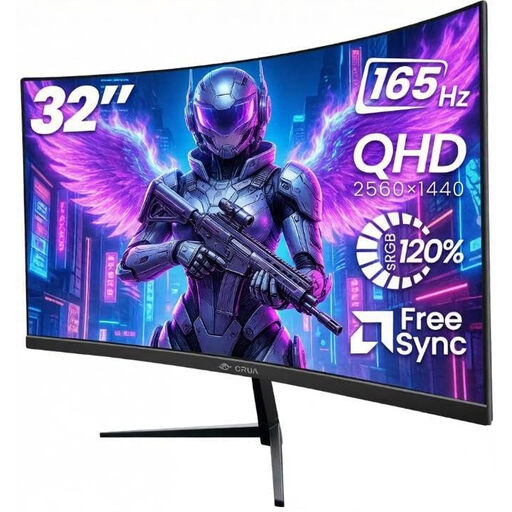
Why We Recommend This Product The 32-inch CRUA monitor offers a significant upgrade in terms of immersion and image quality. The combination of a large screen, a sharp 1500R curve, and WQHD (2560x1440) resolution creates a detailed and captivating viewing experience. With a 165 Hz refresh rate and FreeSync support, this monitor is aimed at more demanding PC gamers who value maximum fluidity in competitive titles.
Pros
Who It's For This model is for PC gamers seeking high resolution and a very high refresh rate for a competitive gaming experience. Thanks to its large screen and wide color gamut, it is also a great option for content creators and users who work with multiple windows simultaneously in a home office setup.
The models presented here are a selection tailored to common user profiles. However, the monitor market is diverse and offers solutions for specific needs, whether in terms of panel technology, connectivity options, or design. You can find a broader overview of available models and accessories in our Computer Systems category.
1. What does the R-value mean on a curved monitor? The R-value, such as 1500R or 3000R, indicates the monitor's radius of curvature in millimeters. If you were to arrange several of these monitors into a complete circle, it would have a radius of 1500 mm or 3000 mm, respectively. A smaller R-value signifies a more pronounced curve.
2. Is a curved monitor also suitable for the home office? Yes, a curved monitor can also be beneficial in a home office. The curvature can help ensure a more uniform viewing distance to all parts of the screen, potentially reducing eye and head movement. This is especially helpful on large widescreen monitors, as it improves clarity when working with multiple application windows.
3. What connections do I need for a 1440p 165Hz gaming monitor? To take full advantage of 1440p resolution at a 165 Hz refresh rate, a DisplayPort connection (version 1.2 or higher) is the recommended choice. While HDMI 2.0 can also support these specifications, DisplayPort is generally considered more reliable for high-refresh-rate PC gaming.