
Lieferung heute & morgen

Qualitätsgarantie
App herunterladen
Kategorien
A Curved Gaming Monitor is designed to fill more of the user's field of view, creating a more immersive viewing experience. The screen's curvature is modelled on the natural radius of the human eye, which can help enhance visual perception and reduce distortion at the edges of the image. When selecting such a monitor, technical specifications like curvature radius, refresh rate, and resolution are crucial parameters that define its performance and intended use.
The decision to purchase a curved PC monitor should be based on an analysis of objective performance features. The following criteria are relevant for your evaluation.
The curvature radius is specified in millimetres (mm) and describes the degree of the curve. A value of 1500R means the monitor follows the arc of a circle with a 1500 mm radius. A smaller number indicates a more pronounced curve and a potentially more immersive feel. A 3000R radius results in a more subtle curve, often found comfortable for mixed use, including both work and entertainment.
The refresh rate indicates how many frames per second the monitor can display. A standard monitor operates at 60 Hz. For gaming, a higher frequency is advantageous as it renders motion more smoothly and sharply.
Resolution determines the pixel density of the image. The choice is closely linked to the screen size.
Most curved monitors use VA (Vertical Alignment) panels. This technology is known for its high contrast ratios, resulting in deep blacks and a vibrant, three-dimensional image. Colour gamut coverage, often expressed as a percentage of sRGB, is an indicator of colour accuracy. A value of 99% sRGB or higher is a solid standard for gaming and web content creation.
An eye-care monitor integrates technologies like Flicker-Free and a Low Blue Light mode to reduce eye strain during extended use. Compatibility with a VESA mount (e.g., 100x100 mm) allows for mounting on a monitor arm or wall, which improves ergonomics and saves desk space. Common ports include HDMI and DisplayPort (DP), with DP often being the preferred choice for achieving high refresh rates at high resolutions on a PC.
Based on the technical criteria above, we present two models whose specifications are suited for different user profiles.
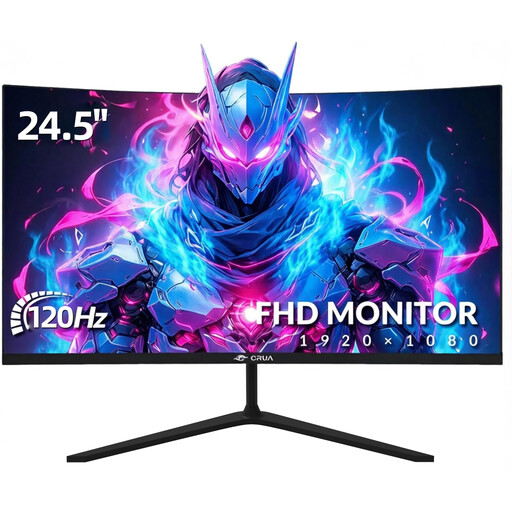
Why we recommend this product
This model combines a Full HD resolution with a 120 Hz refresh rate on a compact 24.5-inch screen. The subtle 3000R curvature provides a gentle immersion effect without being distracting for office applications. Its three-sided narrow bezel design (bezel-less monitor) is well-suited for multi-monitor setups.
Advantages
Who it's for This model is aimed at budget-conscious users looking for an all-round monitor for gaming, home office, and multimedia. It's a great choice for entry-level gamers, users with limited desk space, and as a secondary monitor.
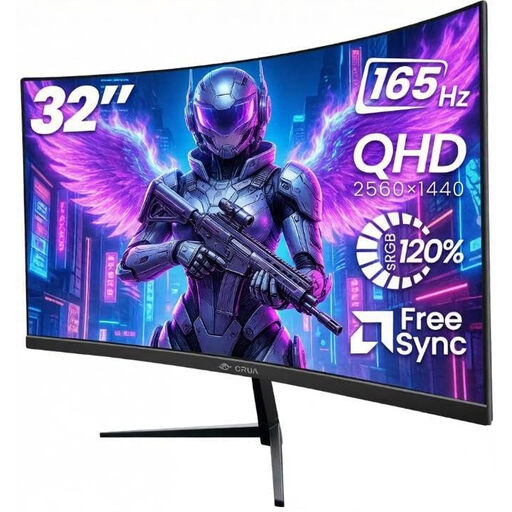
Why we recommend this product
With a 32-inch screen, WQHD (2560x1440) resolution, and a 165 Hz refresh rate, this monitor offers a high-performance package for demanding gaming and productive work. The pronounced 1500R curvature creates a high degree of immersion, while the high resolution ensures a sharp and detailed image.
Advantages
Who it's for This model is designed for gamers and content creators seeking an immersive and detailed visual experience. Its large screen and high resolution also make it an efficient tool for multitasking in the home office.
A high-performance monitor is the foundation of any visual experience. For a complete gaming or entertainment system, a matching set of input devices and consoles is just as important. You can find a selection of peripherals and systems in our Console Gaming Systems category.
1. Is a curved PC monitor suitable for the home office? Yes, a curved screen can be advantageous in a home office. Especially with larger monitors (27 inches and up), the curvature ensures that the distance from your eyes to all parts of the screen remains more consistent. This can reduce eye strain and improve focus, as the content gently wraps around the user's field of view.
2. What role does the refresh rate play for a PS5 monitor? The Sony PlayStation 5 supports video output up to 120 Hz for select game titles. A monitor for PS5 with 120 Hz can leverage this feature to achieve a significantly smoother and more responsive display compared to a standard 60 Hz screen. This requires the monitor to support 120 Hz via its HDMI 2.0 or HDMI 2.1 port.
3. What does the curvature radius 1500R or 3000R mean? The letter "R" stands for the radius in millimetres. A 1500R monitor has a curvature that matches a section of a circle with a 1500 mm radius. A smaller number means a more pronounced curve. 1500R offers high immersion and is primarily designed for gaming and watching movies. 3000R describes a gentler curve that is well-suited for mixed use.