
Lieferung heute & morgen

Qualitätsgarantie

Willkommens-Angebote freischalten: KOSTENLOSE Lieferung | Bis zu 80 % RABATT | Kostenlose 30-Tage-JoyPlus-Testphase
App herunterladen
Finding the right custom 75% mechanical keyboard can quickly become overwhelming. The market is flooded with technical jargon, marketing promises, and an enormous selection. Many users invest in a supposed premium product, only to be disappointed by material fatigue, faulty connectors, or an unreliable wireless connection after just a few months. This guide will help you identify the crucial features and avoid common purchasing pitfalls.
Before we dive into the key specifications, let's highlight the three most common issues that can lead to a bad purchase.
To make an informed decision, you should carefully examine three technical aspects. These largely determine the longevity, functionality, and user experience of your keyboard.
The 75% layout is a popular compromise between compactness and functionality, as it retains the F-key row and arrow keys. However, for users in Germany, the mechanical keyboard ISO-DE layout is crucial. Ensure that the keyboard not only supports the German key layout (QWERTZ) but also the correct physical arrangement with the large Enter key and the keys for ?, ?, ?, and ?.
Another important feature is software compatibility. A keyboard designated as VIA compatible allows you to freely program every key, create macros, and customize layouts—all through a simple graphical interface, without needing manufacturer-specific software running constantly in the background.
A high-quality aluminum keyboard is characterized by a case that is CNC-milled from a single block of aluminum. This provides significant weight, maximum stability, and positively influences the typing sound.
The mounting style describes how the PCB is secured within the case. Modern custom keyboards often use flexible systems such as:
For maximum versatility, a tri-mode keyboard is the ideal choice. It offers three connection options in one device:
Here are some models tailored to specific user profiles that avoid the pitfalls mentioned above.
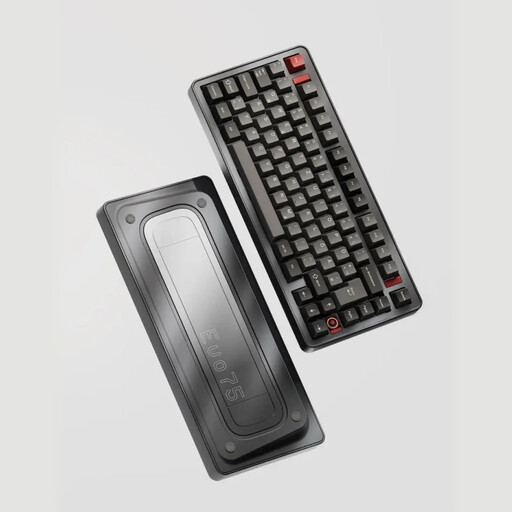
Why This Fits Their Persona: This model is aimed at enthusiasts who refuse to compromise. It combines all sought-after high-end features in one package: a German layout, full programmability, and a construction designed for longevity and a premium typing experience.
The solid, anodized aluminum case and the leaf-spring mount are hallmarks of true premium keyboards. The hot-swap sockets are designed for both 3-pin and 5-pin switches, ensuring high compatibility and durability.
ISO-DE Layout & VIA Compatibility: Perfect for the German market and maximum customisation. Tri-Mode Connectivity & 8000mAh Battery: Offers flexibility and long wireless usage.
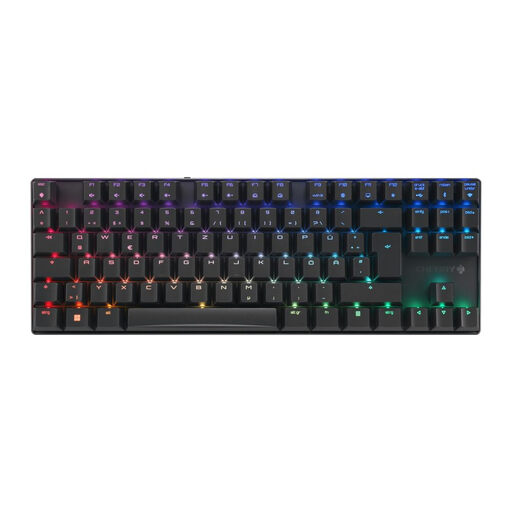
Why This Fits Their Persona: For gamers who rely on proven quality and low latency. The TKL format is very similar to the 75% layout and provides all the necessary keys for gaming. CHERRY is an established brand known for reliable switches and build quality.
The gaming mode with sub-1ms latency over 2.4 GHz directly addresses the problem of wireless lag. The aluminum frame provides the necessary stability in the heat of battle, and the MX2A switches are rated for over 100 million actuations.
Ultra-Low-Latency Mode: Essential for competitive gaming. Robust Aluminum Frame: Offers durability and a premium feel. The keyboard is a pre-built product from a renowned manufacturer.
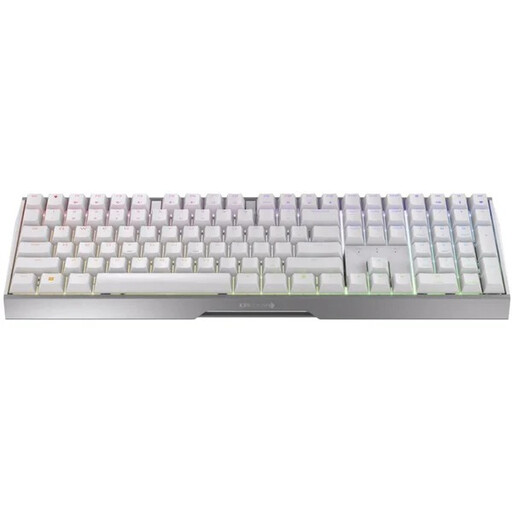
Why This Fits Their Persona: For users who want the premium features of a wireless mechanical keyboard but can't give up a number pad. This full-size model is an alternative for anyone needing one keyboard for both productive work and gaming.
This model also offers the low-latency 2.4 GHz mode for gaming and a sturdy aluminum frame. It avoids the pitfall of having to sacrifice performance features for a number pad, offering the same reliable CHERRY technology.
Full-Size Layout: Includes a number pad for productivity applications. Versatile Connectivity: The tri-mode functionality makes it the centerpiece of any setup, whether at the office or at home.
We have compiled a complete, up-to-date list of products that fully meet these strict selection criteria and German safety regulations.
A Tenkeyless (TKL or 80%) layout is essentially a full-size keyboard without the number pad. A 75% layout is even more compact. It moves the arrow keys and the navigation cluster (Del, Home, End, etc.) closer to the main key block, often arranging them in a single vertical column to save space.
Battery life depends heavily on the battery capacity (measured in mAh), usage, and especially the RGB lighting. With active lighting, the battery can last from a few days to a week. Without lighting, many models can last several weeks or even months on a single charge. Models with large batteries (e.g., 8000 mAh) offer the longest endurance.