
Lieferung heute & morgen

Qualitätsgarantie

Willkommens-Angebote freischalten: KOSTENLOSE Lieferung | Bis zu 80 % RABATT | Kostenlose 30-Tage-JoyPlus-Testphase
App herunterladen
The search for the right keyboard can be complex. For professionals, developers, and gamers who spend many hours at the computer every day, a keyboard is more than just an input device—it's a central tool for productivity and comfort. A mechanical keyboard often offers tangible advantages in terms of typing feel, durability, and customisation.
This guide is designed to help you understand the key features and make an informed decision. We will introduce you to various concepts, from quiet mechanical keyboards for the office to customisable gaming keyboards, and present a selection of models that meet different needs.
Before you decide on a model, it's helpful to know some fundamental characteristics that significantly influence the user experience.
The heart of every mechanical keyboard is the switches beneath each key. They determine the typing feel and noise level. The three main types are:
For users looking for a quiet mechanical keyboard, models with linear or specially dampened tactile switches are a good choice.
Keyboards come in various sizes, known as form factors:
For the international market, the QWERTY layout is the standard. When purchasing, make sure to choose the layout that's right for you, especially with international models.
Modern keyboards offer flexible connection options. A wireless keyboard ensures a clutter-free desk and can be connected via its Bluetooth keyboard function or a 2.4 GHz USB receiver. Many models support simultaneous connection with multiple devices, making it easy to switch between a keyboard for Mac and Windows.
For enthusiasts, a hot-swap keyboard is an interesting option. It allows you to change the mechanical switches without soldering, offering the ultimate level of personalisation.
Here is a selection of models designed for different use cases and preferences.
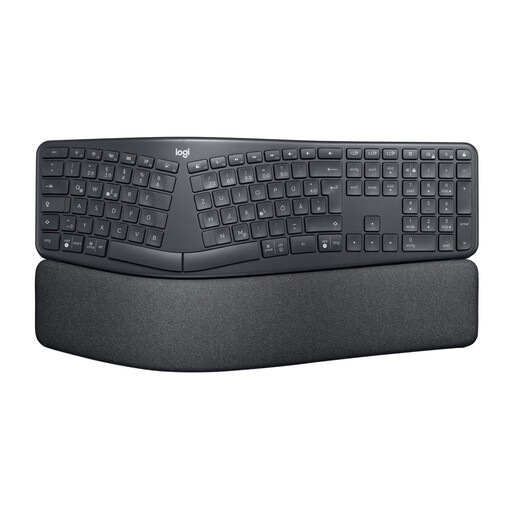
Why it stands out: The ERGO K860 is not a mechanical keyboard, but a specialised ergonomic keyboard. Its curved, split keyframe promotes a more natural hand and wrist posture. According to Logitech, the design reduces muscle activity and provides significantly improved support with its cushioned palm rest.
Pros:
Who it's for: Users who do extensive typing and prioritise maximum ergonomics to prevent strain and discomfort in the wrist and forearm area.
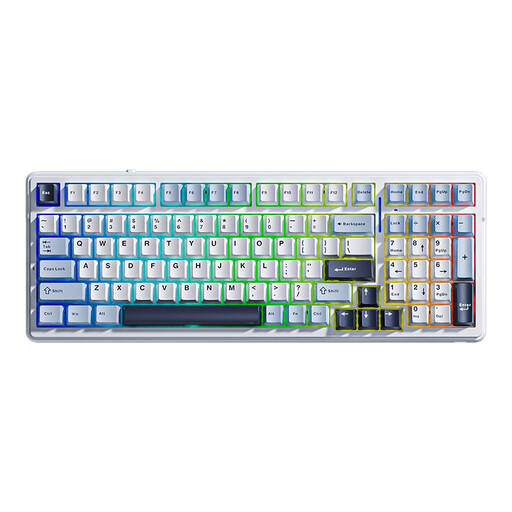
Why it stands out: The AULA F99 is a versatile hot-swap keyboard in a compact 96% layout that retains a number pad despite its small size. With its tri-mode connectivity (Bluetooth, 2.4 GHz, USB-C) and a large 8000 mAh battery, it is designed for flexible work and gaming setups. The multi-layer sound dampening ensures a muted and pleasant typing sound.
Pros:
Who it's for: Keyboard enthusiasts and power users looking for a customisable, compact, and feature-rich mechanical keyboard for gaming, programming, and work.
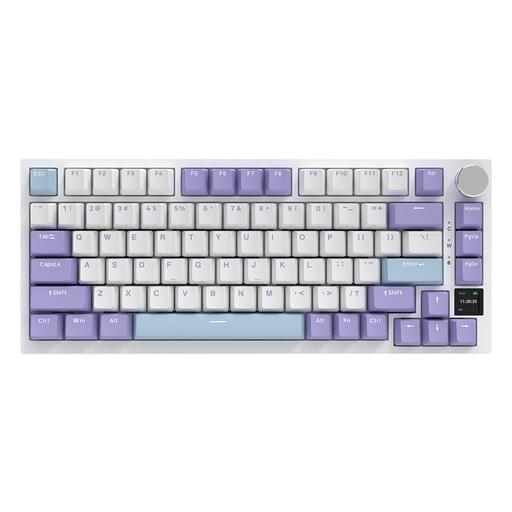
Why it stands out: The Ajazz AK820 Pro distinguishes itself with an integrated TFT colour screen that displays system information like battery level, connection mode, and time. The gasket-mount structure, combined with a flexible PC plate, provides a soft, bouncy typing feel. The compact 75% layout saves significant desk space without sacrificing arrow and function keys.
Pros:
Who it's for: Tech-savvy users and gamers who want a highly customisable keyboard with modern features, a unique typing experience, and a compact form factor.

Why it stands out: The Logitech MX Mechanical combines the precision of mechanical switches with a slim, professional design. Equipped with quiet, low-profile tactile switches, it offers a responsive typing feel without loud clicking noises. The smart backlighting automatically adjusts to ambient light, making it an excellent quiet mechanical keyboard for the office or home office.
Pros:
Who it's for: Professionals, developers, and creatives seeking a high-quality, quiet, and productivity-focused wireless keyboard for use in professional environments.
The world of keyboards is diverse, offering the right model for every need. If the options presented here don't quite match what you're looking for, or if you're specifically searching for more wireless solutions, you can find a broader selection in our Bluetooth Keyboards category.
The main advantage lies in the typing feel, precision, and durability. Mechanical switches provide clear tactile or audible feedback, which can lead to fewer typos. They are also rated for a very high number of keystrokes (often 50 million or more), making them more durable than conventional rubber-dome keyboards.
No. The noise level depends entirely on the type of switch used. While clicky switches (e.g., Cherry MX Blue) are intentionally loud, tactile and linear switches (e.g., Cherry MX Brown/Red) offer a significantly quieter experience. Many manufacturers also offer special "silent" or dampened switches optimised for office use.
A hot-swap keyboard allows the user to easily change the mechanical switches without having to disassemble and solder the keyboard. Using a special tool, the switches can be pulled out and replaced with others. This offers maximum flexibility to customise the typing feel and sound of the keyboard to personal preferences or to easily replace faulty switches.