
Lieferung heute & morgen

Qualitätsgarantie

Willkommens-Angebote freischalten: KOSTENLOSE Lieferung | Bis zu 80 % RABATT | Kostenlose 30-Tage-JoyPlus-Testphase
App herunterladen
A standard keyboard gets the job done, but for enthusiasts, gamers, and discerning professionals, that's often not enough. The desire for a specific typing feel, a pleasant sound profile, and extensive customisation options leads many to the custom mechanical keyboard. The market offers a wealth of options, which can make choosing difficult.
This article serves as your guide. It highlights the crucial features to consider when making your selection and presents a curated list of models that stand out for their specific characteristics and build quality.
To make an informed decision, it's helpful to understand the core components and features that define a mechanical keyboard.
The size and arrangement of the keys, also known as the form factor, significantly impact ergonomics and the amount of space required on your desk.
The heart of any mechanical keyboard is the switches beneath each keycap. They determine the typing feel and acoustics. A hot-swap keyboard offers maximum flexibility in this regard.
High-quality materials and modern technologies round out the complete package.
Based on the criteria above, we have compiled a selection of models that distinguish themselves through their specific features.
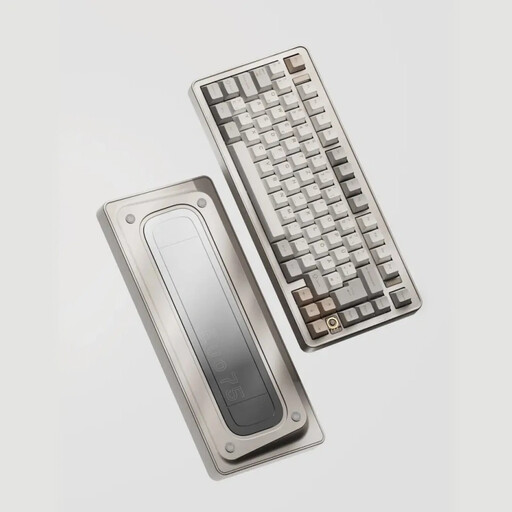
Why it stands out: The Ticktype EVO75 combines many of the most sought-after features into one package. With its compact 75% form factor and German ISO-DE layout, it is specifically tailored to the needs of users in German-speaking regions. The solid aluminum case, hot-swap capability, and VIA compatibility make it a versatile foundation for customisation. Its leaf-spring mount structure ensures a flexible and pleasant typing experience.
Pros:
Who it's for: Enthusiasts and demanding users looking for a high-quality, compact, and fully customisable keyboard for gaming and productivity who prefer the German layout. Anyone looking to buy a Ticktype keyboard and who values local standards will find a suitable option here.
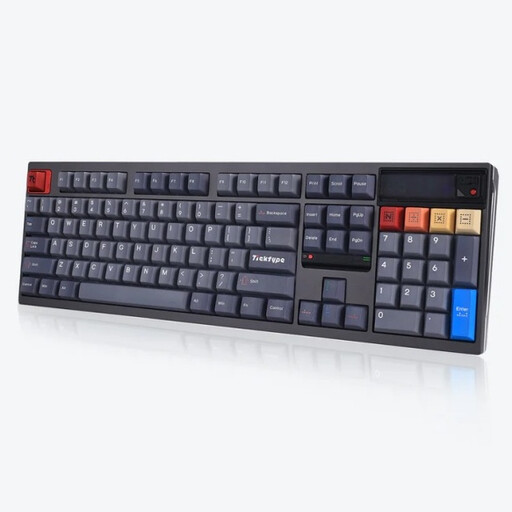
Why it stands out: The full-size Ticktype DP104 is aimed at users who need a number pad. A special feature is its customisable pixel screen, which can display GIFs, system information, or logos. The "Gecha Gray" version comes equipped with "Thocky Linear Switches," which produce a deep and satisfying sound profile popular with many connoisseurs. The case is also made entirely of aluminum.
Pros:
Who it's for: Users looking for a full-featured keyboard with a number pad and a unique visual element. Ideal for gamers, creatives, and anyone who appreciates a special acoustic typing experience and prefers the US layout.
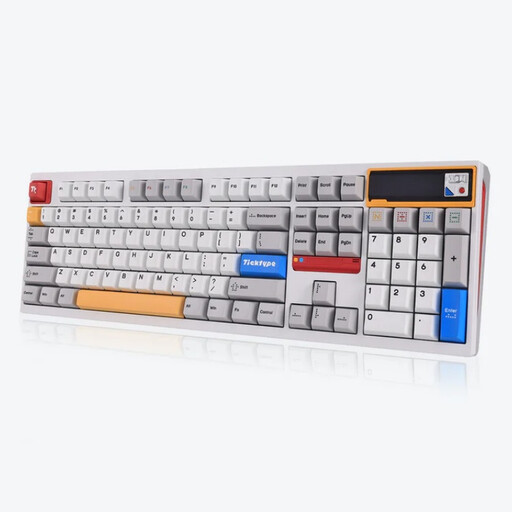
Why it stands out: This model shares the high-quality foundation of the DP104 series, including the aluminum case and pixel screen, but is designed for a quiet user experience. Equipped with "Silent Tactile Switches," it offers the tangible feedback of a tactile keyboard while minimising noise. This makes it a silent mechanical keyboard that is also suitable for offices or quiet environments.
Pros:
Who it's for: Professionals in shared offices, programmers, streamers, or late-night users who need a quiet yet high-quality and tactile mechanical keyboard with a US layout.
A high-quality keyboard is the foundation, but the right accessories complete the experience. For a cohesive aesthetic and a reliable connection, matching cables and other accessories are crucial.
Discover our selection of high-quality RGB cables and other accessories to personalise your setup.
A hot-swap keyboard allows you to change the mechanical switches without using a soldering iron. The switches are not permanently soldered to the PCB but are instead fitted into sockets. This gives users the freedom to easily try out different switch types (e.g., linear, tactile) and adapt the keyboard's typing feel to their preferences at any time, or to easily replace faulty switches.
An aluminum case, like those used in an aluminum gaming keyboard, offers several advantages. It provides significantly greater stability and weight, ensuring the keyboard stays firmly and securely on the desk. It also lends a premium look and feel. Acoustically, a solid metal case helps to reduce vibrations and produce a more solid, less hollow sound when typing.
A VIA compatible keyboard can be configured using the open-source "VIA" software. This application provides a graphical user interface that allows you to customise keymaps, macros, and lighting effects in real-time and without any programming knowledge. The changes are saved directly to the keyboard's onboard memory, so your configuration is retained on any computer without needing software running in the background.