
Lieferung heute & morgen

Qualitätsgarantie

Willkommens-Angebote freischalten: KOSTENLOSE Lieferung | Bis zu 80 % RABATT | Kostenlose 30-Tage-JoyPlus-Testphase
App herunterladen
The search for the perfect keyboard inevitably leads many enthusiasts, gamers, and professionals to the custom mechanical keyboard. The market promises limitless customisation, a superior typing feel, and an aesthetic that standard keyboards cannot match. However, behind the marketing often lie pitfalls that lead to expensive buyer's remorse. Misleading material specifications or limited compatibility can quickly sour the joy of a new device.
This guide serves as your roadmap. We will highlight the most common traps and explain the crucial technical features you should look for before buying to make an informed decision.
Before diving into the world of customisable keyboards, it's essential to recognise common marketing exaggerations and technical limitations.
To avoid these traps, you should focus on a few crucial technical specifications. These are the primary determinants of your keyboard's typing feel, longevity, and customisability.
The way the PCB and switch plate are secured inside the case has an enormous impact on sound and feel.
Switches are the heart of any mechanical keyboard. The choice between linear (smooth press), tactile (noticeable bump), and clicky (audible feedback) switches is personal. More important is the technical foundation:
Using a modern wireless mechanical keyboard offers maximum flexibility.
Based on the criteria above, we have identified a few models that are well-suited for specific user groups.
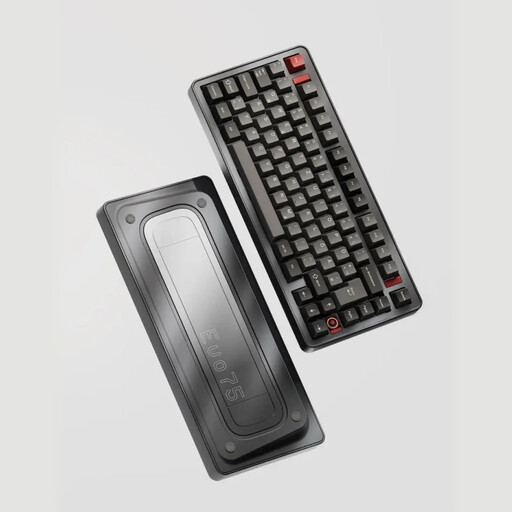
Why This Fits Their Persona: Ideal for programmers, writers, and creatives in Germany who need a compact layout without sacrificing functionality and German keys. The 75% format retains the F-keys and arrow keys while saving valuable desk space.
Directly solves the layout dilemma with a full ISO-DE layout. The hot-swap sockets are 5-pin compatible, thus bypassing the limitations of many competing products.
Full aluminum case, Leaf Spring Mount for a comfortable typing experience during long sessions, and VIA compatibility for in-depth key customisation.
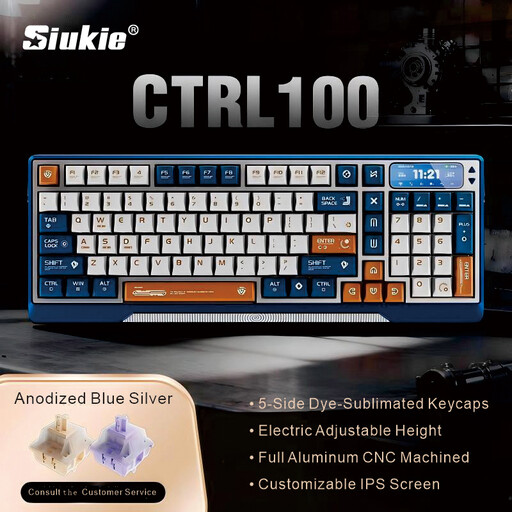
Why This Fits Their Persona: For users who see a keyboard not just as a tool, but as a central design element of their setup. The focus is on material feel, innovative technology, and a first-class typing experience.
Bypasses the "aluminum illusion" with a solid, CNC-milled aluminum case. The gasket mount structure is an authentic premium feature that significantly improves sound and feel.
Unique motorized tilt mechanism for perfect ergonomics, a customisable IPS display, and a rich, dampened typing sound thanks to the Gasket Mount.
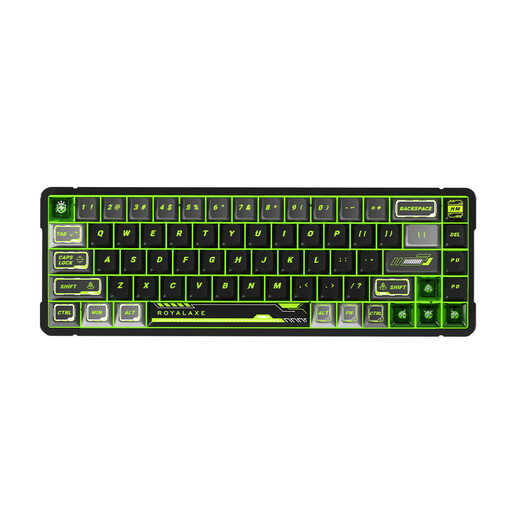
Why This Fits Their Persona: Designed for competitive players where every millisecond counts. The focus is on maximum response speed and switch performance customisation, not general office features.
Relies on a specific, performance-oriented technology (magnetic switches) instead of vague marketing terms. The function is clearly defined: an adjustable actuation point for maximum speed.
Magnetic switches allow the actuation point (Rapid Trigger) to be adjusted with a precision of 0.001 mm. This enables extremely fast, repeated keystrokes—a decisive advantage in fast-paced games.
We have compiled a complete, real-time updated list of products that fully meet these strict selection criteria and safety regulations.
A solid aluminum keyboard case offers objective advantages: it increases the keyboard's weight, which improves stability on the desk and prevents it from sliding. It also alters the sound profile of the switches, often resulting in a deeper, richer, and less hollow sound. For users who value haptics, acoustics, and durability, the extra cost is usually justified.
Both are premium mounting styles. A gasket mount keyboard uses gaskets to decouple the PCB from the case, resulting in a soft, dampened feel. Leaf Spring Mount goes a step further, using flexible metal or plastic arms that create a springy effect. The typing feel here is even more flexible and "bouncier." The choice is subjective: Gasket Mount is soft and controlled, while Leaf Spring is bouncy and dynamic.
Look specifically for switches with "Silent" or "Mute" in their name (e.g., Gateron Silent Red, Kailh BOX Silent Pink). These linear or tactile switches have small silicone dampeners on the stem sliders that absorb the sound of the key bottoming out and returning. Combined with a solid case and a gasket mount structure, a mechanical gaming keyboard can be as quiet as a standard membrane keyboard but offers a far superior typing feel.