
Lieferung heute & morgen

Qualitätsgarantie

Willkommens-Angebote freischalten: KOSTENLOSE Lieferung | Bis zu 80 % RABATT | Kostenlose 30-Tage-JoyPlus-Testphase
App herunterladen
A custom mechanical keyboard can be tailored to your personal use with many models. At the same time, inconsistent information about switches, layouts and software makes comparison difficult. Gaming enthusiasts and esports players in particular should therefore look beyond just RGB lighting or flashy case colours.
Many keyboards are sold with a US layout. This differs from the German ISO-DE layout in, among other things, the position and shape of the Enter key, as well as missing or differently arranged characters such as Ä, Ö, Ü and ß. If you regularly type in German, check the layout before buying by looking at the product specifications and the illustrated keycaps.
With a hot-swap keyboard, mechanical switches can be swapped without soldering. What matters, however, is whether the circuit board supports 3-pin and 5-pin switches and which switch type is intended. Hall-effect models often use magnetic switches and require compatible electronics. Standard mechanical switches cannot simply be used in these.
Rapid Trigger describes a software- and sensor-based function where the actuation and reset of a key happens dynamically based on the key travel. This can be useful for quick direction changes in certain games. However, actual use depends on the supported software, the actuation point setting and the specific game. Figures like "0.001 mm" should therefore always be considered in relation to the sensor type and the available settings.
A 75% keyboard usually offers the most important function keys and arrow keys in a compact form. However, the separate number pad is missing. For desk work involving lots of number entry, a full-size keyboard with 108 keys is more practical. 96% format models try to pack many keys into a narrower width.
Before buying, we recommend checking the following:
Linear switches offer a smooth key travel with no noticeable tactile bump. Tactile switches provide feedback when actuated. The choice affects typing feel, sound and actuation characteristics, but is a matter of personal preference.
A hot-swap socket makes later changes easier. Additionally, the case mounting influences the typing feel. With a leaf-spring or gasket-like construction, the plate can move slightly under pressure. This is a design feature, not a general quality promise.
With a Hall-effect keyboard, key travel is detected magnetically. Typical extra features include an adjustable actuation point and Rapid Trigger. Buyers should check whether the required settings are available via the manufacturer's software or a web application.
A wireless mechanical keyboard can connect via Bluetooth or 2.4 GHz wireless. For gaming with the most consistent connection possible, the wired USB-C mode is a sensible option. Tri-mode models usually offer all three options.
Battery capacity should not be considered in isolation either. Brightness of lighting, wireless standard and software features all affect battery life. An aluminium case can feel sturdy and add weight, but it is not immune to scratches and knocks. An RGB keyboard offers additional lighting settings, but does not automatically improve typing speed.
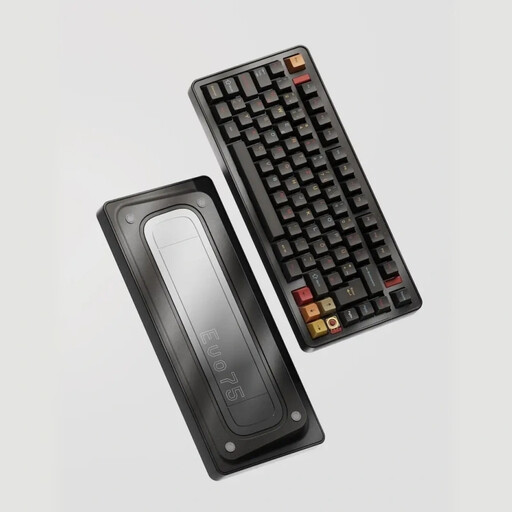
Why this product fits the profile: The 75% format combines a compact footprint with a German layout. Tri-mode connectivity, RGB and hot-swap functionality offer several customisation options for gaming and everyday use.
The ISO-DE layout reduces the risk of an unsuitable key arrangement. The hot-swap circuit board supports 3-pin and 5-pin switches according to the product specifications.
75% layout, ISO-DE, 8,000 mAh battery, USB-C, 2.4 GHz, Bluetooth and per-key RGB.
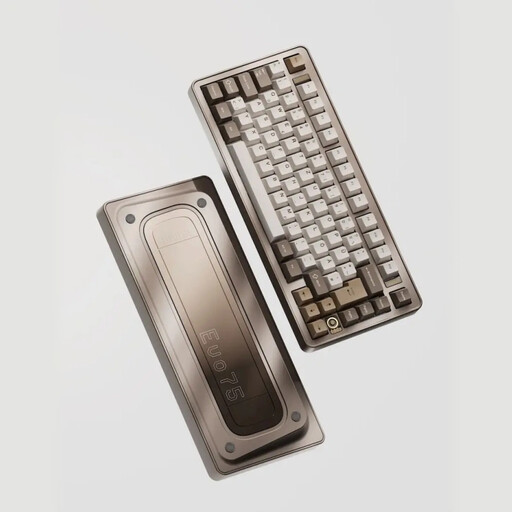
Why this product fits the profile: The aluminium case, quick-disassembly construction and VIA compatibility are aimed at users who want to configure their keyboard long-term.
The specifications explicitly mention ISO-DE, hot-swap, VIA compatibility and multiple connection types. This allows you to check the key buying criteria in advance.
Aluminium case, leaf-spring mount, 8,000 mAh battery, USB-C, Bluetooth, 2.4 GHz and RGB.
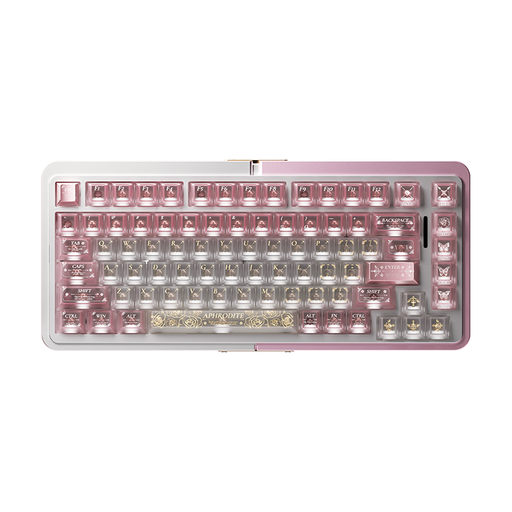
Why this product fits the profile: The Hall-effect technology with TTC Magnetic HE switches and Rapid Trigger is aimed at users looking for adjustable actuation settings for an esports gaming keyboard.
The product specifications explicitly mention Hall-effect switches and Rapid Trigger. Buyers can therefore specifically check whether these features are needed for their own play style.
75% format, aluminium frame, magnetic HE switches, hot-swap function and wired operation.
We have put together a complete, regularly updated list of products that fully meet these strict selection criteria and the safety regulations in force in the EU.
For regular typing in German, an ISO-DE layout is usually more straightforward, as umlauts and ß are on the designated keys. Additionally, the size should fit your workspace. A 75% keyboard saves space, while full-size models offer a number pad.
Hall-effect models are mainly interesting if you want to use an adjustable actuation point or Rapid Trigger. For office work and general typing, these features are not essential. A hot-swap keyboard with standard switches can offer sufficient customisation options here.
The lifespan depends on the switches, hot-swap sockets, circuit board, battery and daily use. For a longer service life, avoid liquids, clean the case dry and do not tilt switches when replacing them. With wireless models, the condition of the built-in battery is also a relevant factor.