
Lieferung heute & morgen

Qualitätsgarantie

Willkommens-Angebote freischalten: KOSTENLOSE Lieferung | Bis zu 80 % RABATT | Kostenlose 30-Tage-JoyPlus-Testphase
App herunterladen
Whether you are sewing, crafting, renovating or working in a small business, cutting tools need to match the material, the type of cut and the amount of work involved. A paper cutter is handy for card and photos, but it cannot replace a cordless cutter for leather or a mitre shear for mouldings. If you focus only on motor power, bold claims about sharpness or the longest possible list of compatible materials, you can quickly end up with a tool that is imprecise, awkward to use or expensive to maintain.
As a Joybuy Product Recommendation Officer, I therefore assess product information against clear, verifiable criteria. The following guidance will help you distinguish marketing claims from product features that genuinely matter.
The description “for paper, card, fabric, leather, felt, carpet, plastic and wood” does not automatically mean the tool will deliver the same cutting quality across all materials. Thin films, soft felt and thick card place different demands on the blade, contact pressure and motor. With wood, it is also important to establish whether the tool can only engrave or can cut as well.
So check the following:
Electric cutters with speeds of, for example, 11,000 rpm can make cutting easier. However, rotational speed alone says little about the actual material throughput. A round blade is suited to different tasks from a pointed blade; an SK5 blade for mitre cuts is not comparable to a rotary cutter for textiles.
Pay attention to how blade material, blade shape, cutting path and safety mechanism work together. A high rotational speed is only useful when the tool can be guided steadily and is intended for the material in question.
“Up to two hours of runtime” is a maximum figure under specific conditions. Continuous use, thicker materials and frequent stops can all affect the actual runtime. Charging time, USB-C compatibility, battery condition and the ability to change the blade are equally important.
When choosing a cordless cutter, therefore, do not look only at the voltage. Also consider:
For paper projects, the maximum format is a key specification. An A4 paper cutter handles paper up to 210 × 297 mm, making it suitable for documents, photos, cards and lightweight fabrics. A grid, angle markings and an extendable ruler make repeatable cuts easier.
For mouldings, cable trunking or plastic profiles, on the other hand, the angle range is what matters. A mitre shear with markings from 45° to 135° can cover several cutting positions. This makes it more suitable for certain DIY tasks than a straight paper cutter.
Metal specifications should be precise. SK5 steel, carbon steel, stainless steel and tungsten steel all have different properties. What matters most is whether replacement blades are available and how they are changed. A blade that can be released without tools or at the press of a button reduces maintenance, but it does not eliminate the risk of injury.
With cutters for paper, card, fabric, leather, felt, carpet and plastic, the blade must always be kept clean and free from material residue. For wood and acrylic, a laser cutter is a different category of device. Protective covers, ventilation, software and permitted materials are particularly important here.
Covered blades, safety locks and a non-slip handle are objectively verifiable features. Battery and charging information also needs to be considered for electric devices. Laser equipment must never be operated unattended. Depending on the material, cutting or engraving can produce smoke and particles, so suitable ventilation is required.
A DIY cutting tool should therefore not be chosen on performance alone. Storage, visibility of the cutting line, weight and cleaning requirements all affect how practical it is for everyday use.
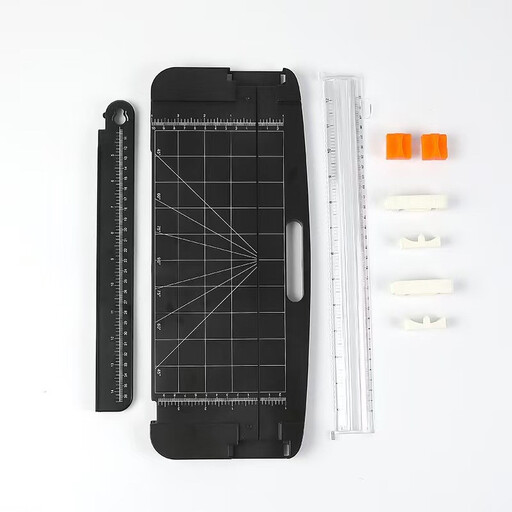
Why this product suits this profile: The A4 sliding cutter is designed for occasional paper, photo, card and lightweight fabric projects, and requires neither a battery nor a power connection.
The grid, angle guides and extendable ruler make the usage limits clear: the maximum cutting area is A4, and the tool is not intended for thick materials.
A4 format, cuts at multiple angles, and a covered double blade with a safety lock.
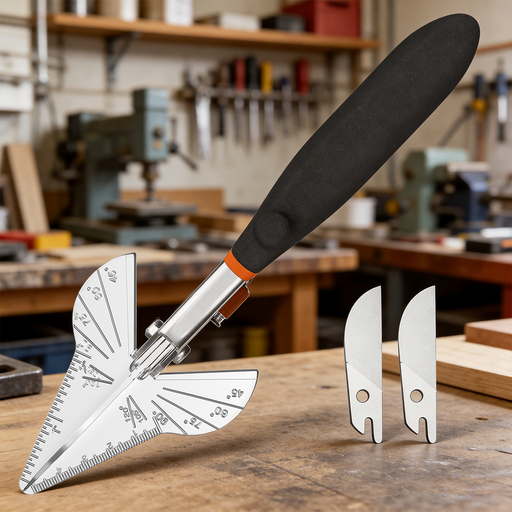
Why this product suits this profile: For precise mitre cuts in PVC, MDF, pine, pipes and mouldings, the engraved angle markings and 45° stop are particularly useful.
The adjustable angle range from 45° to 135° is more specific than a general multifunctional claim. Two replacement blades are listed as included.
SK5 stainless steel blade, non-slip PVC handle and clearly defined angle markings.
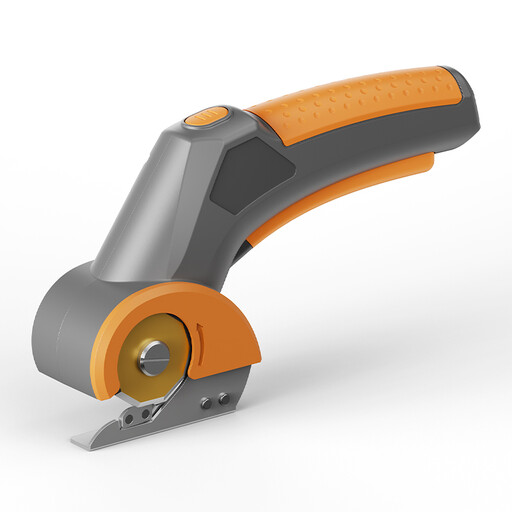
Why this product suits this profile: The cordless rotary cutter is designed for users who repeatedly work with paper, corrugated card, carpet, leather, felt or plastic and want to remain mobile while doing so.
The specifications state the battery, USB-C charging, a weight of 470 g, a safety lock and an included replacement blade. This makes ongoing use and maintenance easier to assess.
4 V battery with a stated runtime of up to two hours, plus a self-sharpening blade that can be changed without tools.
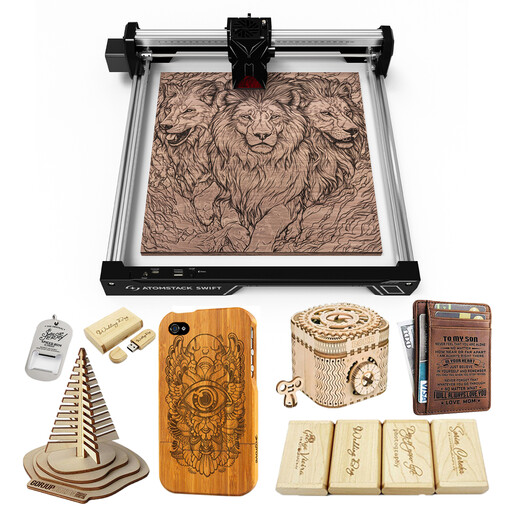
Why this product suits this profile: For engraving wood, leather, card, MDF or dark acrylic, this laser engraving machine offers a working area of 300 × 300 mm and several data connection options.
The product data specifies laser power, working area, wavelength, software support and fixed focusing. A protective cover, safety goggles and ventilation are still required for safe operation.
12 W output power, stated engraving precision of 0.01 mm, and Wi-Fi, hotspot and USB transfer.
We have put together a complete, regularly updated list of products that fully meet these strict selection criteria and the safety regulations applicable in the EU.
For individual sheets, photos and cards, a paper cutter with a grid and stop is a practical choice. For corrugated card or frequent cutting tasks, an electric cutter with a suitable round blade can offer greater freedom of movement. Check the permitted material thickness before buying.
Service life depends on the material, pressure, cutting volume and cleaning. Manufacturer specifications, such as a tested number of cuts, are not a guarantee for every application. Replace blunt or damaged blades, and store metal parts in a dry place.
In addition to the purchase price, the main ongoing costs are charging electricity and, where applicable, replacement blades. USB-C models can be charged using compatible power adapters, computers or power banks. For intensive use, factor runtime, charging time and replacement-part prices into the total cost.