Start by choosing a radio that can pick up a station carrying traffic updates for your area at your desk. DAB+ doesn’t need an internet connection; hybrid radios with Wi-Fi give you access to additional internet stations, but they don’t replace checking your specific route before setting off. The Digital Radio Office Germany’s coverage forecast can help you narrow down your options, but it can’t guarantee reception at the exact spot where you’ll use the radio.
Who is a DAB+ radio for in the home office?
Home workers who commute locally
If you’d like to listen to a station for your route before setting off, check its programmes and whether you can get reception indoors at your location. The Digital Radio Office Germany offers a location-specific coverage forecast to help.
Drivers who plan at short notice
If you want to know whether there are delays on your specific route before you leave, you can also check a live traffic map. Bayerischer Rundfunk describes traffic information as part of its radio service, while the ADAC provides updates on current traffic conditions.
Desk workers who listen in short bursts
If you only switch the radio on briefly while working, look for quick access to your favourite station. Hama lists preset buttons for saved stations on the DR2002.
What should you look for when buying?
First check whether you can receive your preferred station where you’ll listen; then consider ease of use and power options. According to Bayerischer Rundfunk, DAB+ doesn’t require an internet connection, while internet radio needs Wi-Fi.
| What you need |
What to look for |
Who is it important to? |
| Receive a local station |
Check the available stations and indoor reception at your location; test reception where you plan to use the radio. |
I want to listen to a station that suits my area before setting off. Around 36% of consumers prioritise receiving local traffic updates. |
| Check your route |
Think of radio stations and traffic maps as different sources of information. |
If I want to know what’s happening on my specific route just before I leave, a general radio programme isn’t always enough. Around 29% of consumers prioritise information about their own journey. |
| Find your station quickly |
Check for preset buttons, clear labelling and a display you can read at your desk. |
I want to switch on my station during a short break without having to search for it. Around 21% of consumers mainly look for quick, straightforward controls. |
| Listen in different places |
Check whether the model uses mains power, a rechargeable battery or disposable batteries; test reception in each place you plan to listen. |
If I want to listen in another room too, I need a suitable power source for that space. Around 14% of consumers prioritise being able to listen in different places. |
Common buying misconceptions
-
Assuming DAB+ on the box guarantees reception at your desk
Coverage forecasts distinguish between locations and indoor reception, and conditions can vary at your workplace.
Check the available stations and indoor coverage forecast for your location, then test the radio where you plan to use it with the aerial fully extended.
Poor reception may mean you need to move the radio around. An external aerial is only an option if the radio has a suitable socket.
-
Expecting a hybrid radio to automatically warn you about traffic on your route
Extra internet stations and a route-specific traffic map serve different purposes: the radio plays the station’s programme, while a map lets you check your own route directly.
Choose a station that suits your area and, if needed, check a live traffic map shortly before setting off.
-
Confusing ASA safety alerts with everyday traffic updates
ASA DE is designed for safety alerts about hazards and emergencies, not routine daily traffic reports.
Check separately whether the radio offers a suitable traffic station and whether it supports ASA, if you need that feature as well.
Key brands at a glance
Hama
The DR2002 combines DAB+, FM and Bluetooth in a tabletop radio.
- Hama lists preset buttons for quickly selecting saved stations.
- The model described runs on an external power supply. Bluetooth plays audio from another device, but doesn’t replace a radio’s own reception of traffic updates.
Kenwood
The CR-ST85DAB is described as a compact DAB+/FM radio with Bluetooth and an ASA alert function.
- The ASA function is designed for safety alerts.
- ASA is not the same as everyday traffic updates, and access to the alert service also depends on coverage in your area.
Panasonic
The RF-D40 combines DAB+, FM and internet radio, while the RF-D10 is described as offering both mains and battery power.
- The models suit different listening situations: stationary listening with internet radio, or use in different places.
- The RF-D40 needs Wi-Fi for internet radio. Battery operation on the RF-D10 depends on having suitable batteries.
Nubert
The nuGo! ONE+ is described as a portable DAB+/FM radio with a built-in rechargeable battery.
- A built-in battery can be useful if you listen in different places. Nubert quotes a maximum battery life of 24 hours; this is the manufacturer’s claim, not a figure measured for every type of use.
- For a permanent place at your desk, portability may matter less than easy station access and reception at your location.
TechniSat
DIGITRADIO 4 and DIGITRADIO 550 IR are different model names, and their features should be checked separately.
- F.A.Z. Kaufkompass named the DIGITRADIO 4 its preferred digital radio for the home.
- This editorial recommendation applies to the DIGITRADIO 4 and doesn’t automatically apply to the DIGITRADIO 550 IR.
DAB+ radios for your desk and other listening spots
This selection includes DAB+/FM radios for a permanent listening spot in your home office, as well as models you can use in different places.
 No image available
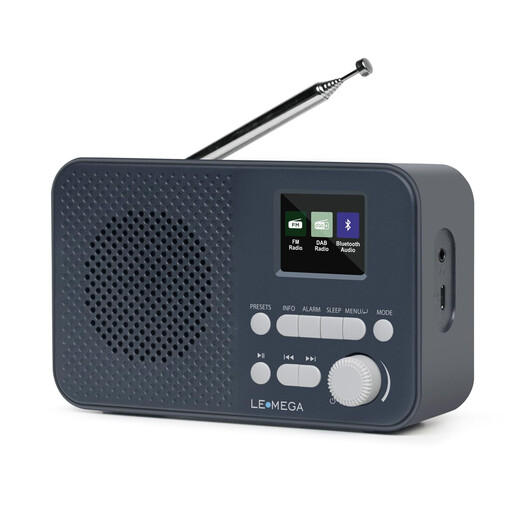
LEMEGA DAB Go
A good choice if you listen in different places and want to use a saved station without relying on a power socket.
DAB+/FM, Bluetooth, built-in 2200 mAh battery, USB-C charging, headphone socket and 40 station presets.
View at Joybuy
 No image available
LEMEGA DR6
An option if you want to run the radio from the mains at your desk and take it somewhere else when needed.
DAB, DAB+ and FM, Bluetooth and 40 station presets. Battery operation requires four AA batteries, which are not included according to the product description.
View at Joybuy
 No image available
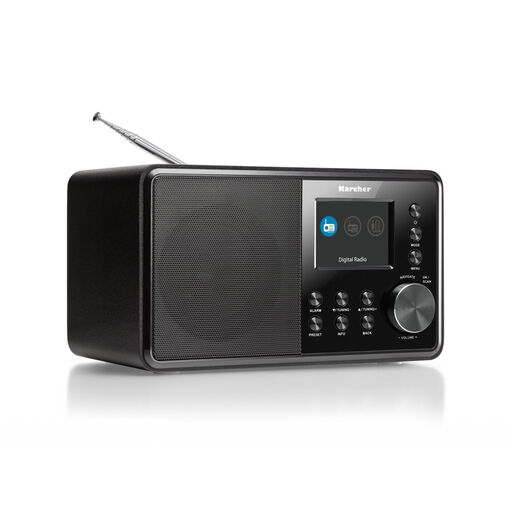
Karcher DAB 3000
Suited to a permanent listening spot if you’re looking for a radio with a display and extra connections. Check reception at the location you have in mind.
DAB+ and FM, 2.4-inch colour display, speaker, AUX input, line-out and alarm function.
View at Joybuy
 No image available
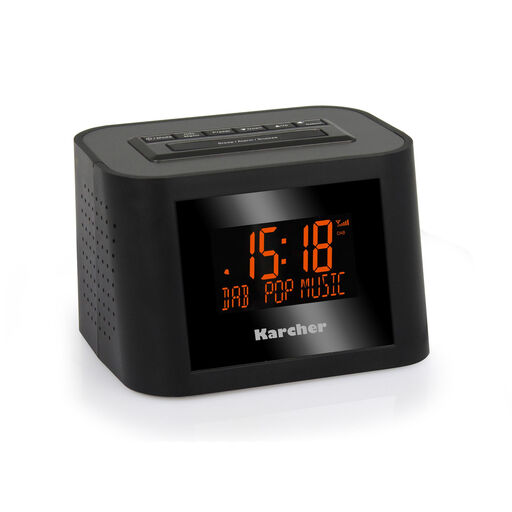
Karcher DAB 2420
A useful option for a permanent spot on your desk if you want to combine radio listening with alarm functions.
DAB+ and FM, stereo speakers, mains power, two alarm times, sleep timer, snooze function, display and headphone socket.
View at Joybuy
 No image available
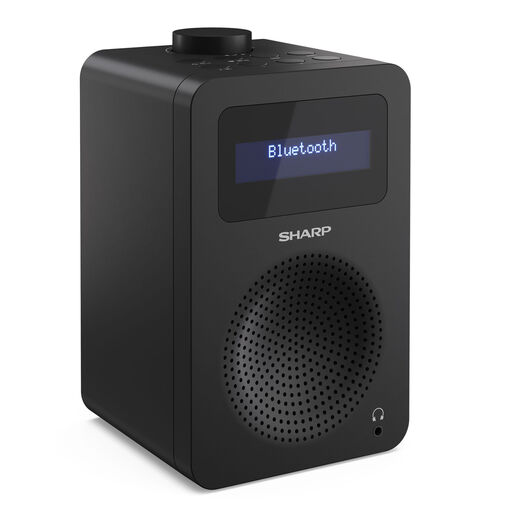
SHARP DR-430(BK) Tokyo Digital Radio
A good fit for your desk if you want to save a favourite station and quickly tune in again later.
DAB+ and FM, Bluetooth 5.0, mains power, 40 station presets, dual alarm and DRC audio.
View at Joybuy
Frequently asked questions
Do I need the internet to get traffic updates over DAB+?
No. DAB+ reception itself doesn’t need an internet connection. However, you’ll need a station that you can receive at your location and that broadcasts the traffic updates you want. A hybrid radio’s additional internet radio function requires Wi-Fi.
What can I do if I can’t receive my preferred station at my desk?
First, check the coverage forecast for your location and run a station scan. Then try moving the radio or aerial and test reception where you plan to use it. A forecast can’t guarantee a signal at every desk.
Will a hybrid radio automatically give me traffic updates for my route?
No. A hybrid radio can receive additional stations over Wi-Fi, but it won’t automatically check your specific route. If you want to check for delays before setting off, use a live traffic map as well.
Are ASA alerts the same as daily traffic updates?
No. ASA DE is designed for safety alerts about hazards and emergencies, and doesn’t replace a local traffic station. According to the Digital Radio Office Germany, standard DAB+ radios without ASA certification can alternatively tune in to the service manually; whether it’s available also depends on coverage in your area.


