Before choosing a DAB+ radio, check whether you can receive your preferred weather station at your desk and whether it broadcasts at a suitable time. For a permanent workspace, an easy-to-use DAB+/FM radio may be enough. If terrestrial reception is weak, an internet radio could be an option, provided your preferred station is available as a stream. A battery and ASA are most relevant if you work in different locations or specifically want automatic official alerts. Digitalradio Deutschland’s reception forecast can help you check coverage for your location.
Who a DAB+ radio is suitable for in a home office
Listeners who want local weather reports
If you want to listen to a particular local weather report while you work, check both the programme and reception at your desk. Digitalradio Deutschland’s programme map and reception forecast can help you choose based on your location.
Radio between video calls
If you only want to catch the news and weather briefly between tasks, easy-to-reach controls and quick access to your preferred station are useful. For specific models, Hama Deutschland, for example, lists direct preset buttons and a rotary control.
Listeners who work in different locations
If you work in several places or expect DAB+ reception to be weak at your desk, you can consider a battery, FM or internet radio, depending on your needs. Bayerischer Rundfunk notes that DAB+ does not need an internet connection, whereas internet radio requires internet access.
What to consider when buying
First, check whether your preferred station is available at the intended location and at a suitable time. Digitalradio Deutschland’s programme map and reception forecast can help you choose based on your location.
| What you need |
What to check before buying |
Who should pay particular attention |
| Weather station and reception |
Check the programme and broadcast times, as well as the DAB+ reception forecast for your intended location. |
If I want to listen to a particular local weather report in my home office, that specific programme needs to come through at my desk. Around 36% of consumers put finding the right station and getting reception first. |
| Ease of use |
Check the direct preset buttons, labelling and volume control on the specific model. |
If I want to operate the radio quickly between tasks or before a video call, I need direct access to the station and volume controls. Around 29% of consumers prioritise straightforward controls at their workspace. |
| Alternative ways to tune in |
Check whether the station is available locally on FM or as an internet stream, and whether you have internet access at your workspace. |
If DAB+ reception is difficult at my desk, I want to be able to use a suitable alternative. Around 21% of consumers pay particular attention to alternative reception options. |
| Changing locations or alerts |
If you’ll be moving the radio around, check whether it runs on mains power and batteries. For automatic official alerts, check its ASA certification and setup requirements. |
If I work in different places or want automatic official alerts, I need a radio with the right features. Around 14% of consumers put this specific requirement first. |
Avoiding common buying mistakes
-
Assuming DAB+ guarantees access to a local weather programme
Whether you can receive a programme at your workspace depends on your location. Whether it broadcasts weather reports also depends on its schedule and broadcast times.
First check your preferred station and its broadcast times, then check the reception forecast for the spot where you plan to put the radio.
-
Expecting internet radio to work without an internet connection
DAB+ works without an internet connection. However, using the internet reception option on a hybrid radio requires internet access.
Check separately whether you can receive your preferred station on DAB+ or FM, and whether its stream and an internet connection are available.
-
Assuming every DAB+ radio supports ASA
ASA is for automatic official alerts and is not the same as a regular weather report.
If you want this feature, check that the specific model is ASA-certified and find out what setup is needed to receive local alerts.
Key brands to consider
Hama
The range includes DAB+ tabletop radios and models with internet radio. The DR1001 is one example of a radio designed for easy operation at a permanent workspace.
- According to Hama Deutschland, the white DR1001 has four direct preset buttons, a rotary control, DAB+/FM and an external power supply.
- These features do not tell you whether reception will be good enough at a particular desk.
Philips
The TAR5005/10 is a DAB+/FM home radio with station presets; features on other models should be considered separately.
- Philips lists up to 20 station presets and top-mounted buttons for the TAR5005/10.
- Bluetooth details for the TAR5505/10 do not automatically apply to the TAR5005/10. Its features do not replace checking reception at your own location.
Pure
According to Pure, the Evoke Spot combines DAB+, FM and internet radio in a compact home radio.
- Internet radio may provide an additional way to tune in if your preferred station is available as a stream.
- Internet radio requires an internet connection, and having additional ways to tune in does not guarantee that a particular station will be available.
TechniSat
The DIGITRADIO 1 A is a specific portable DAB+/FM model with a battery and ASA functionality.
- TechniSat lists mains and battery operation for this model, with battery life of up to 10 hours.
- ASA is for official alerts, not the frequency of regular weather reports. The stated battery life applies to this model.
Joybuy products for listening to the radio in your home office
This selection includes DAB+/FM radios for a permanent workspace and portable models for when you work in different locations.
 No image available
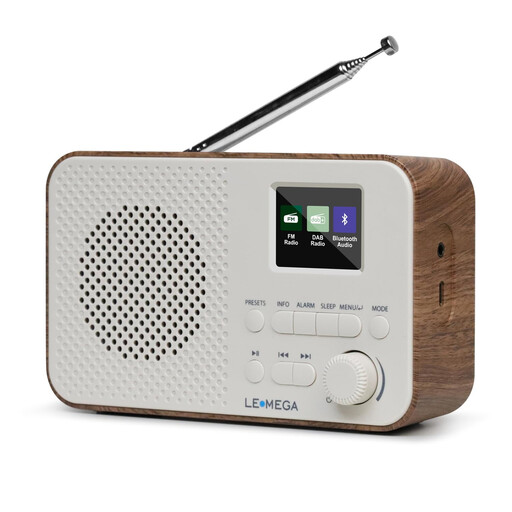
LEMEGA DAB Go DAB+/FM radio, walnut
Could suit a changing workspace if your preferred station is available there on DAB+ or FM.
DAB+/FM, Bluetooth, LCD display and headphone socket; rechargeable 2200-mAh battery, USB-C charging and 40 station presets.
The product description gives battery life of up to 15 hours.
View at Joybuy
 No image available
LEMEGA DR6 stereo DAB radio, walnut
Could suit a permanent workspace if your preferred station is available there and the controls are easy for you to reach.
DAB+/FM, Bluetooth and 40 station presets; mains and battery operation, according to the product name.
View at Joybuy
 No image available
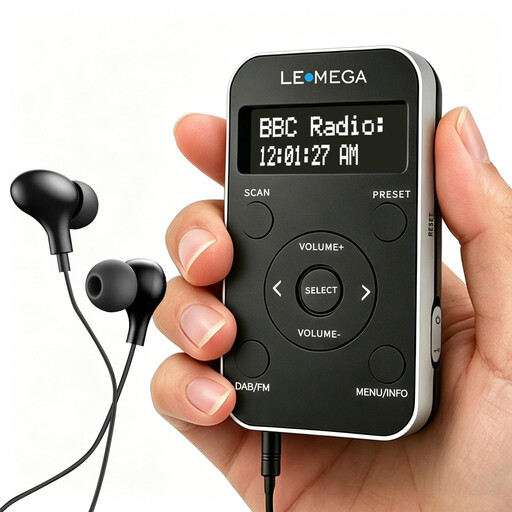
LEMEGA PR1 Pocket DAB/DAB+ and FM radio, black/silver
Could suit a changing workspace if you want a portable radio with a battery and your preferred station is available at each location.
Rechargeable battery, 20 station presets and supplied earphones.
View at Joybuy
 No image available
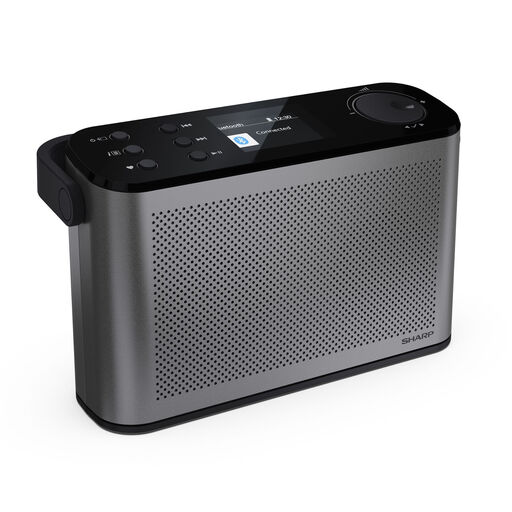
SHARP DR-P540(GY) Osaka, portable DAB+/FM radio, grey
Could suit a changing workspace if your preferred station is available there on DAB+ or FM.
Bluetooth 5.3, 120 station presets, USB-C charging port and 2.4-inch colour display.
The product name gives battery life of up to 12 hours.
View at Joybuy
 No image available
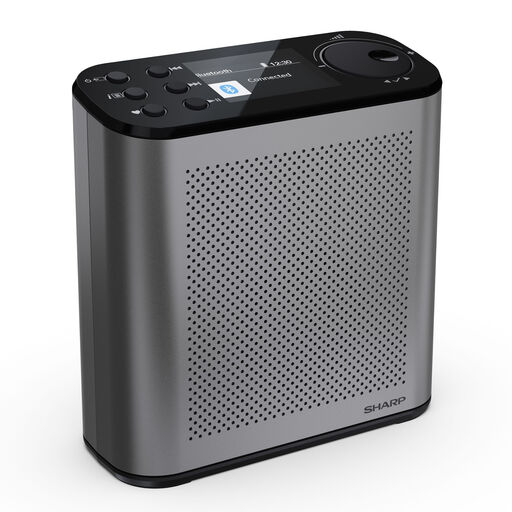
SHARP DR-P530(GY) Osaka, portable DAB+/FM radio, Storm Grey
Could suit a changing workspace if your preferred station is available at each location.
120 station presets and USB-C charging.
The product name gives battery life of up to 15 hours.
View at Joybuy
Frequently asked questions
How do I find a suitable weather station?
Look for a programme that broadcasts weather reports during your working hours, then check whether it’s available at your workspace. Digitalradio Deutschland’s programme map and reception forecast can help you search. Examples from individual regions cannot be assumed to apply elsewhere without checking.
Does DAB+ need Wi-Fi in a home office, and what can I do about poor reception?
DAB+ itself does not require an internet connection, as Bayerischer Rundfunk explains. Check reception and the aerial position where you plan to put the radio. Internet radio is only an alternative if you have internet access and the preferred stream is available.
Is an ASA alert the same as a weather report?
No. ASA is for automatic official hazard alerts, which are different from regular weather reports. To use the feature, the specific radio must be ASA-certified and set up to receive local alerts. Verbraucherzentrale describes ASA as a supplement to other warning systems.
Will buying a radio mean paying an additional broadcasting fee?
In general, private households pay one broadcasting fee per home, not per radio bought. As of 3 November 2026, the Beitragsservice listed the general fee as 18,36 € per month; exemptions and other usage arrangements are assessed separately.


