
Lieferung heute & morgen

Qualitätsgarantie

Willkommens-Angebote freischalten: KOSTENLOSE Lieferung | Bis zu 80 % RABATT | Kostenlose 30-Tage-JoyPlus-Testphase
App herunterladen
A DAB radio with Bluetooth combines digital radio reception with wireless music streaming from your smartphone. For many households, this combination is a practical choice: DAB+ offers automatic station search and saved presets, while Bluetooth lets you play content from your mobile phone or tablet through the radio’s speaker.
However, buying one can lead to false expectations. A large number of stations doesn’t automatically mean good reception, and not every portable model comes with a built-in battery. That’s why the following selection from the Joybuy Product Recommendation Officer focuses on clear features, ease of use and everyday practicality.
A DAB+ radio receives digital programmes via DAB or DAB+ and often also FM. The actual stations you get depend on your location, the antenna’s position and regional network coverage. If you buy a device without FM support, you’ll have fewer fallback options when the DAB+ signal is weak.
So look for a DAB+/FM tuner, automatic station search and enough memory presets.
A portable DAB radio can run on mains power, AA batteries or a built-in rechargeable battery. These options aren’t equally convenient:
Also check whether a power adapter is included and whether you need to buy batteries separately.
A DAB radio stereo with two speakers can deliver a more spacious sound for music than a model with just one speaker. However, the wattage alone doesn’t tell you the full story about sound quality. The number of drivers, the cabinet design, available equaliser modes and where you plan to use it all matter.
For news and podcasts, a speech mode can be helpful. For private listening, make sure the radio has a headphone socket, ideally a 3.5 mm jack.
A suitable device should support DAB, DAB+ and FM. Automatic station search makes setup easier. 20 DAB and 20 FM presets are enough for most households; 60 presets offer more flexibility if several people listen to different programmes.
Bluetooth is great for streaming music, podcasts or audiobooks from compatible mobile devices. Check that Bluetooth is explicitly mentioned in the specs and that a headphone socket is also included. An AUX or 3.5 mm input is especially useful if you want a wired connection.
If you’re after internet radio with Spotify Connect, you’ll need a Wi-Fi-enabled model. That’s a different category of device from a pure digital radio with Bluetooth. Using Spotify Connect also requires a compatible Spotify account.
A DAB radio with alarm should ideally offer two alarms, separate weekday and weekend times, a snooze function and a sleep timer. A clear, easy-to-read display matters in the bedroom or for anyone with reduced eyesight. In the bedroom, also check whether the display brightness is adjustable.
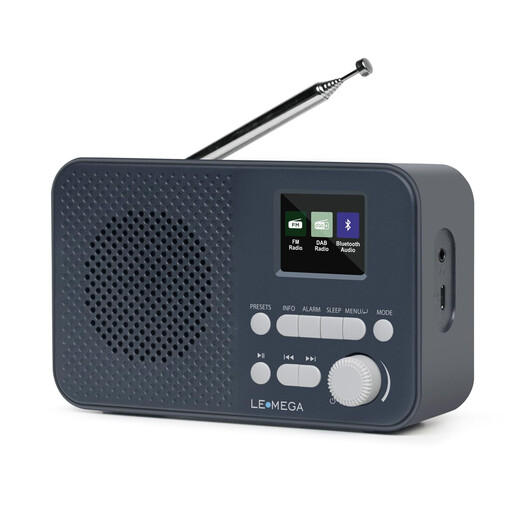
Why this product fits the profile: This compact model combines DAB+/FM, Bluetooth, an alarm and a built-in rechargeable battery. At 375 g, it’s ideal for the kitchen, bedside table or occasional use in the garden.
The power source is clearly stated: built-in 2200 mAh rechargeable battery, USB-C charging port and mains adapter. This means no need to regularly buy AA batteries.
Up to 15 hours battery life according to the product spec, 40 station presets, dual alarm, headphone socket and colour display.
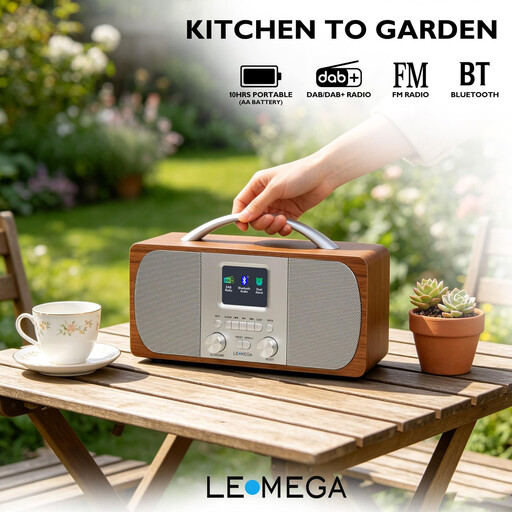
Why this product fits the profile: Two 2.5-inch full-range speakers and a wooden cabinet make it a great choice for stationary use in the living room, kitchen or bedroom.
The stereo setup is clearly specified: 2.0 stereo, two drivers and 6 watts speaker output. For portable use, however, you’ll need four AA batteries; these are not included.
40 presets, DAB+/FM, Bluetooth, headphone socket, music and speech modes, plus two independently adjustable alarms.
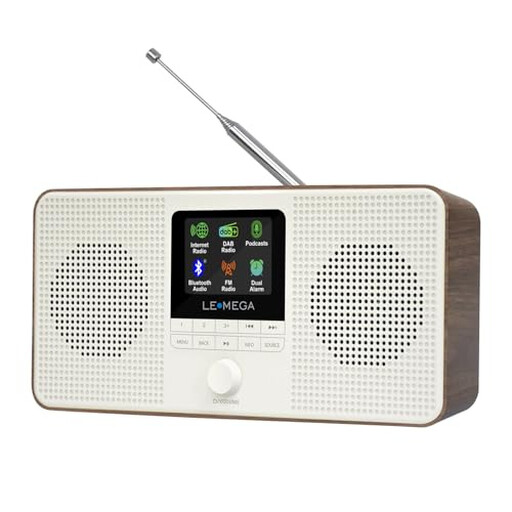
Why this product fits the profile: This model is aimed at users who want internet radio, podcasts and Spotify Connect alongside FM.
The reception type is clearly stated: internet radio and FM via Wi-Fi, not DAB+. So if you need DAB+ reception, you should choose a different model.
Access to over 30,000 internet radio stations according to the product description, podcasts, Spotify Connect, Bluetooth, 2.0 stereo and dual alarm.
We’ve put together a full, regularly updated list of products that meet these strict selection criteria and all applicable EU safety regulations.
Plug the radio into the mains or charge the battery. Fully extend the telescopic antenna and start the automatic station scan. You can then save available programmes to the presets. For Bluetooth, activate the function on your smartphone, select the radio model from the device list and confirm the connection.
Battery life depends on the battery capacity, volume, display and reception type. The models listed here claim up to 15 hours and up to 20 hours respectively. These are manufacturer figures and may vary in real-world use. For devices using AA batteries, usage time also depends on the battery type and capacity.
When running on mains power, you’ll pay for the device’s electricity consumption. With a DAB radio that has a rechargeable battery, the main cost is charging cycles; with a battery-powered model, you’ll need to buy replacement AA batteries. Bluetooth itself doesn’t incur any mobile data costs on the radio. However, internet radio and Spotify Connect require an active Wi-Fi connection, and data usage goes through your internet service.