For comparing existing recordings, a desktop DAC/headphone amplifier with a suitable headphone output is enough if you listen in turn and match the volume and settings. The International Telecommunication Union (ITU) also stresses the importance of controlled listening conditions. If several people need to listen at the same time, individually adjustable outputs are essential – and an additional headphone splitter needs an analogue source. If you want to record analogue signals yourself, look instead for an audio interface with the right inputs.
Who compares audio at a desk?
Recording comparers
If you listen to existing recordings in turn at the same desk, keeping your settings consistent and matching the levels helps you control the conditions for comparison. The International Telecommunication Union (ITU) stresses the importance of controlled conditions for subjective audio assessments.
Headphone switchers
If you use different wired headphones at your desk, check that the plug, output and gain are suitable for each model. Connections and power ratings vary by model and output; for example, FiiO lists different headphone outputs for the K11.
Listening together
If several people want to listen to the same recording at the same time and adjust their volume independently, a splitter with individual output controls is a different solution from a DAC with several sockets. Behringer describes the HA400 as having four separately adjustable headphone outputs.
What matters when buying?
| What matters |
What to check when buying |
Who cares about it? |
| Comparable volume |
Easy-to-reach volume control; check the gain and playback settings when switching. |
When I want to assess recordings one after another, I want to match the levels and settings carefully. Around 36% of consumers consider volume comparison their top priority. |
| Suitable headphone connections |
Match the plug, output and gain; compare power ratings only for the relevant load and measurement conditions. |
When I switch between headphones, I want to know whether each pair is suitable for the output I’ve chosen, without setting the volume unnecessarily high. Around 29% of consumers prioritise headphone compatibility. |
| Listening at the same time |
Check the number of usable outputs and whether each has a separate level control; if you use a separate splitter, make sure the source and connection are suitable. |
When we listen to the same recording together, I want to be able to adjust my own volume. Around 21% of consumers say listening together is their main priority. |
| Connecting the source |
Choose digital inputs to match the source’s actual output; for recording, check the analogue inputs and monitoring options. |
If I want to connect my existing computer or another source, the input must suit the signal path. If I need to record, I also need suitable inputs. Around 14% of consumers prioritise connecting their source. |
Common misconceptions
-
More sockets don’t automatically mean separate listening stations
Different headphone connections on a DAC don’t prove that each person can adjust the volume independently. A separate splitter also needs a suitable analogue signal.
First decide whether you’ll compare recordings in turn or listen at the same time with individual volume levels. If you need several listening stations, check specifically for separate controls.
An additional splitter also needs a suitable connection to the source and takes up more desk space.
-
Don’t compare power ratings without checking the measurement conditions
A power rating depends on factors including the output, load and measurement conditions. Fosi Audio gives different power ratings at 32 Ω for the Q4 on its manufacturer pages.
Only compare figures that use clearly comparable measurement methods, and check which output is intended for your headphones.
-
A playback DAC doesn’t replace recording inputs
Digital playback inputs are not the same as inputs for microphones or instruments. A DAC on its own therefore won’t meet your recording needs.
If you want to record analogue signals, check the inputs you need and the monitoring function on an audio interface.
-
Don’t assume similarly named versions are the same
FiiO lists the K5 Pro and K5 Pro ESS, as well as the E10K and E10K-Type-C, as distinct model names with different specifications.
Before buying, check the full model name and the connections on the exact version being offered.
Brands worth considering
FiiO
Desktop DACs and headphone amplifiers for digital sources and wired headphones.
- For the K11, FiiO lists USB-C, optical and coaxial inputs, along with 6.35 mm and 4.4 mm headphone outputs. According to the manufacturer, the K7 also has an analogue input.
- Having several types of connection doesn’t prove that multiple people can adjust their volume independently. The K5 Pro and K5 Pro ESS are separate model names.
Fosi Audio
The Q4 is a compact DAC/headphone amplifier for a single pair of headphones and digital sources.
- Fosi Audio lists a 3.5 mm headphone socket, RCA outputs, and bass and treble controls for the Q4.
- The manufacturer’s power ratings at 32 Ω differ. Don’t use them to rank performance; only compare figures based on suitable measurement conditions.
Behringer
The HA400 is an additional headphone splitter for several people sharing an analogue stereo source.
- Behringer describes four headphone outputs, each with its own level control.
- The HA400 doesn’t replace a DAC when you’re using a digital source. Behringer specifies an output impedance of around 80 Ω, so check that it’s suitable for your headphones.
Focusrite
The fourth-generation Scarlett 2i2 is a USB audio interface for playback and analogue recording inputs.
- The Focusrite guide lists two inputs, Direct Monitoring and a separately controlled headphone level.
- The guide specifies one headphone output. On its own, this model therefore doesn’t provide two independently controlled headphone listening stations.
RME
The ADI-2 DAC FS is aimed at users looking for separate headphone and IEM outputs, as well as adjustable signal processing.
- RME describes the model as having a headphone output, an IEM output and a parametric EQ.
- These features don’t prove audible superiority or provide two equivalent, independently controlled listening stations. For neutral comparisons, keep DSP settings under control.
Joybuy products for your playback setup
The products below cover individual parts of a playback setup. Check whether you need a digital-to-analogue converter, a headphone amplifier or both, and which connections your source and headphones require.
 No image available
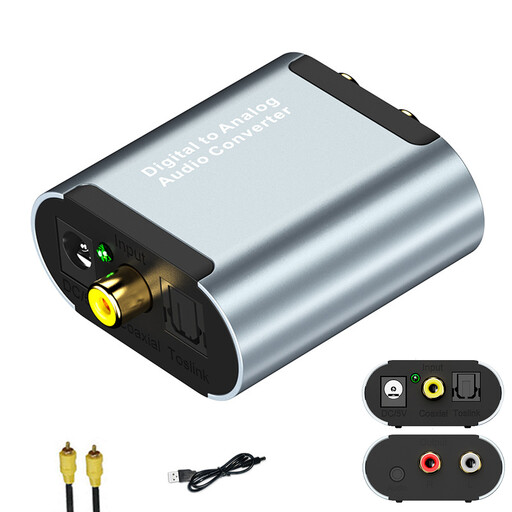
Digital audio converter with optical and coaxial input
A suitable choice if you want to convert a digital source with an optical or coaxial output into an analogue 3.5 mm signal.
The product name lists optical and coaxial inputs, a 3.5 mm audio output and USB power. It doesn’t mention a headphone amplifier, so check whether you’ll need an additional device for your headphones.
View at Joybuy
 No image available
Douk Audio T4 PRO Mini Valve tube amplifier
Could be worth considering if your source already outputs an analogue signal and you’re looking for a headphone amplifier.
The product specifications list MM phono and 3.5 mm AUX inputs. For a digital source, you’ll therefore need a DAC or converter upstream with a suitable analogue output; use the supplied power adapter.
View at Joybuy
Frequently asked questions
Do I need recording inputs to compare existing files?
No, you don’t need recording inputs just to play back existing files. If you want to record microphones or other analogue signals, look for an audio interface with suitable inputs; the fourth-generation Scarlett 2i2 is one example. Also check whether your source outputs over USB, optical, coaxial or analogue.
Can two people listen independently through two different-sized sockets?
Not automatically. FiiO lists a 6.35 mm and a 4.4 mm headphone output on the K11, but that doesn’t mean each person can adjust the volume separately. Behringer describes the HA400 as having individual controls for four headphone outputs; the device needs an analogue stereo source.
How can I avoid setting the volume too high when switching headphones?
Turn the volume down before unplugging or switching headphones, then raise it carefully to the level you want. The World Health Organization (WHO) notes that both sound level and listening duration affect your exposure.
What are the rules on conformity and consumer rights in Germany?
For products covered by relevant EU rules and placed on the market in the European Economic Area, manufacturers must meet requirements including conformity assessment, technical documentation, an EU Declaration of Conformity and CE marking. The European Commission sets out these requirements. You can’t tell whether a specific listing meets them from the product category alone. For consumer purchases in the EU, Your Europe states that you have a minimum two-year legal guarantee from the seller; this is separate from any voluntary guarantee.
Does every USB DAC need to be designed for mains voltage?
No. The EU Low Voltage Directive applies within its specified voltage range of 50 to 1,000 V AC or 75 to 1,500 V DC. If a device uses an external power supply, the requirements that apply to the device and the power supply need to be considered separately. A voltage rating for the device alone doesn’t prove that the power supply complies.


