Which option is right for you?

Dash cam drivers backing up to a smartphone

If you want to read a microSD card on the go using a USB-C smartphone and save selected clips, check the card format, file access and available storage on your device. Apple Support and Files by Google Help explain the requirements for accessing external storage devices.

Travellers using different card formats

If you use SD or microSD cards as well as your dash cam, you could consider a reader that supports both formats. Supported card formats vary by model; for example, UGREEN and TP-Link list SD and microSD slots for their respective readers.

Users with limited battery or storage

If you want to copy files without access to a mains socket, plan ahead for a suitable backup destination, enough free storage and, where necessary, an external power source. A card reader doesn’t provide extra storage or power automatically.

What should you look for when buying?

Compact USB-C microSD reader

A good fit if: you only want to read your dash cam card on a compatible USB-C device.

The trade-off: it doesn’t automatically provide extra ports, storage space or power.

USB-C dual-slot reader

A good fit if: you use SD cards as well as microSD and want to read both formats with one reader.

The trade-off: the extra slot doesn’t replace free storage or a working way to copy files.

USB-C hub with power passthrough

A good fit if: your target device needs extra ports or power, and you have a suitable external power source available.

The trade-off: a hub means more cables, and power passthrough alone doesn’t generate extra power.

Buying criteria What to check Who is this important to?
Card format Check that the format and capacity of your dash cam card match the specifications for the specific reader model. If I want to read my existing dash cam card, it needs to work with the reader. Around 36% of consumers check card compatibility first.
Mobile file access Use a test file to check whether your device recognises the card and can copy files to your chosen storage location. If I want to back up clips directly to my smartphone, the device needs to recognise the reader and allow me to copy files. Around 29% of consumers check mobile file access first.
Backup destination and power Check your available storage, destination device, battery level and, if needed, a suitable external power source. If I want to make an extra copy on the go, I need an available destination and, if necessary, a power source. Around 21% of consumers consider their backup destination and power supply first.
Copying speed Consider the UHS support of both card and reader, as well as the data connection and backup destination. If I’m copying a large number of clips, the speed of the entire connection matters. Around 14% of consumers consider copying speed first.

Common backup mistakes

  • Assuming a card reader is a complete backup system

    A reader gives you access to the card, but it doesn’t provide free space at your destination or, if needed, power for an external drive.

    Before you buy, decide which device and storage location you’ll use, then test the entire copying process with one file.

  • Taking manufacturer speeds in MB/s as guaranteed copying speeds

    Usable speed also depends on the card, target device and storage destination. A connection specification doesn’t automatically tell you how fast the entire backup will be.

    Check that your card and reader have matching UHS support rather than choosing solely by the highest advertised figure.

  • Deleting the dash cam card straight after copying

    Starting a transfer doesn’t prove that the clips you need have been copied in full and can be opened at the destination.

    Open the copied files at the destination and keep the originals until you’ve checked them.

Brands and models to consider

UGREEN

According to UGREEN, the 50706 card reader combines USB-C and USB-A with SD and microSD slots. It could be a good fit if you switch between a mobile device and a computer.

  • UGREEN lists simultaneous access to both cards and UHS-I support.
  • The advertised transfer benefits are manufacturer claims; UHS-II performance isn’t specified for this model.

TP-Link

The UA440C is a USB-C dual-slot reader for SD and microSD, including UHS-II. It’s worth considering if you use different card formats or have compatible faster cards.

  • TP-Link lists read speeds of up to 312 MB/s with UHS-II, as well as simultaneous access to both cards.
  • This conditional maximum speed quoted by the manufacturer isn’t the same as the measured backup speed on your own smartphone.

Lexar

According to Lexar, the Professional USB-C Dual-Slot Reader is designed to transfer data from SD and microSD cards to USB-C computers.

  • Lexar lists UHS-II, backwards compatibility with UHS-I and an activity light.
  • Its stated use with USB-C computers doesn’t automatically confirm compatibility with a smartphone.

Belkin

The CONNECT USB-C 7-in-1 Multiport Hub AVC009 combines SD and microSD slots with extra ports and power passthrough.

  • Belkin lists up to 100 W passthrough with a suitable power supply.
  • Power passthrough doesn’t replace an external power source when you’re out and about.

Joybuy products

This selection includes USB-C products with SD, TF or microSD card readers for mobile dash cam backups. Some combine a card reader with extra ports or other features.

Acer 7-in-1 USB-C Hub, ODK6V0

Acer 7-in-1 USB-C Hub, ODK6V0

Could be a good option if you want to combine a card reader and extra ports in one hub.

The product name lists HDMI with 4K@30Hz, 3x USB 3.0 with 5Gbps, an SD/TF card reader and 100W PD Charging.

View at Joybuy

4-in-1 USB-C card reader with USB-A

4-in-1 USB-C card reader with USB-A

Could be a good fit if you’re looking for a card reader for USB-C devices and computers.

The product name lists slots for SD, MicroSD, TF and SDHC, as well as a USB-A port.

View at Joybuy

7-in-1 external DVD drive with USB 3.0, Type-C and SD/TF card reader

7-in-1 external DVD drive with USB 3.0 and Type-C

Could be worth considering for a setup that needs an external DVD drive as well as a card reader.

The product name lists an SD/TF card reader and compatibility with Windows, Linux and Mac OS.

View at Joybuy

UGREEN USB-C Dock with 2xHDMI, 2xUSB-C 3.2, USB-A and SD/TF

UGREEN USB-C Dock with 2xHDMI, 2xUSB-C 3.2, USB-A and SD/TF

Could be a good fit if you want to combine a card reader and extra ports in one USB-C dock.

The product name lists 2xHDMI, 2xUSB-C 3.2, 1xUSB-A and SD/TF.

View at Joybuy
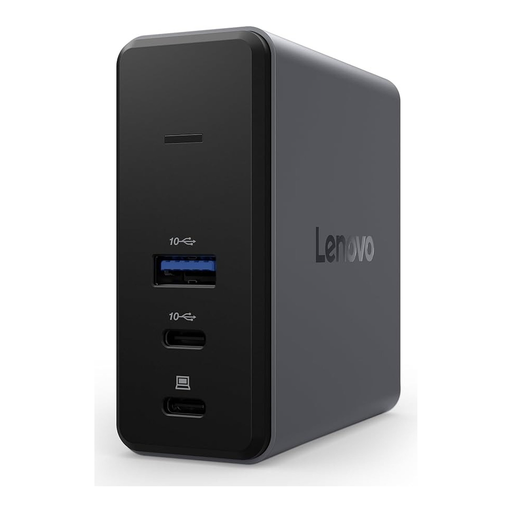
Lenovo X9 Charging GaN Dock, Wired, 60 W, Grey, MicroSD

Lenovo X9 Charging GaN Dock, Wired, 60 W, Grey, MicroSD

Could be worth considering if you’re looking for a wired dock with a microSD slot.

The product name lists USB 3.2 Gen 2 Type-C, 60 W and MicroSD.

View at Joybuy

Frequently asked questions

How do I copy dash cam clips to my smartphone when I’m out and about?

On a compatible Android device, you can open the recognised USB storage device in Files by Google and copy files to your chosen location. On an iPhone, compatible SD cards can be opened in Files using a suitable reader. Check the copied files at the destination before deleting the originals.

Why might a card not appear on my iPhone?

Apple says external storage devices need a single data partition and one of the following file systems: APFS, APFS (encrypted), macOS Extended (HFS+), exFAT or FAT. Check the connection, card reader and format. Don’t format a card containing original footage you need just to test whether it’s recognised.

Can I copy files and charge at the same time with a hub when there’s no mains socket?

Only with a suitable external power source and a compatible setup. Belkin describes the AVC009 as supporting power passthrough; Apple recommends a powered hub for some external hard drives connected to an iPhone. Passthrough alone doesn’t generate power.

What are my rights if a card reader is faulty in Germany?

Your statutory consumer rights apply against the seller; a manufacturer’s guarantee is separate and voluntary. If a product is faulty, the first remedies to consider are repair or replacement. Many online purchases generally come with a 14-day right to cancel; the requirements for the specific purchase should be checked. This summary is based on information from the Verbraucherzentrale.

Does saving dash cam footage automatically make recording or sharing it lawful?

No. The 2019 position paper from the German Data Protection Conference considers continuous recording of public traffic without a specific reason incompatible with the data protection requirements described in the paper. It isn’t a blanket ruling on every individual case; using a card reader doesn’t change the legal assessment of recording or sharing the footage.