
Lieferung heute & morgen

Qualitätsgarantie

Willkommens-Angebote freischalten: KOSTENLOSE Lieferung | Bis zu 80 % RABATT | Kostenlose 30-Tage-JoyPlus-Testphase
App herunterladen
A dash cam for your car can document your journeys and provide important information in the event of an accident. However, high resolution figures or terms such as ‘night vision’ alone reveal little about whether a model is suitable for your vehicle in everyday use. The key factors are recording coverage, storage, power supply and legally compliant use.
A 4K dash cam generally records more pixels than a 2K dash cam. At night, in backlit conditions or with a dirty windscreen, usable image quality also depends on the sensor, aperture, HDR or WDR and image processing. High resolution cannot replace balanced night-time recording.
So don’t just look for ‘4K’. Also check:
A dash cam with parking monitoring often requires a separately available hardwire kit. Depending on the model, connecting it to the fuse box enables time-lapse, motion or collision recording, but professional installation may be required. On some vehicles, the battery protection also needs to be configured correctly.
Before buying, check:
A front camera only records the area in front of the vehicle. If you also want to capture rear-end collisions, situations behind the vehicle or events inside the cabin, you will need a front and rear dash cam or a multi-channel system. The rear camera, cable and memory card are not included with every offer.
Before placing your order, compare the number of channels, cable length, installation method and included accessories.
1080p may be sufficient for a compact car camera with straightforward front recording. 2K offers more detail for number plates and road signs. 4K is particularly useful if you often drive on motorways or want a front and rear view with higher detail.
However, the resolution should match the memory card. High-resolution videos require more storage space and can cause recording errors when used with low-quality cards. A high-endurance microSD card with at least U3 or UHS-I U3 is recommended, where required by the manufacturer. Format the card according to the device’s instructions and regularly back up important clips.
A car camera with night vision should reproduce bright headlights, dark sections of road and changing lighting as evenly as possible. HDR or WDR helps process very bright and dark areas of an image together. Actual recording quality also depends on windscreen tinting, mounting position and a clean lens.
A viewing angle of approximately 120 to 170 degrees covers areas of varying width. A wider angle captures more of the surroundings at the sides, but may create greater distortion at the edges of the image. The camera should be positioned behind the rear-view mirror without obstructing the driver’s field of vision.
A dash cam with GPS can record speed, time and route. This additional data is useful when reviewing a clip later, but should be checked for personal information before sharing.
A dash cam with Wi-Fi usually connects directly to a smartphone app. This lets you view, download and manage videos without removing the memory card. Faster 5 GHz Wi-Fi is practical in everyday use when handling 4K files.
A dash cam with voice control can perform certain commands hands-free. Check which language is supported and whether commands are restricted by region or model.
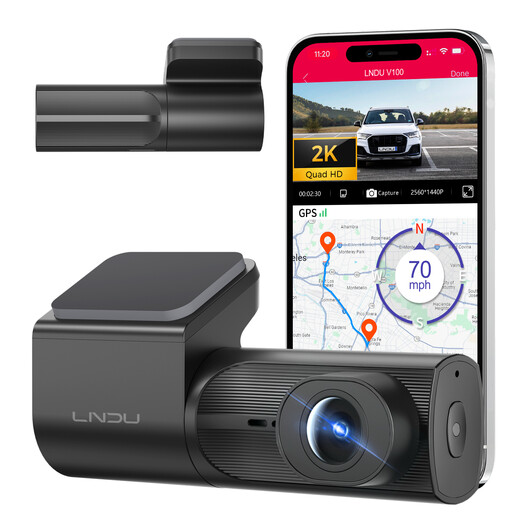
Why this product suits this profile: The front camera combines 2K resolution, a Wi-Fi app, G-sensor and loop recording for a straightforward set of essential features during everyday commuting.
The product details expressly state that a separately available hardwire kit is required for 24-hour parking monitoring. This means you can plan for the installation requirements in advance.
2K recording, F1.8 lens, Wi-Fi app, G-sensor and night vision support; the camera operates without an integrated display.
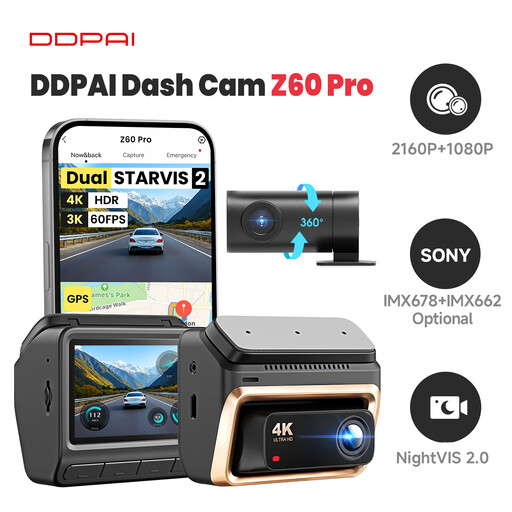
Why this product suits this profile: Ideal for frequent drivers who want to combine front and rear recording, GPS and flexible storage in one system.
The details separately highlight the hardwire kit, microSD card and optional 4G module. This makes the additional costs and installation requirements clear.
4K front recording, 1080p rear camera, Sony STARVIS 2 sensors, 5 GHz Wi-Fi, GPS and support for up to 512 GB microSD.
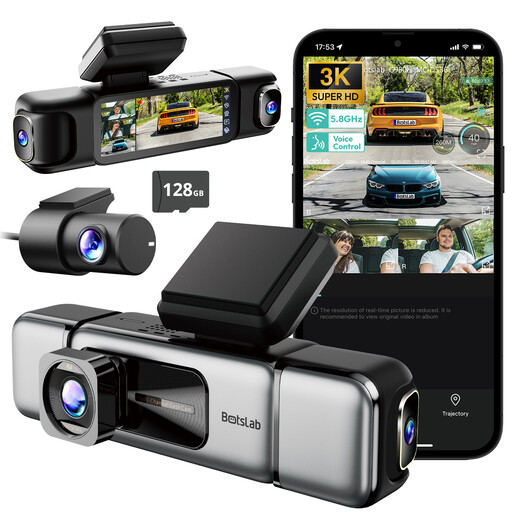
Why this product suits this profile: Taxis, rideshare vehicles and family cars benefit from coverage to the front, rear and sides, as well as the interior camera.
The four channels overcome the limitations of a front-only camera. According to the product details, a hardwire kit is required for the 24/7 parking modes.
3K front camera, three additional cameras, 3.18-inch touchscreen, GPS, 5.8 GHz Wi-Fi and voice control.
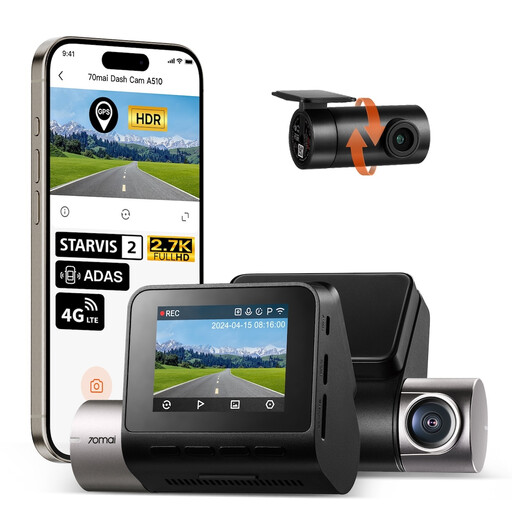
Why this product suits this profile: The two-channel system records traffic in front of and behind the vehicle, making it suitable for regular city and motorway journeys.
The rear camera is listed as included. However, the separately required memory card and hardwire kit are also expressly identified as additional items.
1944p front recording, 1080p rear camera, Sony STARVIS 2, HDR night vision, GPS, app control and 24-hour parking mode with accessories.
We’ve put together a complete, regularly updated list of products that fully meet these strict selection criteria and the safety regulations applicable in the EU.
A dash cam must not automatically record public spaces continuously and without a specific reason. Where possible, use event-based recording, short storage intervals and automatic overwriting of older files. Before sharing footage, check whether number plates or people are visible. For specific advice on the legality of your intended use, it may be advisable to seek data protection guidance.
For normal driving, many models can simply be connected using the supplied 12-volt cable. The camera will then often start together with the vehicle’s power supply. A dash cam with parking monitoring usually requires a separately available hardwire kit with battery protection. The cables should be routed so that they do not obstruct the field of vision, airbags or controls.
Service life depends on temperature, power supply, memory card and intensity of use. Models with a supercapacitor are designed for significant temperature fluctuations; devices with a lithium battery should not be exposed to direct summer heat for extended periods. Replace the memory card if recording errors occur and regularly check that the camera is actually recording.
In addition to the purchase price, you may need to pay for a suitable microSD card, a hardwire kit and, where applicable, installation. Wi-Fi apps normally do not involve ongoing mobile data charges as long as the connection is made directly between the smartphone and camera. An optional 4G module or cloud service, however, may require a separate tariff.