If space is limited and you want to choose your screen separately, a mini PC is a good place to start. If internal expansion slots matter and you have room, a small form factor (SFF) PC could be an option. An all-in-one combines the computer and screen, but gives you less freedom to choose the screen separately. First, check whether you’ll create reports in a browser or use a specific desktop application. Then check the operating system, ports, monitor and input devices you’ll need for a complete workstation.
Which form factor is right for you?
Dashboard creators using desktop software
If you want to prepare data locally or use Power BI Desktop, check which application you need before choosing an operating system. Microsoft Learn distinguishes between the more extensive report-creation features in Power BI Desktop and simpler reports in a browser.
Students with limited desk space
If you need room to study as well as a screen that’s comfortable to use, compare a mini PC with a separate monitor against an all-in-one as two different workstation setups. The form factor and screen connections should suit the space you have available.
Buyers on a tight overall budget
Factor in more than just the computer: you may also need a monitor, keyboard and mouse. In a survey of German students about general tech purchases, Back Market reported that price and performance were key purchase considerations. This doesn’t necessarily tell us anything about choosing a PC for a dashboard.
What to look for when buying
First decide which application you need and how you want to set up your workstation. Then you can compare specifications and connections more effectively.
Mini PC with a separate monitor
A good fit if: space is limited and you’d like to choose the screen separately from the computer.
Things to consider: A monitor isn’t included automatically. Acer Deutschland lists one HDMI and one DisplayPort output for the Revo Box RB102-14U5U DT.BMCEG.002.
Small form factor PC
A good fit if: you have room for a separate case and need internal expansion slots for your planned requirements.
Things to consider: HP lists PCIe x16 and PCIe x1 slots for the specified Pro SFF 400 G9 variant. This specification doesn’t automatically apply to a Pro Mini.
All-in-one PC
A good fit if: you want the computer and screen together as one unit on your desk.
Things to consider: The Acer Aspire C 24-B AI configuration listed by Acer includes a 23.8-inch screen, but Acer says the keyboard and mouse aren’t included.
| What matters when buying |
What to check |
Who it matters most to |
| Software and workload |
Check that the application you need is compatible with the operating system on the specific variant. If you’ll be working with local files, also check the built-in RAM and SSD. |
If I want to prepare data locally, the application I need must work with the operating system; around 33% of consumers prioritise software and workload. |
| Desk space and form factor |
Measure the available space and decide whether you want the computer and screen separate; also consider any planned internal upgrades. |
If space is tight on my student-room desk, the main thing for me is how the computer and screen will fit; around 25% of consumers put available space first. |
| Screen and connections |
Check that the video outputs on the exact PC variant match the monitor inputs. If you’ll be using several screens, check all the connections you need. |
If I want to use my existing screen or several displays, the connections and workstation layout need to work together; around 25% of consumers prioritise the screen and connections. |
| Complete workstation |
Check whether a monitor, keyboard and mouse are included, and confirm the operating system for the specific variant. |
If my budget for the whole workstation is limited, I want to factor in any missing devices from the start; around 17% of consumers prioritise the total cost. |
Common buying mistakes
-
Assuming similarly named models are the same variant
One Joybuy listing has different model numbers and key specification details in its title and description. This makes it difficult to tell which configuration is being offered.
Compare the full manufacturer part number and the key specifications before matching an offer to a specific model variant.
-
Planning for the computer case alone
A mini PC needs a separate screen. The keyboard and mouse are explicitly not included with the all-in-one configuration listed by Acer.
Before buying, make a note of which devices you already have and which ones you’ll still need for your workstation.
-
Assuming one form factor has the same upgrade options as another
HP lists PCIe x16 and PCIe x1 slots for the specified Pro SFF 400 G9 variant. This doesn’t mean the Pro Mini from the same brand has the same slots.
Choose based on the specific model variant and the upgrades you actually plan to make, not just the brand name.
Brands to consider
Lenovo
The ThinkCentre M75q Gen 5 Tiny range is designed for compact workstations with a separately chosen screen.
- For variant 12RQ004MEZ, Lenovo Deutschland lists a Ryzen 5 PRO 8500GE, 16 GB RAM, a 512 GB SSD and Windows 11 Pro.
- These specifications don’t automatically apply to other variants, and they don’t prove a particular speed when working with dashboards.
HP
The Pro Mini 400 G9 range is a compact option, while the differently designed Pro SFF 400 G9 range is an alternative.
- For the Pro SFF 400 G9 variant CP9J4EA#ABD, HP lists PCIe x16 and PCIe x1 slots.
- Don’t assume the SFF slots are also available on the Pro Mini. The manufacturer’s specifications aren’t independent performance tests.
Acer
The Revo Box is a mini PC for a separate screen, while the Aspire C range also includes all-in-one configurations.
- For the Revo Box DT.BMCEG.002, Acer Deutschland lists 16 GB RAM, a 512 GB SSD, HDMI and DisplayPort.
- The Aspire C 24-B AI listed includes a 23.8-inch screen, but not a keyboard or mouse. Similar model names don’t prove that they’re the same variant.
MSI
The Cubi NUC 1M range may suit compact setups where video outputs and potential memory upgrades are a priority.
- The MSI family datasheet lists two HDMI outputs and two SO-DIMM slots.
- The product-family specifications don’t tell you which operating system, RAM or SSD is included in a specific offer.
Dell
The Pro Micro QCM1250 is another compact desktop range with configurable specifications.
- Dell Deutschland describes the model as a micro desktop.
- Dell notes that images may vary depending on the configuration selected, so check the specifications for the exact variant.
Joybuy products for a compact workstation
The mini PCs below are options for a workstation with a separately chosen screen. For each model, check that the operating system, connections and specifications suit your application.
 No image available
SOYO Y5Pro Mini PC, Intel Core i5 8250U/8350U
This mini PC could suit a workstation with a separate screen; check that its outputs match your monitor.
Windows 11, 8 GB DDR4 and a 256 GB SATA SSD. Two HDMI outputs and one Type-C output are listed.
View at Joybuy
 No image available
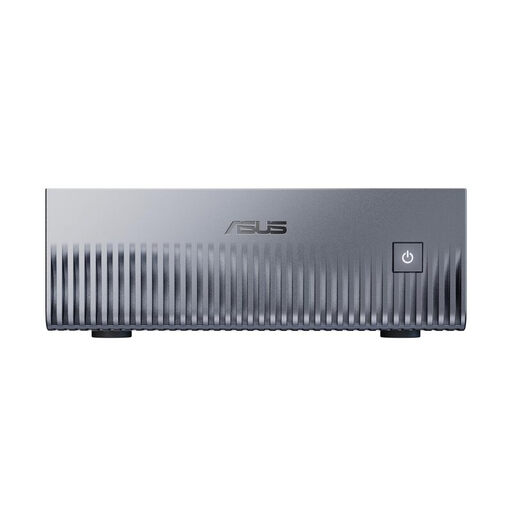
ASUS Ascent GX10 Mini AI Supercomputer
Only consider this if the dashboard application you need runs on Linux or DGX OS.
The description lists 128 GB Unified Memory, a 2 TB SSD and HDMI 2.1. Keep the ventilation openings clear and use the supplied 240 W power adapter.
View at Joybuy
 No image available
THUNDEROBOT Mini PC Workstation AI Max+ 395
The listed storage capacities may be useful when choosing a PC for local files, but they don’t in themselves guarantee a particular dashboard speed.
The product title lists 128 GB LPDDR5X RAM at 8000MT/s and a 1 TB SSD. A side-mounted SSD slot and a quick-release network card interface are also listed.
View at Joybuy
 No image available
ACEMAGIC E3B Mini Desktop Computer
If you want to connect several screens, compare the listed outputs with your displays’ inputs and the actual requirements of your application.
AMD Ryzen 7 7735HS, 24 GB LPDDR5, a 512 GB NVMe SSD and Windows 11 Pro. HDMI, DisplayPort and USB-C are listed as outputs.
View at Joybuy
 No image available
MaxMini B3 Mini PC, Intel N4100
If you’re planning to use two screens, check that the connections on the specific variant work with both monitors.
Intel N4100 up to 2.4 GHz, 8 GB LPDDR4 and a 256 GB SSD. Two HDMI ports are listed.
View at Joybuy
Frequently asked questions
Do I need to install Power BI Desktop for a sales dashboard?
No, it depends on what you need to do. Microsoft Learn describes simpler reports in the Power BI service in a browser, and more extensive report-creation features in Power BI Desktop. Check which application you need before choosing your PC.
How do I connect two screens to a mini PC?
Compare the video outputs on the exact PC variant with the inputs on both monitors, and check which cables you’ll need. For the Acer DT.BMCEG.002, Acer Deutschland lists one HDMI and one DisplayPort output. Check the specifications separately for other variants.
What happens if my PC develops a fault?
For consumer purchases in Germany, statutory consumer rights against the seller are separate from a voluntary manufacturer’s guarantee. Verbraucherzentrale explains the general two-year statutory warranty period and an extension under the conditions it describes, if you choose a repair instead of a replacement when a fault occurs.
Can I put an old PC in my household rubbish?
No. Umweltbundesamt explains that old electrical appliances must be collected separately; recycling centres accept them free of charge.


