
Lieferung heute & morgen

Qualitätsgarantie

Willkommens-Angebote freischalten: KOSTENLOSE Lieferung | Bis zu 80 % RABATT | Kostenlose 30-Tage-JoyPlus-Testphase
App herunterladen
A dashcam can document journeys, capture minor parking collisions and provide important video footage in unclear traffic situations. However, not every model is equally suitable for drivers, commuters, families, taxi operators and private-hire providers. It is not just high resolution that matters, but also memory management, power supply, installation and how the dashcam performs in everyday use.
A 4K dashcam creates significantly larger video files than a 2K dashcam. Using an unsuitable or too slow dashcam memory card can result in recording interruptions, corrupted files or a short recording time. Before buying, check the following:
For example, a 128-GB card will not automatically be compatible with every vehicle camera. Compatibility specified for the particular model is what matters.
The term dashcam with parking surveillance does not always mean that the function is ready to use straight away. Several models require a separate hardwire kit. This connects the car camera directly to the vehicle’s electrical system and, depending on the system, enables time-lapse recording, impact detection or motion detection.
Before installation, check:
The LNDU V100 and various DDPAI models require a separately available hardwire kit for 24-hour parking mode.
Depending on the model, “night vision” can refer to different technical methods. Look for objectively described specifications such as aperture, sensor, HDR support and recording mode. A wider viewing angle can capture more of the surroundings, but at the same resolution it results in less detail in the image.
The camera’s position also matters. Mounting it discreetly behind the rear-view mirror may obstruct the driver’s view less than positioning a large device in the middle of the windscreen.
For most journeys, a front camera with 2K resolution is sufficient, provided that the lens is clean and correctly aligned. If you also want to document events behind the vehicle, you will need a front and rear dashcam. A dashcam with a rear camera does, however, require more installation work, as a cable must be routed through the interior to the rear of the vehicle.
With 4K models, you should also check whether 4K is actually available on the front camera and what resolution the rear camera uses. With dual- or three-channel systems, the maximum resolution is often distributed across the individual cameras.
Loop recording overwrites older, unprotected files once the memory card is full. This is convenient for everyday use, but it does not replace regularly backing up important videos.
A G-sensor detects sudden movements or impacts and can lock the relevant file to prevent it from being overwritten. Its sensitivity should be adjustable, as cobbled roads or a hard speed bump can also trigger the locking function.
A dashcam with Wi-Fi usually lets you connect to a smartphone without removing the memory card. Depending on the app, you can view, download and manage recordings. Wi-Fi does not, however, automatically provide an internet connection or cloud service.
A dashcam with GPS can record the route, speed, time and coordinates in the footage or in the app. Check whether GPS is integrated or provided via a separate mount.
Sensors such as Sony STARVIS 2 are used in various models to record in difficult lighting conditions. Actual image quality also depends on the lens, HDR processing, compression, installation and lighting.
The following models differ in resolution, camera channels, operation and storage support. The recommendations are based on typical usage situations in Germany.
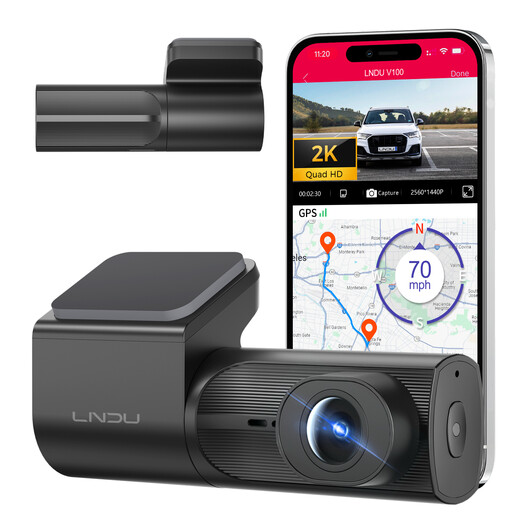
Why this product suits the profile: The front camera offers 2K recording, Wi-Fi app control, loop recording and G-sensor functionality for the daily commute or private journeys.
The specifications clearly state 2K resolution, Wi-Fi and loop recording. However, a separate hardwire kit is expressly required for 24-hour parking surveillance.
2K front camera, integrated Wi-Fi, F1.8 lens and automatic protection of detected impacts.
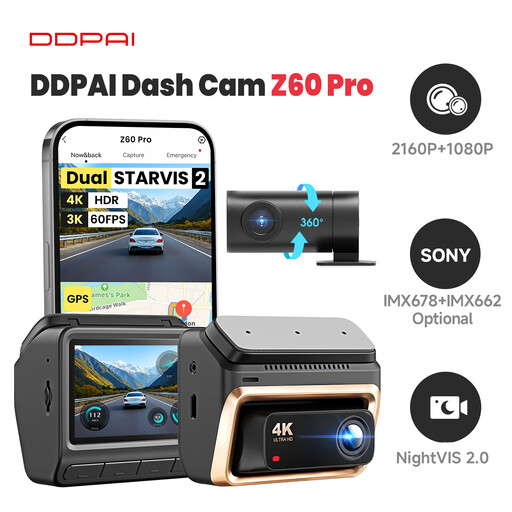
Why this product suits the profile: For high-mileage drivers, this model offers a 4K front camera, an optional rear camera, Sony STARVIS 2, GPS and 5-GHz Wi-Fi.
The specifications distinguish between the 4K front camera and 1080P rear camera. The memory card, hardwire kit and optional 4G module should not automatically be assumed to be included as a complete accessory package.
Sony STARVIS 2 IMX678 at the front, HDR, integrated GPS and support for MicroSD cards up to 512 GB.
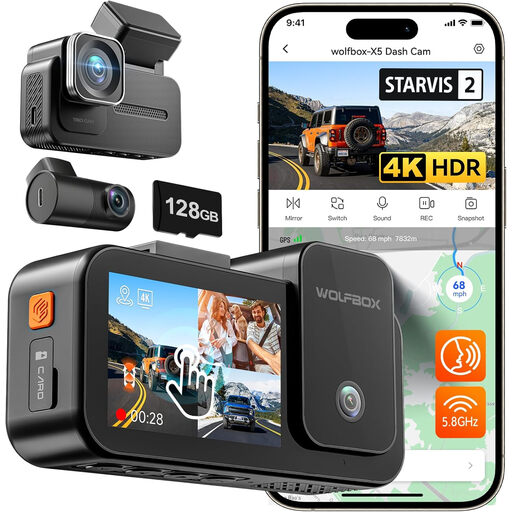
Why this product suits the profile: According to the model name, the three-channel system records the front, rear and interior, making it potentially useful for family vehicles or private-hire services.
The number of channels is clearly stated. Before buying, you should check the desired viewing angle, cabin recording and required storage capacity against your vehicle.
Three recording channels, 4K front recording, 2.5K recording for the additional cameras and 5.8-GHz Wi-Fi according to the product name.
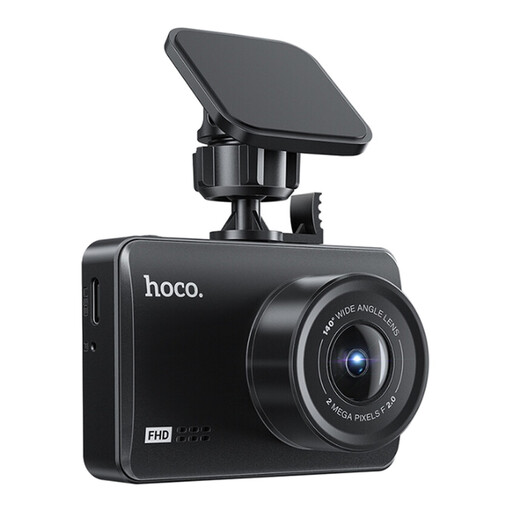
Why this product suits the profile: This model combines front and rear cameras with an integrated 4.5-inch display, making it suitable for users who want to check recordings directly in the vehicle.
The front and rear resolutions are specified separately: 1080P at the front and 720P at the rear. The MicroSD card up to 128 GB is not included.
4.5-inch IPS display, 140° viewing angle for the front camera, G-sensor, loop recording and waterproof rear camera.
In Germany, dashcam footage should be used in compliance with data protection regulations and, wherever possible, in response to a specific incident. Continuously recording or sharing footage of identifiable people and number plates without restriction can cause problems. The camera must also not obstruct the driver’s field of vision or interfere with the operation of the vehicle.
Before your first journey, we recommend the following setup:
We have put together a complete, regularly updated list of products that fully meet these strict selection criteria and the safety regulations applicable in the EU.
Using one is generally permitted, but you must comply with data protection requirements. Continuous, indiscriminate recording of public roads and surrounding areas can be problematic. Use protected clips only in connection with a specific incident wherever possible, and check the applicable legal framework before sharing any footage.
Its lifespan depends on temperature, power supply, memory card quality and daily recording time. Models with a supercapacitor are designed to shut down safely and handle brief power interruptions. A high-quality, compatible MicroSD card should be checked regularly and replaced if errors occur.
Follow the manufacturer’s specifications. For 2K and 4K recording, a MicroSD card Class 10 or U3 is often recommended. The capacity must be compatible with the camera. A 70mai 128-GB card or a DDPAI memory card should only be used with models expressly listed as compatible.