What should you look for when buying?
First, check the card format and the connection on the device you want to save your footage to. Then decide whether you want to copy to a phone or laptop only, or connect a second storage device at the same time.
The proportions below relate to consumers who want to save dashcam clips while staying at a hotel.
| What you need |
What to check before buying |
Who is this important to? |
| Save footage to a smartphone without a laptop |
Check the card format, device connection, any adapter you might need and support for external storage. |
If I only have my phone with me at the hotel, I want to read the card directly and have enough storage space for the clips. Around 36% of consumers prioritise backing up without a laptop. |
| Connect extra storage to a laptop |
Check the available laptop ports, card slot, connections on the external drive and its power requirements. |
If I want to connect a USB drive or hard drive as well as my dashcam card, I need the right ports. Around 29% of consumers prioritise connecting an extra storage device to their laptop. |
| Copy directly to a USB-A laptop |
Check for a USB-A connection and support for your microSDHC or microSDXC card format. |
If my laptop has a USB-A port and I simply want to copy the clips to it, a suitable direct connection is essential. Around 21% of consumers prioritise a straightforward connection to a USB-A laptop. |
| Transfer larger numbers of clips |
Check the card's UHS class, the reader's specifications and the destination device's connection separately. |
If I'm copying lots of clips and the card and device connections are already compatible, I'm interested in the speed of the entire transfer chain. Around 14% of consumers prioritise transferring larger numbers of clips, rather than addressing a connection issue. |
Joybuy products for backing up cards
This selection includes USB-C card readers and hubs for reading SD and microSD cards, as well as a USB-A card reader. Before buying, check that the card format and connection are compatible with your dashcam card and backup device.
 No image available
Acer 7-in-1 USB-C Hub Docking Station (ODK6V0)
Suitable if you want to read an SD or TF card and connect other devices to your laptop.
- USB-C connection, SD/TF card reader and 3 × USB 3.0 ports with speeds of up to 5 Gbit/s, according to the product name
- HDMI with 4K at 30 Hz and 100 W PD charging, according to the product name
View at Joybuy
 No image available
USB-C 3-in-2 adapter with SD card reader for iPhone and iPad
A possible choice if you want to read SD or microSD cards on a compatible USB-C device.
- USB-C connection
- The product description lists SD and microSD cards, and iPhone and iPad as compatible devices
View at Joybuy
 No image available
4-in-1 USB-C card reader with USB-A and OTG adapter for SD, microSD, TF and SDHC
Suitable if you want to read an SD or microSD card via USB-C and need a USB-A adapter for your connection.
- The product name lists SD, microSD, TF and SDHC
- The product description lists USB 2.0 with speeds of up to 480 Mbit/s
View at Joybuy
 No image available
HOCO HB45 Spirit 2-in-1 USB 3.0 card reader
An option if you want to use a card reader with a USB-A connection directly with a compatible laptop.
- USB 3.0 and integrated USB-A connection
- The product description lists SD and TF cards, which can be inserted at the same time
View at Joybuy
 No image available
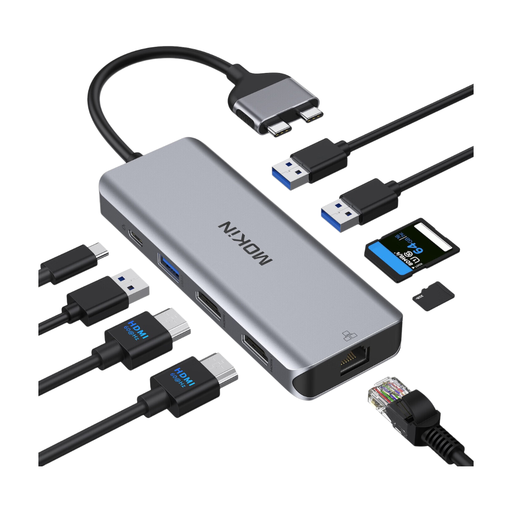
Mokin docking hub with USB-C, HDMI, Ethernet, SD/TF card slot and PD charging port
Suitable if you want to connect an SD or TF card and other devices to the USB-C port on a compatible device.
- The product description lists HDMI, Ethernet, two USB 3.0 ports, one USB 2.0 port, SD/TF and a PD charging port
- According to the product description, only compatible with certain MacBook Pro and MacBook Air models; not compatible with MacBooks with the base M1, M2 or M3 chips
View at Joybuy
Frequently asked questions
Can I copy footage from my dashcam card directly to an iPhone or Android phone at the hotel?
This may work with a compatible phone and card reader. Apple Support lists a suitable plug or adapter and supported file systems as requirements; Files by Google explains how to access USB storage on Android 7.0 and later. Whether your particular card is recognised also depends on your device and how the card is formatted.
What should I do with the memory card after copying the files?
Check the copy on your destination device before making any changes to the original card. Safely eject the card from your computer; Apple Support advises ejecting an SD card before removing it and not taking it out while your Mac is asleep.
Does backing up dashcam footage mean recording or sharing it is legally permitted?
No. Copying a recording does not determine whether recording or sharing it is permitted. A position paper published by Germany's data protection authorities on 28 January 2019 takes a critical view of continuous, indiscriminate recordings of public traffic. On 15 May 2018, Germany's Federal Court of Justice ruled that a recording made in breach of data protection law could still be used as evidence in a specific road traffic accident liability case. This does not amount to general permission for continuous recording or publication.
Will a fast card reader guarantee that my clips copy faster?
No. The interface specification alone does not guarantee a particular transfer speed. The SD Association says that actual speeds depend, among other things, on card performance and the host device. So check the card, reader and destination device as one complete transfer chain.


