What should you look for when buying?
First, check that the card and destination device work together and that your second storage location has enough free space. Only choose extra slots or hub connections if you’ll actually need them at your hotel.
| What matters |
What to check before buying |
Who is this important to? |
| Card format and file access |
Check that the card type and capacity match the slot and destination device. According to the SD Association, SDXC uses exFAT. |
If my dashcam card contains the only copy, I need to be able to read it without finding out that I’ve chosen the wrong slot; around 36% of consumers put card format and readable files first. |
| Backing up to a phone |
Check that the connection is compatible and that you can access the files; make sure there’s enough free space for the clips. |
Without a laptop, I want to copy the clips straight to my phone and have enough free space there; around 29% of consumers prioritise backing up to a smartphone. |
| Time needed for larger transfers |
Compare the card’s UHS rating with the reader standard; don’t treat manufacturers’ maximum figures as a guaranteed copy time. |
With lots of clips, I want to estimate the total copying time rather than compare USB specifications alone; around 21% of consumers put transfer time first. |
| Extra connections |
Check which USB connections you need, as well as the connection for a separate drive or power supply. |
If I need to connect a drive or power supply as well as the card reader at the hotel, there should be enough ports; around 14% of consumers prioritise having extra connection options. |
Joybuy products for backing up cards
This selection includes USB-C card readers and hubs with SD, microSD or TF card readers. A card reader isn’t a second storage location: to back up your files, you’ll also need a destination device or drive with enough free space.
 No image available
Acer 7-in-1 USB-C Hub, ODK6V0
A good fit if you need extra connections on your USB-C device as well as a card reader.
Listed with an SD/TF card reader, three USB 3.0 ports at 5 Gbit/s, HDMI with 4K@30Hz and 100 W PD charging.
View at Joybuy
 No image available
USB-C Hub 3-in-2 with SD card reader
An option if you want to read an SD or microSD card on a compatible USB-C device.
Listed with SD and microSD card readers and one USB 3.0 port; the description names iPhone and iPad as compatible devices.
View at Joybuy
 No image available
4-in-1 USB-C card reader with USB-A
Useful if you switch between a USB-C phone and a computer with USB-A.
Listed with SD, microSD, TF and SDHC support, plus USB 2.0 at up to 480 Mbit/s. The description names Android, Windows and macOS as supported systems.
View at Joybuy
 No image available
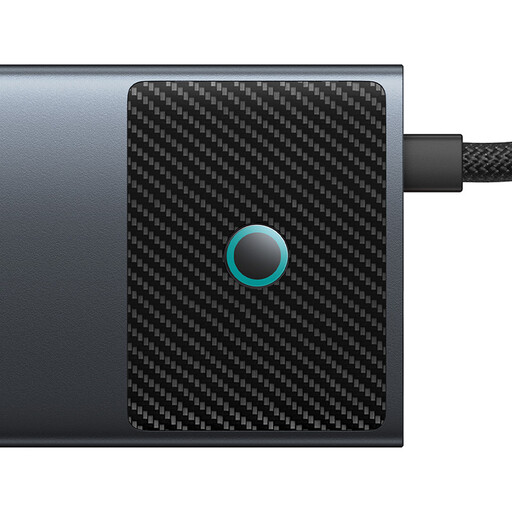
BASEUS Metal Gleam Series II 10-in-1
For a laptop set-up where you need extra connections as well as a memory card reader.
Listed with an SD/TF reader, USB-A and USB-C data ports, RJ45, USB-C PD and two HDMI outputs; 4K@120Hz and 4K@60Hz are quoted.
View at Joybuy
 No image available
WOZINSKY 14-in-1 USB-C hub
An option if you want to connect other devices to your USB-C device alongside SD or TF cards.
Listed with USB-A, HDMI, RJ45, 3.5 mm audio, USB-C PD and an SD/TF card reader; the cable is listed as 15 cm long. Compatible systems include Windows, macOS, Android and iPadOS.
View at Joybuy
Frequently asked questions
Can I back up my dashcam card straight to my phone at the hotel?
Yes, as long as the connection, card and phone’s file access are compatible. Apple Support explains how to access external media on an iPhone using Files; Files by Google states that its USB storage feature requires Android 7.0 or later. Copy the clips to a location with enough free space and open a copy there before putting the card back in your dashcam.
Do I need to format the memory card before backing it up?
No. Formatting doesn’t copy any files and could put existing recordings at risk. If the card or clips aren’t showing up, first check the card format, connection and file access. Don’t format a card containing recordings you still need. According to the SD Association, SDXC uses exFAT.
What extra costs and rights should I bear in mind when buying online?
If needed, allow for extra storage space or an external drive, as the card reader itself won’t keep a second copy. For consumer purchases in Germany, Verbraucherzentrale distinguishes between the statutory warranty and a voluntary guarantee. Online purchases generally come with a 14-day right to cancel; check the conditions and any possible exceptions for your individual case.
Does making a personal back-up automatically make dashcam recordings lawful in Germany?
No. The 2019 position paper from the German Data Protection Conference says that continuously recording traffic without a specific reason may raise data protection concerns under the conditions it describes. In 2018, Germany’s Federal Court of Justice ruled that an unlawfully made recording could still be used as evidence in a particular motor accident liability case. This does not amount to general permission to film continuously or publish recordings.


