For Python, data preparation and many conventional scikit-learn tasks, a suitably configured compact desktop is often enough; you don’t automatically need a powerful graphics card. If you want to train models locally using a GPU framework, choose a PC that meets its requirements for graphics hardware, memory and software, and weigh the space and cost against using an external computing environment. In a shared office, you should also consider the connections, what’s included and, if the PC will be shared, separate user accounts.
Who are the different options suitable for?
Those learning with notebooks and Python
If you work with data and write code, choose your setup based on the tools you actually use, rather than assuming you need a particular level of AI performance. Anaconda recommends at least 5 GB of free space for downloading and installation; you may need more for your projects and other applications. scikit-learn does not provide GPU support for its algorithms by default.
Those studying at a small shared desk
If space is tight, measure up for the computer, monitor, cables and power supply together. If several people will genuinely use the same PC, separate user accounts help keep files and desktops apart. Microsoft describes how separate Windows accounts keep files and personal settings separate.
Students with local GPU projects
If you specifically want to work on a project locally with GPU support, check that the graphics hardware is compatible with your framework and operating system, and meets your memory requirements. PyTorch recommends an NVIDIA or AMD GPU for certain features, but does not require one.
What should you look for when buying?
First decide which programmes and projects you want to run locally. Then check the storage, space requirements and what’s included with the exact model variant.
| Consideration |
What to check before buying |
Who this matters most to |
| RAM, SSD and programmes |
Check the installed RAM, not just the maximum supported amount, as well as the SSD capacity, operating system and requirements of the programmes you use. Anaconda Distribution requires at least 5 GB of free space just for downloading and installation. |
If I use notebooks, datasets and several applications locally, I want to choose a configuration that suits the tools I use. Around 33% of consumers consider a suitable basic local setup their top buying priority. |
| Space and shared use |
Allow for the case, power supply and ventilation together; check the monitor connections and noise figures for the relevant operating conditions. Set up separate user accounts if the PC will be shared. |
Anyone working at a small shared desk will want to make sure there’s room for the computer and accessories, and that sharing it will be practical. For around 27% of consumers, space and consideration for others in a shared office come first. |
| Local GPU work |
Check the framework, operating system, supported GPU technology and graphics memory required for your specific project; don’t assume you need a GPU just because of your subject. |
If my project requires local GPU training, the specific combination of hardware and software needs to be compatible. Around 20% of consumers prioritise local GPU computing as their top buying consideration. |
| Workspace and what’s included |
Consider the computer, monitor, keyboard, mouse, software you need and any potential upgrades together. Check what’s included with the exact model variant. |
Anyone planning a complete workspace will want to identify any missing accessories or unsuitable specifications early. For around 20% of consumers, a ready-to-use workspace at a predictable cost is the priority. |
Common buying mistakes
-
‘Data science’ automatically means you need an expensive GPU
Requirements depend on the specific projects and frameworks you use. scikit-learn does not provide GPU support for its algorithms by default.
First decide which projects and frameworks you want to use. Only compare GPU options if your planned local work genuinely requires one.
An unnecessary GPU can add to the cost and take up extra space.
-
The maximum RAM for a product range tells you how much memory is installed
Specifications can vary between model variants. A maximum upgrade figure doesn’t tell you how much memory is already installed.
Check the model number, installed RAM and SSD capacity for the exact variant on offer. If you’re planning an upgrade, also check the documented free slots.
Upgrading later may mean extra components and setup work.
-
A mini PC is automatically a complete workspace
According to Lenovo, the monitor, keyboard and mouse are optional extras and sold separately with the Lenovo ThinkCentre Neo 50q Gen 5.
Before buying, make a list of the devices you already have and anything else you’ll need.
You’ll need to budget for a monitor or input devices if you don’t already have them, to make your workspace usable.
-
An idle noise figure also tells you how loud the PC is during long computing sessions
MSI publishes different noise figures for idle and full load for certain PRO-DP21 versions. These are manufacturer figures for the documented variants.
For each figure, check the operating condition and exact model version, especially if the PC will be in a shared room.
Key brands at a glance
HP
HP offers compact Pro Mini PCs and Z2 Mini workstations in a range of configurations.
- For the HP Pro Mini 400 G9 937U0EA#ABD, HP lists 16 GB RAM, a 512 GB SSD and integrated graphics.
- These specifications apply to this specific variant; Z2 Mini configurations also differ in their memory, among other things.
Lenovo
The ThinkCentre Neo 50q Gen 5 Tiny is designed for a space-saving workspace, with the monitor selected separately.
- Lenovo documents the model’s compact design and connections.
- According to Lenovo, the monitor, keyboard and mouse are optional extras and sold separately; what’s included depends on the variant.
MSI
The PRO-DP range includes compact office PCs, along with other case and specification options.
- For PRO-DP21 versions, MSI documents the connections, upgrade options and separate noise figures for idle and full load.
- Check the specifications and upgrade options for the exact model version; figures for different variants are not interchangeable.
GEEKOM
The A5 Pro 2026 Edition is a compact computer option. Make sure its specific configuration and what’s included suit your workspace.
- GEEKOM lists a Ryzen 5 7530U, 16 GB RAM and a 1 TB SSD for the A5 Pro Edition on offer.
- Specifications and accessories may vary by edition and offer; check the details for the exact variant.
Joybuy products for data science tasks
This Joybuy selection includes compact computers and systems for programming and data tasks, including an option for planned local GPU work. Before choosing, check that the operating system and specifications suit the programmes and projects you have in mind.
 No image available
SOYO Y5Pro Mini PC, Intel Core i5-8250U/8350U, 8 GB DDR4, 256 GB SATA SSD
Its compact design may suit a workspace with limited room; check the specifications against the requirements of your local programmes.
The product title lists 8 GB DDR4, a 256 GB SATA SSD and Windows 11. The processor options listed are Intel Core i5-8250U/8350U.
View at Joybuy
 No image available
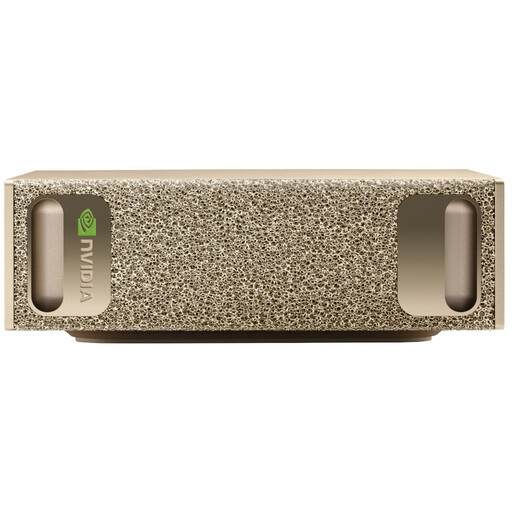
NVIDIA DGX Spark Founders Edition, NVIDIA GB10, 128 GB RAM, 4 TB SSD
This configuration is worth considering as a compact local GPU option only if your planned frameworks and projects are compatible with the specific hardware and software environment.
Specifications include 128 GB LPDDR5X, a 4 TB SSD, NVIDIA DGX OS and a case measuring 150 × 150 × 50,5 mm. According to the product description, surface temperatures can exceed 60 °C during intensive use; keep the ventilation openings clear.
View at Joybuy
 No image available
Apple Mac Mini, M6 12-Core CPU and 12-Core GPU, 24 GB Unified Memory, 512 GB SSD
This compact configuration could be a good fit for programming and data tasks at a shared workspace, provided the tools you use are compatible with macOS.
The product specifications list macOS, 24 GB Unified Memory, a 512 GB SSD, Thunderbolt 4 and HDMI. According to the product description, the keyboard and mouse are sold separately.
View at Joybuy
 No image available
MaxMini B3 Mini PC, Intel N4100, 8 GB LPDDR4, 256 GB SSD
If you’re considering a space-saving configuration, check the requirements of your development environment and datasets against the specifications of the exact model.
Specifications include 8 GB LPDDR4, a 256 GB SSD and two HDMI outputs. The product description says to use the supplied original power adapter and keep the ventilation openings clear.
View at Joybuy
 No image available
BMAX B6 Mini PC, Intel Core i3-8109U, 12 GB RAM, 256 GB SSD
The small case may suit a cramped workspace; before choosing, check the requirements of your programmes and which monitor connections you need.
The specifications list 12 GB RAM, a 256 GB SSD, HDMI and DisplayPort, and a case measuring 125 × 112 × 34 mm.
View at Joybuy
Frequently asked questions
Do I definitely need a dedicated graphics card for a data science degree?
Not necessarily: scikit-learn does not provide GPU acceleration for its algorithms by default. If you’re planning specific GPU projects, check the requirements and supported hardware for the framework you’ll use; PyTorch explains that GPU use depends on the system and computing requirements.
How do I set up a PC that other people in the office will also use?
Set up separate user accounts so everyone can use their own files, browser favourites and desktop. Microsoft describes these features for Windows accounts. Also check with the relevant organisation how project files should be stored and backed up.
Does a mini PC automatically come with a monitor, keyboard and mouse?
No, check the details of the specific offer. Lenovo describes the monitor, keyboard and mouse for the ThinkCentre Neo 50q Gen 5 as optional extras, sold separately; the stated contents of the package are what matter.
What are my rights as a consumer when shopping online in Germany?
For ordinary online purchases of goods, you generally have a 14-day right to cancel, subject to statutory exceptions. The Verbraucherzentrale explains this time limit; your statutory rights relating to faulty goods are separate from a voluntary manufacturer’s guarantee. Under § 438 BGB, the general limitation period for relevant claims for goods is two years from delivery.
What should I check to make sure a pre-built PC complies with product regulations?
Check whether the relevant EU rules require the device to carry CE marking, and look for identifiable manufacturer details and any required instructions and warnings. The European Union explains that CE marking is only required for products covered by the relevant harmonised rules; the Bundesnetzagentur lists marking and manufacturer details among the aspects of its market surveillance. A CE mark is not an independent assessment of performance.


