If you have a large archive of design drafts that will usually stay at your desk, a sufficiently spacious HDD could be a good fit. If you regularly carry projects around or revisit them, a portable SSD may suit the way you work better. You’ll also need a second copy stored separately, a tested recovery process and the right file system. Whatever type you choose, a single external drive is not a complete backup plan.
Who is this guide for?
Designers with growing archives of drafts
If you want to keep completed versions and project files locally, allow for your collection to grow and check that files can actually be restored from a backup. Germany’s Federal Office for Information Security notes that the lifespan of storage media cannot be predicted precisely.
Designers with confidential client files
If your drafts contain personal data, choose safeguards that match the specific risks and how the drive will be accessed. The European Data Protection Board explains that the GDPR requires appropriate technical and organisational measures.
Designers working across multiple locations
If you open projects on different computers or transfer them frequently, consider the connectors, cables, file system and portability together. Toshiba lists USB-A and USB-C cables for the Canvio Flex range. For a Mac backup with Time Machine, you’ll also need to check the volume format.
What should you look for when buying?
External HDD for a stationary archive
A good fit if: You mainly store lots of completed drafts and the drive will usually stay in the same place.
Consider: Desktop models need space and a power supply, so check these requirements before buying.
Portable SSD for frequent access
A good fit if: You regularly transfer large project files or take your archive between work locations.
Consider: The transfer rate you achieve also depends on the connected computer. Advertised peak speeds don’t replace checking the connection or planning for a second copy.
First decide whether you’ll mainly store your archive or access and transport it regularly. The proportions below refer to the most important buying priority for a local archive of design drafts.
| Priority |
What to check when buying |
Who it matters most to |
| Recoverability |
Plan for a second copy stored separately and test restoring a project file. |
If I keep my archive without using the cloud, I need a tested way to retrieve files if something goes wrong. Recoverability is the top priority for roughly 26% of consumers. |
| Space for drafts and versions |
Allow for your current collection, expected growth and the additional space needed for a separate backup. |
If you want to keep earlier drafts, you’ll need enough room for your projects and future growth. Capacity is the top priority for roughly 21% of consumers. |
| Confidentiality |
For files containing personal data, choose safeguards that match the risks and keep passwords or recovery keys somewhere secure. |
If client files must remain inaccessible to unauthorised people, I also need to consider who can access the drive and how to store the key securely. Confidentiality is the main priority for roughly 21% of consumers. |
| Device compatibility |
Check that the connectors, supplied cables, operating system and file system work with your planned backup method. |
If I use several computers or want to use Time Machine, the drive and its format need to suit that setup. Device compatibility is the top priority for roughly 16% of consumers. |
| Speed and portability |
Check the host connection and drive interface together. Assess protection claims only for the specified model and test conditions. |
For frequent transfers or carrying files between work locations, I care about the connection and a portable design; I still need a backup copy, though. Roughly 16% of consumers say mobile access is their top priority. |
Which mistakes should you avoid?
-
Treating the external archive as your only copy
External storage can fail too. If the original and the copy are kept in the same place, both could be affected by the same damage.
Keep an additional copy somewhere separate and regularly test restoring a file.
You’ll need another storage device, as well as time to check your backups and test recovery.
-
Assuming a USB-C connector means full compatibility
The connector alone doesn’t tell you whether the transfer rate will suit your computer or whether the file system is right for your backup. A volume formatted for Windows may need to be reformatted for Time Machine, which will erase any files already on it.
Check the host connection, supplied cables, operating system and file system separately. Back up any existing files before reformatting a volume.
Depending on the connections you already have, you may need a suitable cable or a different backup method.
-
Assuming durability claims mean your data is safe
Samsung says the T7 Shield’s IP65 rating was tested under controlled conditions, and excludes liquid and dust damage from the stated warranty cover.
Assess protection claims only for the specific model and its test conditions. Don’t rely on them instead of keeping a separate backup.
Key brands at a glance
Toshiba
Canvio Basics is a portable HDD range with a file system geared towards Windows. Canvio Flex is designed for switching between compatible devices using USB-A and USB-C.
- Toshiba lists models of up to 4 TB for both ranges, and USB-A and USB-C cables for Canvio Flex.
- Toshiba says Canvio Basics is formatted as NTFS. It may need to be reformatted for Time Machine, which can erase any existing files.
Samsung
The portable T7 Shield SSD is an option for frequent transfers and carrying your files around.
- For the German 2-TB model MU-PE2T0S/EU, Samsung lists read speeds of up to 1.050 MB/s and write speeds of up to 1.000 MB/s, depending on the host.
- Samsung says the IP65 rating was tested under controlled conditions. The manufacturer’s warranty does not cover liquid or dust damage.
Kingston
The XS1000 is a portable SSD range for transferring data and keeping local backups.
- Kingston lists models of up to 2 TB, supplied with a USB-A cable and a USB-C adapter.
- The stated transfer rates are maximum speeds; the speed you achieve depends on the connected computer.
Seagate
Expansion Desktop is designed for larger archives that will mostly stay in one place, while One Touch is a portable HDD range.
- On the Expansion Desktop product page, Seagate lists an external power supply and a USB Micro-B to USB-C cable.
- What’s included, service and warranty can vary by model and region, so check the exact version.
Verbatim
The Vx500 is a portable SSD alternative with a USB-C drive connection.
- For the 2-TB model #47454, Verbatim lists read speeds of up to 500 MB/s and write speeds of up to 440 MB/s, plus a USB-A cable and a USB-C adapter.
- The manufacturer says speeds depend on the host. The Nero backup software listed on the product page is not compatible with Mac.
Joybuy products for local archives
This selection includes external HDDs for portable or stationary archives, as well as portable SSDs for frequent access and carrying files around.
 No image available
WD Elements, 2 TB, portable hard drive
For a portable local archive, if 2 TB is enough for your current files and planned growth.
Product name lists USB-C, USB 3.2 Gen 1, 2.5-inch and exFAT.
View on Joybuy
 No image available
WD Elements Desktop, 8 TB
For a large local archive kept at a permanent workstation.
The desktop model needs the supplied external power supply; the product specifications list USB 3.0 and NTFS.
View on Joybuy
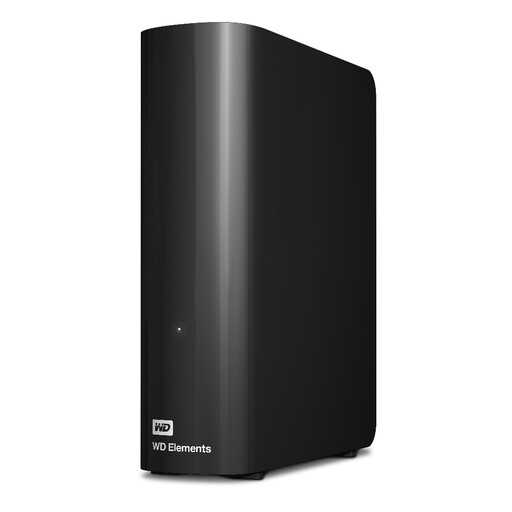 No image available
Western Digital WD Elements Desktop, 20 TB
For a very large local archive that will mostly stay at a permanent workstation.
Desktop design with an external power supply; the product name lists USB 3.2 Gen 1.
View on Joybuy
 No image available
KEXIN portable external SSD, 256 GB, USB 3.1 Type-C
For a compact local archive or transferring files, if 256 GB is enough.
The product name lists transfer speeds of up to 500 MB/s.
View on Joybuy
 No image available
KEXIN M.2 SATA portable external SSD, 256 GB, USB 3.1
For a portable local archive, if 256 GB is enough for the project files you’ve selected.
The product name lists USB 3.1 and speeds of up to 500 MB/s.
View on Joybuy
Frequently asked questions
How do I set up a local backup without using the cloud?
On Windows, File History can back up files to a connected external drive; check that it includes your project folders. On a Mac, you can use an external drive with Time Machine. Keep an additional copy somewhere separate, and test that you can restore a project file.
Can the same drive back up Windows files and Time Machine without any extra steps?
Not necessarily. Apple Support recommends APFS or APFS (Encrypted) for Time Machine backup volumes. Apple also notes that reformatting a Windows-formatted volume will erase any files already on it. Check how you plan to use the drive before reformatting one that already contains files.
Do I always need to encrypt client files?
This doesn’t mean that every design archive must be encrypted. If you process personal data, the GDPR requires appropriate technical and organisational safeguards for the level of risk, as the European Data Protection Board explains. Depending on the risks, encryption may be a suitable measure. Consider the file contents and the specific processing context.
What else should I consider with a desktop drive?
Check that you have a suitable permanent place for it and that the power supply works for your setup. To make your archive recoverable, also keep a copy somewhere separate. An additional drive is no substitute for regularly testing your recovery process.


