
Lieferung heute & morgen

Qualitätsgarantie

Willkommens-Angebote freischalten: KOSTENLOSE Lieferung | Bis zu 80 % RABATT | Kostenlose 30-Tage-JoyPlus-Testphase
App herunterladen
A new desk is a significant purchase for your home office, study, or gaming setup. However, the market is crowded, and many products fail to deliver on their promises. As a Joybuy Product Recommendation Officer, I'm here to help you identify the common pitfalls and make an informed decision based on facts, not marketing hype.
Before you choose a model, you should be aware of the most common issues that often only become apparent after assembly or during daily use.
To avoid a bad buy, focus on these three objective criteria. They determine durability, functionality, and comfort.
The foundation of any good desk is its construction. A robust office desk or gaming desk needs a solid base.
Measure your available space accurately before deciding on a shape.
A modern PC desk often offers more than just a work surface. Consider which additional features are relevant to you.
Here are some models tailored to specific user profiles that meet the quality criteria mentioned above.
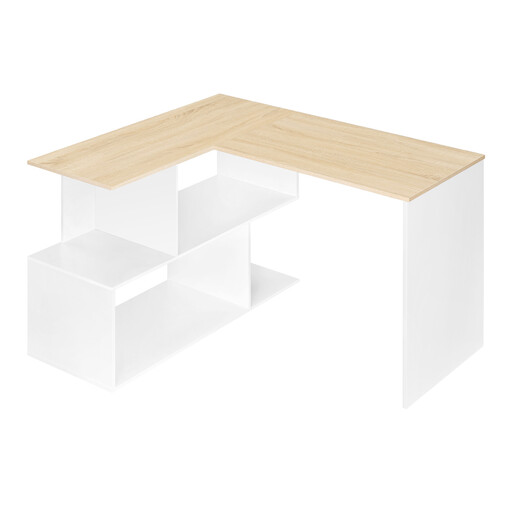
Why this model is a great fit: Ideal for students or small home office nooks. The L-shape uses space efficiently without feeling bulky and creates a clear separation between the computer and work areas.
Sidesteps the impractical storage trap with four open and easily accessible shelves that offer ample space for binders, books, and accessories.
Compact L-shape design for maximum space utilisation in corners. Non-slip feet ensure stability even on uneven floors.
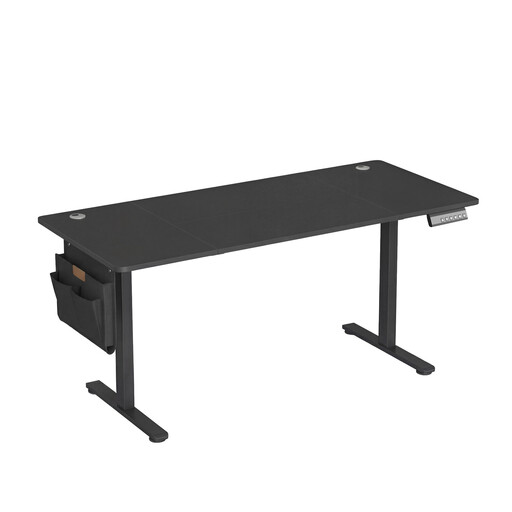
Why this model is a great fit: Perfect for professionals who spend long hours at their desk and value ergonomics. Switching between sitting and standing promotes a healthy posture.
Solves the problem of a fixed, unergonomic working height. The quiet motor and sturdy steel frame avoid the stability trap often found in cheaper adjustable desks.
Electric height adjustment (72-120 cm) with a memory function for four positions and an integrated USB-C port with fast-charging capabilities.
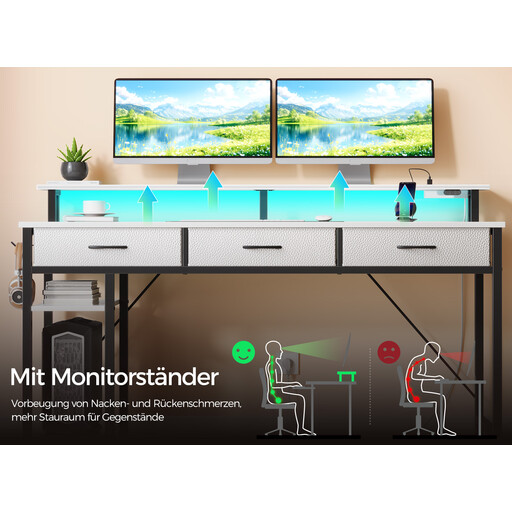
Why this model is a great fit: Designed for gamers and tech enthusiasts who need a fully equipped command centre. It offers integrated solutions for power, lighting, and organisation.
Provides a thoughtful all-in-one solution, avoiding the cable clutter and lack of ports that often require external power strips with standard desks.
Integrated charging station with 2 power outlets and 2 USB ports, plus an app-controlled RGB LED strip for an immersive atmosphere.
We have compiled a complete, up-to-date list of products that fully meet these strict selection criteria and safety regulations.
1. How high should a desk be for an ergonomic posture? The ideal height depends on your body height and your chair. As a rule of thumb, your forearms should rest on the desktop at an approximately 90-degree angle with your shoulders relaxed. For most people, this is between 72 cm and 76 cm. If multiple people will use the desk or you want maximum flexibility, a height-adjustable desk is the best solution.
2. What's the difference between a desk and a computer desk? The terms are often used interchangeably. Traditionally, a desk is a simple work surface. A computer desk or PC desk is specifically designed for use with computers and often has additional features like cable management holes, raised monitor stands, or integrated compartments for PC towers.
3. How much weight can an average desk support? The maximum load capacity varies greatly depending on the construction and material. Simple models often support only 30-50 kg, while sturdy office desks with solid steel frames can hold up to 100 kg or more. Always check the manufacturer's specifications, especially if you plan to place multiple heavy monitors or other equipment on it. The load capacity is a clear indicator of quality.