
Lieferung heute & morgen

Qualitätsgarantie

Willkommens-Angebote freischalten: KOSTENLOSE Lieferung | Bis zu 80 % RABATT | Kostenlose 30-Tage-JoyPlus-Testphase
App herunterladen
A desk clamp lamp saves space, can be positioned flexibly and is suitable for desks, shelves and monitors. However, not every model will provide the right lighting. Buyers often choose based on design or the stated wattage alone, overlooking important details such as how the lamp attaches, how it is powered and how it distributes light.
A desk lamp with a clamp needs to fit the thickness of your desk or monitor. If the clamp is too small, the lamp may not be secure. Tighten it too much and you could damage delicate surfaces. Monitor lamps also need to support the weight of the light itself.
Before you buy, check:
Wattage mainly indicates energy consumption, not how bright a lamp is. For an LED clamp lamp, lumens, light distribution and dimming range are more useful measures. Even a high-powered, narrow lamp may only illuminate a small area.
Positioning also matters for a task light used when working from home or studying. The light should reach your work surface without shining directly into your eyes or causing distracting reflections on your monitor.
RGB lighting, music synchronisation and a USB port can be useful for some people, but they’re no substitute for well-positioned main lighting. For focused work, the right colour tone, even illumination and adjustable brightness are usually more important.
If you’re choosing a dimmable desk lamp, check whether its brightness can be adjusted continuously or only across a few fixed settings. The power supply is worth checking, too: USB models may flicker or fail to reach their intended brightness if the power adapter is underpowered.
A monitor lamp is usually attached to the top of the screen. This saves space, but not every monitor casing is suitable. Check whether your monitor is flat, slightly curved or particularly thick. According to the product details, the Leair L-50CM-01 is designed to fit large monitors from 24 inches, curved monitors and laptops.
A traditional clamp light for a desk or shelf usually gives you more flexibility when positioning it. Check the stated maximum clamp thickness. According to the product description, the Aigostar Light02 clip holder is designed for edges up to 74 mm thick. It is a mount for compatible lamps, not a complete lamp in its own right.
Kelvin indicates colour temperature:
A flexible LED desk lamp with several colour temperatures can be more practical for different tasks. For creative projects or work where colour accuracy matters, the CRI value is also relevant. A higher value indicates more natural colour rendering, provided the specification is backed up with clear documentation.
USB desk lamps are flexible, but they need a suitable power source. According to the manufacturer, the Leair L-50CM-01 requires 5 V and 2 A. A connection with insufficient power may affect how it works. The Leair L-42CM-AL-01 RGB model also requires 5 V and 2 A or more, according to the product details, and is powered via USB-C.
Unless a different protection rating is stated, use electric lamps only indoors in dry conditions. Don’t use lamps with damaged cables or casings. At the end of their useful life, electronic products should be taken to a designated WEEE collection point, not put in unsorted household waste.
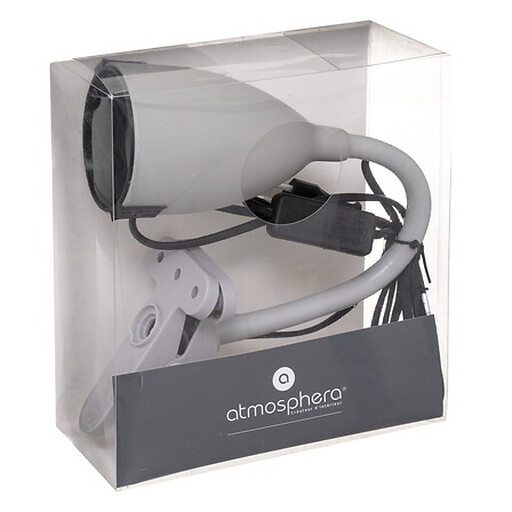
Why this product suits this profile: This compact clamp light is suitable for desks and shelves. You can choose a separate bulb to suit your preferred brightness and colour temperature.
The product description clearly states that a bulb is not included, so you can choose the right light source before buying.
Clamp mounting, a flexible cable and a height of 43 cm, according to the product details.
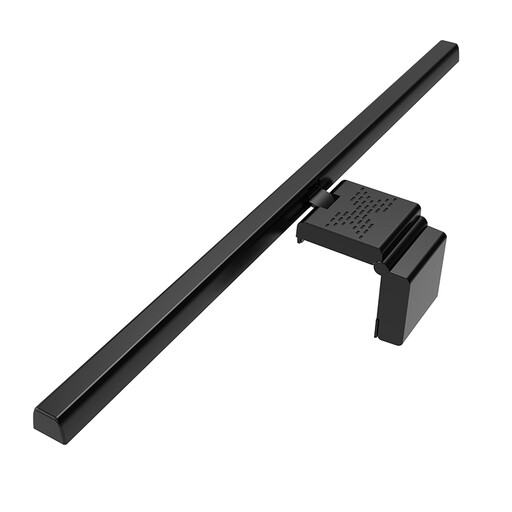
Why this product suits this profile: According to the product details, this 50 cm monitor light is designed for larger monitors, dual-screen workstations and laptops.
According to the product description, its asymmetrical light design illuminates the work surface while helping to limit direct reflections on the screen.
Three colour temperatures of 3000, 4500 and 6500 K, plus stepless brightness adjustment, according to the product details.
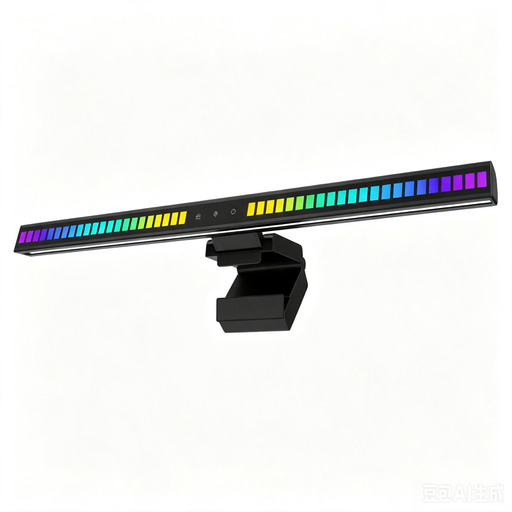
Why this product suits this profile: This monitor light is aimed at gamers and anyone who wants coloured backlighting as well as illumination from the front.
The front light and RGB lighting are described separately, helping you distinguish the decorative feature from the lighting used for your workspace.
42 cm long, with three colour temperatures, stepless front-light adjustment and USB-C power requiring 5 V/2 A, according to the product details.
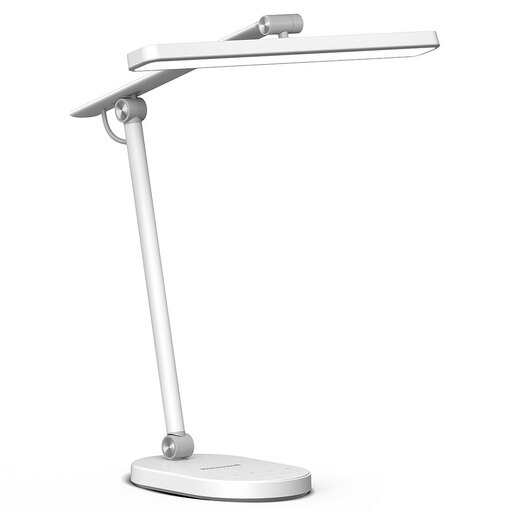
Why this product suits this profile: This desk lamp is a good choice if you prefer a stable base and want to adjust the direction of the light using its movable arm and lamp head.
The specifications give specific figures rather than making vague claims about brightness: 700 lumens, 14 watts, five brightness levels and three colour temperature ranges.
Memory function, timer and ambient light sensor, plus RG0 and anti-glare protection, according to the product details.
We’ve put together a complete, regularly updated list of products that meet these strict selection criteria and comply fully with the safety regulations in force across the EU.
A monitor lamp should fit the width, casing thickness and shape of your monitor. A flexible clamp design is important for curved screens. Also check that the counterweight is sufficient and that the light is directed asymmetrically onto your work surface.
Attach the lamp securely to the edge of your desk, a shelf or the top of your monitor. Direct the beam towards your work surface, not straight at your eyes. Try to avoid bright reflections on your screen. For USB models, the power adapter should provide the voltage and current specified by the manufacturer.
Energy use depends on the lamp’s wattage and how long you use it each day. A lamp rated at 8 watts uses 0.04 kWh per day if it’s on for five hours a day. Depending on the model, dimming can reduce consumption. The key factors affecting running costs are the stated wattage, dimming range and actual time in use.