
Lieferung heute & morgen

Qualitätsgarantie

Willkommens-Angebote freischalten: KOSTENLOSE Lieferung | Bis zu 80 % RABATT | Kostenlose 30-Tage-JoyPlus-Testphase
App herunterladen
When summer temperatures rise, a reliable desk fan quickly goes from a luxury to a necessity, especially in the office or home office. However, the market is flooded with models whose marketing promises often don't hold up in practice. Before you make a decision, it's helpful to know the typical pitfalls that can lead to disappointment and unnecessary expense.
As your Joybuy Product Recommendation Officer, I'll help you define objective criteria for your selection and make informed decisions.
Many buyers regret their choice after just a short time. This is usually due to one of these three points being overlooked during the purchase:
To avoid a bad purchase, you should focus on verifiable technical features. These three parameters will give you a reliable basis for your decision.
Noise level is one of the most important factors for a desk fan. Pay attention to the sound pressure level, specified in decibels (dB). For reference:
The type of power supply determines how and where you can use your fan.
An effective fan moves air rather than just swirling it. The airflow rate (specified in m?/h) is a useful metric here, although not always provided. As a general rule: larger blades can move more air at lower speeds and are often quieter. An oscillation feature (automatic swiveling) is beneficial for distributing cool air evenly throughout the room instead of just blowing on one spot.
Here are some models that, based on objective features, are suitable for different user profiles.
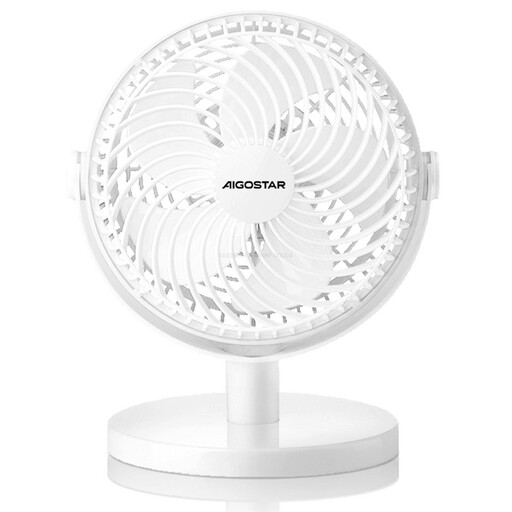
Why This Fits Their Persona: Ideal for users seeking straightforward, direct cooling at their workspace. Its pure USB operation makes it a simple addition to any desk with a PC or laptop, without the hassle of managing batteries.
The 5-blade design is engineered for a soft, personal airflow, avoiding the disappointment of a weak but noisy draft. Its simple, battery-free construction reduces potential points of failure.
The 360-degree adjustable head allows for precise airflow direction. Its direct USB operation ensures a low weight and maintenance-free use.
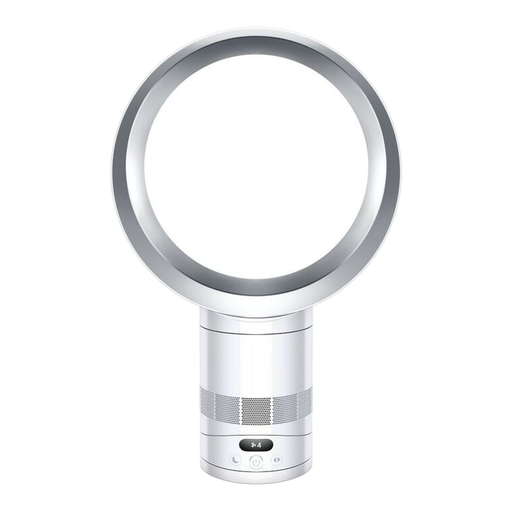
Why This Fits Their Persona: For users who value design, safety, and exceptionally quiet yet powerful cooling. Ideal for modern living and working environments where aesthetics also play a key role.
It directly addresses the noise trap with a specified sleep mode of just 29 dB. The bladeless design and stable construction completely bypass the problems of vibration and poor build quality.
The patented Air Multiplier technology generates a smooth, powerful stream of air without blades. This significantly increases safety and makes cleaning much easier.
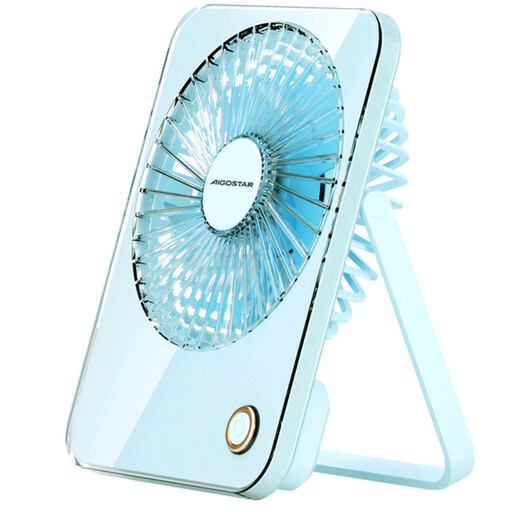
Why This Fits Their Persona: Perfect for students, commuters, or anyone who needs cooling in various locations. The integrated battery makes it independent of power outlets, and the foldable design facilitates transport.
Thanks to the 3600mAh battery, this fan delivers consistent performance even without a cable, avoiding the trap of underpowered USB devices. The robust, foldable housing is designed for mobile use.
It offers wireless operation for several hours and, thanks to the 180-degree folding mechanism, can be both stood up and hung, allowing for maximum placement flexibility.
We have compiled a complete, up-to-date list of products that fully meet these strict selection criteria and rigorous safety standards.
The power consumption of a desk fan is typically very low. A standard mini fan or USB fan often consumes only between 3 and 5 watts. Larger, mains-powered models usually range from 25 to 40 watts. Even with daily use for several hours, the impact on your electricity bill is minimal.
A sound pressure level of 30 decibels (dB) is very quiet. It is comparable to the sound of rustling leaves in the wind or a soft whisper. A fan with this rating is ideal for environments where silence is important, such as a bedroom at night or a focused work setting.
Before cleaning, ensure the fan is disconnected from the power source. For models with a removable safety grille, you can take it off and wipe it with a damp cloth. The fan blades can be carefully cleaned of dust with a slightly damp cloth or a soft brush. For bladeless models like those from Dyson, simply wiping the surfaces with a dry or slightly damp cloth is sufficient. Make sure no moisture gets into the motor or electronics.