A compact, fanless Gigabit switch is a sensible starting point if you want to connect several wired devices to an existing LAN connection. With a five-port model, the incoming connection will usually take up one port. If your work laptop simply doesn’t have an Ethernet port, a suitable USB-C Ethernet adapter is the more direct solution; a switch won’t replace one. Before considering features such as 2.5 Gigabit, VLAN or PoE, check your devices, cabling and any IT requirements. TP-Link Deutschland and D-Link Deutschland describe fanless Gigabit models, Anker Deutschland explains the adapter option, and the BSI recommends keeping work and personal environments separate.
Who is a network switch suitable for on a small desk?
A workspace with too few LAN ports
If you want to connect several wired devices to an existing network connection, count the ports needed for your devices as well as the port for the incoming connection. TP-Link Deutschland and NETGEAR describe straightforward Gigabit switches for adding extra ports.
A small, quiet desk
If you need extra LAN ports but have limited desk space and want to avoid fan noise, check the dimensions, placement options and fan specifications of the model you’re considering. TP-Link Deutschland, D-Link Deutschland and Zyxel describe fanless models.
A laptop without a LAN port
If your work laptop doesn’t have an Ethernet port, you’ll first need a suitable interface for the laptop. Anker Deutschland describes a USB-C Ethernet adapter or a compatible hub for this purpose. If it’s a work device, check your IT requirements too.
What should you look for when buying a switch?
First, check whether you want to connect several devices to an existing LAN connection. Then you can compare the ports, space requirements and extra features.
| Consideration |
What to check before buying |
Who it matters to most |
| Enough LAN ports |
Count the incoming connection, laptop and other wired devices separately, and allow for a possible future connection. |
If I want to use several devices with an existing connection, I need enough available ports. Around 33% of consumers put extra LAN ports first. |
| Space and noise |
Check the dimensions, fan specifications, port layout, and space for the power supply and cables on the model you’re considering. |
If space is tight on my small desk and a fan could bother me, I look at the design and noise levels. Around 27% of consumers prioritise space and quiet operation. |
| Laptop connection |
Check whether the laptop has an RJ45 port or needs an approved USB-C Ethernet adapter. |
If my work laptop doesn’t have a LAN port, I first need to work out which connection option is suitable; a switch alone won’t add a port to the laptop. Around 20% of consumers focus mainly on this connection. |
| Suitable speed |
Compare the Ethernet ports and adapters on all the devices involved; consider 2.5 Gigabit only if you need it and the connected devices are compatible. |
If I want to transfer data locally between compatible devices, the adapters and devices at both ends must also support the speed I want. Around 13% of consumers prioritise local data transfer speeds. |
| VLAN or PoE |
Agree the VLAN configuration with your IT team; for PoE, check the standard, power requirements for each device and the total power budget. |
If my work network requires an agreed VLAN configuration or power for additional network devices, I check these features carefully. Around 7% of consumers prioritise VLAN or PoE features. |
Common buying and connection mistakes
-
Assuming five ports means five free device connections
When you connect the switch to a router or Ethernet connection, one port will usually already be in use.
Count the incoming connection first, then count all the devices you want to connect by cable.
-
Buying a switch to make up for a missing LAN port on your laptop
A switch provides RJ45 ports for network devices, but it doesn’t connect directly to your laptop’s USB-C port.
First check your laptop’s interface and any requirements from your IT team. If only the laptop needs a network connection, a suitable adapter may be a better option.
-
Confusing the power per PoE port with the total power budget
For the TP-Link TL-SG105PE, TP-Link specifies up to 30 W per PoE port and a maximum total of 65 W.
Check the PoE standard and power requirements of each device against both the power per port and the total budget.
-
Assuming VLAN support means network separation is already set up
A VLAN feature alone won’t set up secure separation for your work network.
If your network needs to be separated, check with your IT team before buying to find out what configuration and network architecture are required.
Key brands at a glance
TP-Link
The range includes basic Gigabit expansion, managed models, 2.5 Gigabit switches and PoE versions. These differences apply to individual models, not necessarily to the brand as a whole.
- TP-Link Deutschland lists five Gigabit ports and fanless operation for the TL-SG105.
- VLAN, 2.5 Gigabit and PoE depend on the model you choose. Compare the full model numbers and features.
NETGEAR
The GS305v3 is an unmanaged five-port Gigabit switch for simple expansion at your workspace.
- NETGEAR lists a metal case, desktop or wall mounting, and quiet operation.
- No PoE budget is specified for the GS305v3. NETGEAR’s installation guide states that a network cable isn’t included.
D-Link
D-Link Deutschland describes the DGS-105 and DGS-105GL as compact Gigabit switches for expanding your network.
- D-Link lists five ports and fanless operation for the DGS-105; the DGS-105GL is also described as fanless.
- Check the model name and revision before buying so you don’t assume features carry over to another model.
Zyxel
According to Zyxel, the GS-100 series includes desktop Gigabit switches with five or eight ports.
- Zyxel describes the series as compact and fanless, and lists integrated QoS.
- Compare the full model number with the number of ports you actually need.
Joybuy products for your desk
The Joybuy models below include Gigabit and 2.5 Gigabit options, as well as managed or PoE-capable switches. Choose extra features only if they suit the connected devices and your network requirements.
 No image available
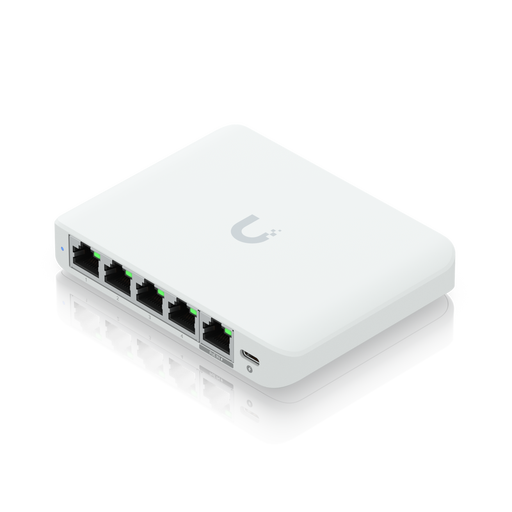
Ubiquiti UniFi Flex Mini 2.5G
For a setup that needs 2.5 Gigabit Ethernet and management features; also check that your adapters and connected devices support them.
The product name lists Managed, Ethernet (100/1000/2500) and PoE.
View at Joybuy
 No image available
D-Link DGS-1005P/E
An option if you want to connect wired devices and power compatible PoE devices too.
The product name lists five Gigabit ports, four PoE+ ports, a 60 W PoE budget and a fanless metal case.
View at Joybuy
 No image available
TP-Link TL-SG105PE
For expanding a network with VLAN and PoE features, provided they suit your configuration and connected devices.
Five Gigabit ports and four PoE+ ports; TP-Link specifies up to 30 W per PoE port and up to 65 W in total. The VLAN feature needs to be configured appropriately.
View at Joybuy
 No image available
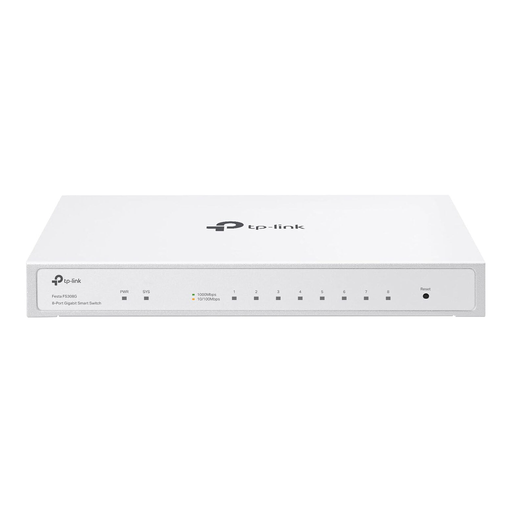
TP-Link Festa FS308G
For a workspace where you need to connect more wired devices and want management features.
The product name lists eight Gigabit ports, optional PoE input and cloud management. Check whether these management features are needed for your network.
View at Joybuy
 No image available
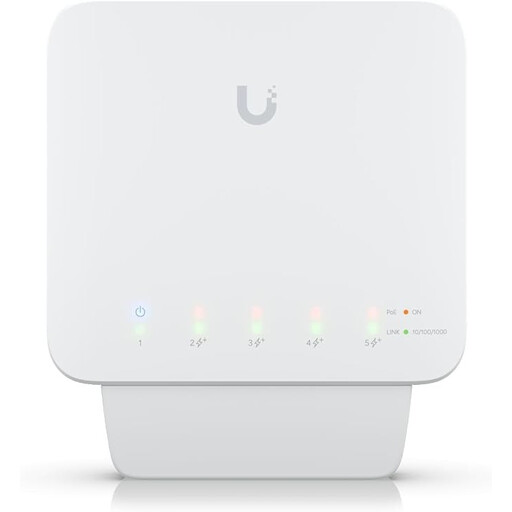
Ubiquiti UniFi Switch Flex (USW-Flex)
For managed Gigabit network expansion with PoE+, if you’ve already planned for the required power supply.
The product name lists a manageable five-port Gigabit PoE+ switch. According to the product description, it requires a compatible PoE++ source or a 60 W PoE adapter to operate; the adapter isn’t included.
View at Joybuy
Frequently asked questions about desk network switches
How do I connect a switch if my work laptop doesn’t have a LAN port?
Connect one switch port to the existing Ethernet connection and use the other ports for devices with an Ethernet interface. If your laptop doesn’t have an RJ45 port, a suitable USB-C Ethernet adapter or hub can provide one. Check your IT requirements in advance if it’s a work device.
Does a five-port switch mean I can connect five devices?
Not necessarily. If one port connects to the network, a five-port model will usually have one fewer port available for other devices. So count the incoming connection and the ports needed for your devices separately.
Do I need to configure a basic switch?
TP-Link and NETGEAR describe the unmanaged TL-SG105 and GS305v3 respectively as plug-and-play models that don’t require configuration. VLAN settings, however, need a suitably equipped model that has been configured appropriately.
When do I need 2.5 Gigabit, VLAN or PoE?
2.5 Gigabit is only relevant if the devices and adapters involved support it. VLAN features are useful when there’s a specific configuration requirement and you can agree how they’ll be set up. PoE is an option if you want to power compatible network devices over Ethernet; check the power requirements of each device and the total budget.
Are network cables always included with a switch?
No. According to NETGEAR’s installation guide, the GS305v3 doesn’t come with a network cable. Check what’s included with the specific model before buying, and add a suitable cable if needed.


