
Lieferung heute & morgen

Qualitätsgarantie

Willkommens-Angebote freischalten: KOSTENLOSE Lieferung | Bis zu 80 % RABATT | Kostenlose 30-Tage-JoyPlus-Testphase
App herunterladen
A disorganised workspace and poor posture can significantly impact your productivity, whether you're working from home, studying, or in the middle of a gaming session. Many users know the problem: neck pain from constantly looking down at the monitor, cable clutter creating a mess, and simply not enough space for a multi-monitor setup. A desk with a monitor riser is a functional solution to overcome these challenges.
This article serves as a guide. We will introduce various models and explain the key features to look for, helping you create a workspace that is both ergonomic and tidy.
Before you decide on a model, the following criteria will help you make the right choice for your needs.
The primary function of a monitor riser is to improve ergonomics. A correctly positioned screen, with its top edge at or just below eye level, promotes an upright posture and can help reduce neck and back strain. Pay attention to the height of the riser and ensure it suits your body height and sitting position. Also, consider the overall size of the desk. A setup with two or more monitors requires a wider desktop than one for a single screen. Measure the available space in your room to ensure the computer desk will fit.
A PC desk must be sturdy enough to safely support the weight of monitors, computers, and other accessories. Models with a metal frame typically offer excellent stability. The design should match your personal style and existing decor. An industrial-style desk that combines materials like a wood-effect finish and dark metal creates a modern yet inviting atmosphere. For a gaming desk, surfaces with a carbon fibre look and darker colours are often popular, supporting a dynamic aesthetic.
Modern desks often offer more than just a work surface. A desk with shelves or integrated drawers provides valuable storage space for books, office supplies, or gaming accessories. Some models go a step further, integrating tech features like USB ports, power outlets, or even LED lighting systems. These features help keep the workspace organised by simplifying cable management and powering external devices directly from the desk.
Here is a selection of products that cover a range of needs in terms of functionality and design.
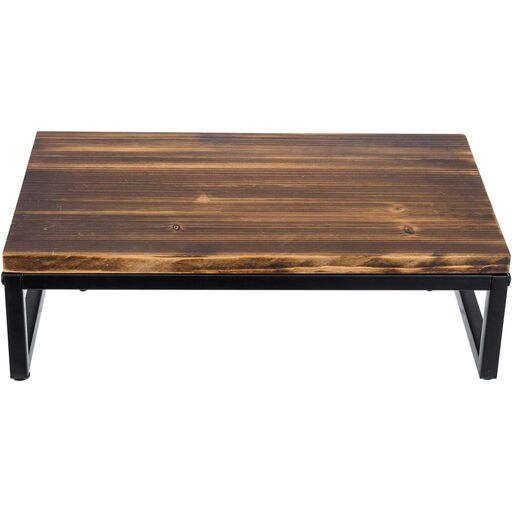
Why it stands out: This product isn't a complete desk, but a separate monitor stand. Its strength lies in its flexibility. It can be placed on any existing desk to instantly improve ergonomics and create additional storage space. The combination of solid wood and black metal legs gives it a high-end industrial design character.
Pros:
Who is it for? For users who are happy with their current desk but are looking for an ergonomic and stylish solution to raise their monitor and improve organisation. Ideal for fans of industrial or rustic interior styles.
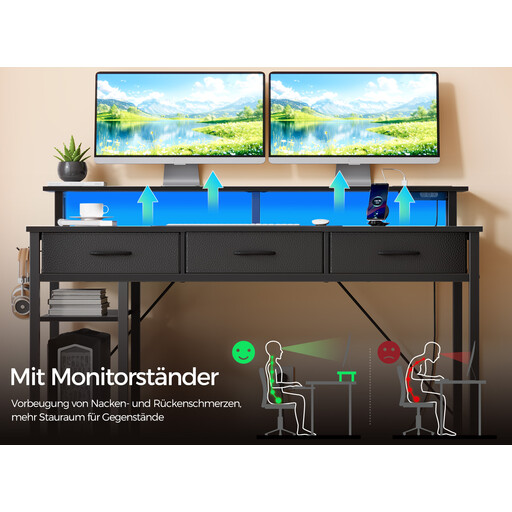
Why it stands out: This gaming desk is a fully-equipped workstation. It integrates numerous technical and organisational features directly into the furniture, including a charging station, LED lighting, and versatile storage options. The reversible design allows for flexible adaptation to your room's layout.
Pros:
Who is it for? For gamers and home office users looking for an all-in-one solution. Anyone who values integrated technology, customisable aesthetics, and maximum organisation will find this to be a suitable model.
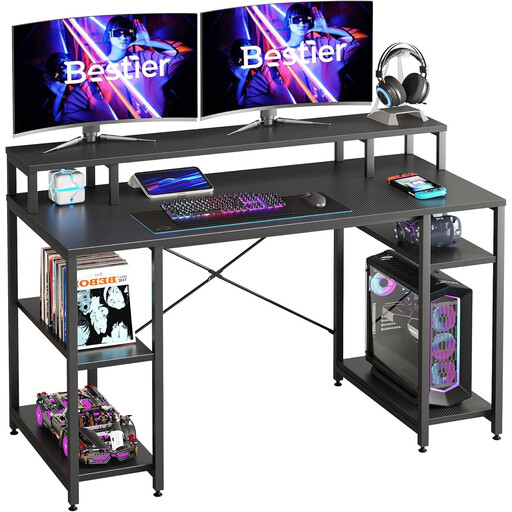
Why it stands out: This model combines a generous work surface with flexible storage options. With a width of 140 cm, the desk offers ample space for multi-monitor setups and work documents. The adjustable shelves under the desktop allow for customisation to your needs, whether for a PC tower, a printer, or binders.
Pros:
Who is it for? For professionals with a home office desk and students who need a large, stable, and customisable workspace. It is particularly suitable for users who require a lot of space for multiple devices and documents and appreciate a clean, industrial design.
The models presented here already cover a wide range of needs. However, if you are looking for different dimensions, materials, or specific configurations, many other alternatives are available.
Discover a wider selection of functional and stylish solutions in our Monitor Stands category.
1. What is the advantage of a desk with a monitor riser? The main advantage is ergonomics. By raising the monitor to eye level, it promotes a healthier posture, which can prevent neck and shoulder strain. Additionally, the riser creates a second tier on the desk, allowing for better organisation of the work surface and using the space underneath as extra storage.
2. How high should the monitor riser be? As a general ergonomic guideline, the top edge of the screen should be at or slightly below eye level when you are sitting upright. This allows for a straight-ahead gaze without needing to tilt your head. The ideal height depends on your body height, your chair's height, and the size of your monitor.
3. Does an industrial-style desk fit into a modern office? Yes, the industrial design is very versatile. By combining clean lines, neutral colours like black or grey, and materials such as metal and wood (or a wood-effect finish), it blends well with modern interior styles. It can create an interesting contrast in minimalist environments or enhance an urban, loft-like atmosphere.