Choose your desktop based first on the browsers and operating systems you need to test checkout on. For Windows testing, a compact Windows PC could be a good fit; for direct Safari testing on macOS, consider a Mac mini. A tower is an option if you have more space and plan to make internal upgrades later. If you already have a monitor, check the connections and what’s included. Mobile emulation is no substitute for testing on real mobile devices, and payment testing requires the relevant provider’s test environment.
Which type of computer is right for you?
Testing across browsers
If you need to check specific desktop browsers or test Safari directly on macOS, choose your computer based on the platform you need. Chrome for Developers describes Device Mode as a simulation, while Apple Developer documents how to test websites in Safari on macOS.
Working with multiple tools at once
If you have browsers, developer tools and other programmes open at the same time, compare the exact RAM and storage specifications of each version. Lenovo Deutschland and HP Store Deutschland list different configurations within their model ranges.
Working at a small desk
If you want to keep using a monitor you already own and save desk space, check the case design, compatible monitor connections and included accessories. Lenovo Deutschland notes that the monitor and input devices for the ThinkCentre M70q Gen 5 Tiny are sold separately.
What should you consider when choosing?
Compact Windows desktop
A good fit if: You mainly test on Windows, have a suitable monitor and want to keep desk space to a minimum.
Bear in mind: Upgrade options vary by model, and a mini PC is no substitute for testing Safari on macOS.
Mac mini
A good fit if: Direct Safari testing on macOS is one of your main tasks and you already have, or plan to get, an external monitor.
Bear in mind: Storage and connections depend on the configuration. You may need a suitable additional system for Windows-specific workflows.
Expandable tower
A good fit if: You have room for a larger case and plan to make internal upgrades later.
Bear in mind: A tower takes up more desk space. Its upgrade potential doesn’t mean that straightforward checkout testing calls for a particularly powerful configuration.
For checkout testing at home, your choice depends on the test environment and equipment that your specific workflow calls for.
| What matters |
What to check before buying |
Who it matters to |
| Browser and operating system coverage |
Check which browsers, operating systems and wallets you need, as well as the installed operating system version. |
If I need to test specific browsers or Safari directly on macOS, I choose a computer that supports the platform I need. Around 33% of consumers put browser and operating system coverage first. |
| Running multiple tools at once |
Compare the installed RAM and SSD in the specific version, and check planned upgrades for the exact model. |
If I use browsers, developer tools and other programmes at the same time, I compare the actual specifications rather than just the model range name. Around 25% of consumers prioritise working with multiple testing tools. |
| Space and connections |
Check that the video connections and number of monitors suit your workspace, and make sure you know whether a monitor, keyboard and mouse are included. |
If I need to take a small desk and existing equipment into account, the case design and compatible connections matter to me. Around 25% of consumers prioritise workspace and connectivity. |
| Total cost and future upgrades |
Check what’s included, any upgrades you’re planning, and the terms for your statutory rights and any voluntary warranty. |
If I still need accessories or may want to change components later, I factor those points into my choice. Around 17% of consumers focus primarily on total cost and future upgrades. |
Buying and testing pitfalls
-
Assuming mobile emulation is the same as testing on a real smartphone
Chrome for Developers points out that Device Mode is an approximation and doesn’t run the code on a mobile device.
Use emulation for early checks, then test important mobile checkout steps on suitable real devices too.
If a monitor, input devices or suitable adapters aren’t included, you’ll need to factor in the cost of getting them for your workspace.
-
Planning to use an older Windows 10 PC without checking its support status
According to Microsoft, regular support for the Windows 10 editions in question ended on 14 October 2025.
Before buying, check the exact edition and its current support status.
Relevant brands and model ranges
Lenovo
The ThinkCentre M70q Gen 5 Tiny range is a compact Windows option for a workspace with an external monitor.
- For model 12TD0083EZ, Lenovo Deutschland lists Windows 11 Pro, 16 GB RAM and a 512 GB SSD.
- These specifications apply to that specific version. The monitor for the ThinkCentre M70q Gen 5 Tiny is sold separately.
Apple
The Mac mini is worth considering if direct Safari testing on macOS is part of your workload.
- Apple documents different storage options and external display connections for Mac mini configurations.
- Specifications depend on the configuration. You may need an additional suitable system for Windows-specific testing.
HP
HP offers different case designs for Windows workspaces with the Pro Mini 400 G9 and Pro Tower 400 G9.
- The specific mini version CP9G3EA#ABD is listed with 16 GB RAM and a 512 GB SSD.
- HP describes the Pro Tower as scalable. This is the manufacturer’s claim, not an independent performance test.
Dell
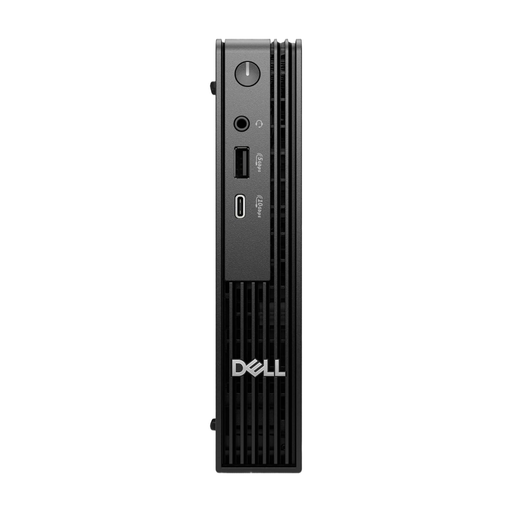
The Dell Pro Micro QCM1250 is a configurable range of compact Windows PCs.
- Dell Deutschland lists different processor, operating system and RAM options for the model range.
- The model range name alone doesn’t tell you the specifications of a specific product.
Joybuy desktop PCs for checkout testing
The Joybuy products below are Windows desktops: compact models for limited desk space and tower models for a larger workspace.
 No image available
HP Z2 Mini G1a Ryzen AI Max+ Pro 395, 128 GB RAM, 2 TB SSD
This compact Windows desktop is an option for Windows-based checkout testing when desk space is limited.
Listed specifications include Windows 11 Professional, 128 GB RAM and a 2 TB SSD.
Video outputs listed include Thunderbolt 4, USB-C and Mini-DisplayPort.
Joybuy
 No image available
HP Z1 Tower G1i A40T1ET#ABD, Core Ultra 9 285, 64 GB RAM, 1 TB SSD
The tower design is worth considering if you have a larger workspace and plan to make upgrades later.
Listed specifications include Windows 11 Professional, 64 GB RAM and a 1 TB SSD.
DisplayPort, HDMI and several USB connections are listed.
Joybuy
 No image available
Dell Pro Max Micro FCM2250, Core Ultra 7, 16 GB RAM, 512 GB SSD
This compact Windows micro PC is an option if you want to set up a small workspace for Windows testing.
Listed specifications include Windows 11 Pro, 16 GB DDR5 RAM and a 512 GB SSD.
Gigabit LAN, HDMI and DisplayPort connections are listed.
Joybuy
 No image available
Lenovo ThinkStation P2 Tower Gen2, Core Ultra 7 265, 32 GB RAM, 512 GB SSD
The tower case is an option if you have a larger workspace and plan to connect a monitor you already own.
Listed specifications include Windows 11 Pro, 32 GB RAM and a 512 GB SSD.
DisplayPort and HDMI are listed; a keyboard and mouse are included.
Joybuy
 No image available
Dell Pro Micro QCM1250 MJ5TK TPM i7-14700T, 16 GB RAM, 512 GB SSD
This micro PC is an option for Windows-based checkout testing in a workspace where space is at a premium.
Listed specifications include Windows 11 Pro, 16 GB DDR5 RAM and a 512 GB NVMe SSD.
Gigabit Ethernet, Wi-Fi 6E and Bluetooth are listed.
Joybuy
Frequently asked questions
Is Chrome’s mobile view enough to sign off checkout on smartphones?
No. Chrome for Developers describes Device Mode as an approximation; the code doesn’t run on a real mobile device. Use it for early layout and functionality checks, then test important mobile journeys on suitable real devices too.
How can I test payments without changing the live integration?
If your checkout uses Stripe, Stripe documents isolated sandboxes, test API keys and test card numbers. If you use another payment provider, check its own testing process; your computer’s performance can’t replace this setup.
Do I need a Mac or a particularly powerful PC to test wallets?
Not necessarily. With a Stripe integration, the wallets shown can depend on factors including a compatible device, a supported browser and its settings. Check the requirements for the wallet integration you actually use rather than assuming that a computer’s performance determines whether you can test it.
What should I check first if something goes wrong after buying?
Your statutory rights against the seller are separate from any voluntary warranty. The Verbraucherzentrale explains that, if a product is faulty, your initial right is to have the issue put right. The seller and the terms of your contract apply to your specific purchase.
Does a consumer checkout offered in Germany have to be accessible?
Subject to certain conditions, the BFSG covers consumer e-commerce services and has generally applied since 28 June 2025. Section 3 of the BFSG includes an exemption for micro-enterprises that offer or provide services. The Bundesfachstelle Barrierefreiheit and the legislation set out the framework; whether a particular shop and its operator fall within its scope must be assessed separately. This does not mean there is a blanket minimum requirement for the desktop PC discussed here.


