Portal developers juggling multiple tasks
If you switch between an editor, browser and local preview, check that the specific computer configuration has the right features for your workflow.


A fully equipped mini PC can be a space-saving option for developing with an editor, browser and local preview. A larger desktop may be a better fit if you need room for upgrades or additional internal drives. With a Mac mini, make sure your essential tools are compatible with macOS. Whatever you choose, check the exact configuration, ports and what’s included – and remember that desktop simulations can’t replace testing on a real mobile device.
If you switch between an editor, browser and local preview, check that the specific computer configuration has the right features for your workflow.
If you test different screen sizes and browsers, plan to test on suitable real devices as well as using simulations. Chrome for Developers describes device mode as a simulation, not as running a site on a mobile device.
If you manage local image or document files alongside the portal, consider storage requirements and data maintenance. The Library of Congress lists monitoring digital storage holdings as one aspect of digital preservation.
Base your choice on your biggest bottleneck: juggling development tasks, responsive testing, local files or setting up a complete workstation. Whatever type of computer you choose, check the operating system, ports, configuration and included accessories individually.
A good fit if: you use code, a browser and local previews at a compact workstation, and your tools run on Windows.
Things to weigh up: specifications, ports and accessories vary by model and version, so check the exact configuration.
A good fit if: future hardware upgrades or additional internal drives matter more to you than having the smallest possible case.
Things to weigh up: Allow more desk space and check the available drive bays in the specific case. One model’s review doesn’t prove that every tower is better overall.
A good fit if: your development software is compatible with macOS and the display outputs on your chosen configuration suit your monitors.
Things to weigh up: Memory and SSD vary by configuration, and a desktop can’t replace testing on real mobile devices.
A good fit if: you want to choose and set up any missing components and, where necessary, an operating system yourself.
Things to weigh up: A barebone PC isn’t necessarily fully equipped. ASUS lists the ExpertCenter PN64 without a pre-installed operating system; this doesn’t apply to all other models.
| Buying priority | What to check before buying | Who is it important to? |
|---|---|---|
| Smooth development workflow | RAM, SSD, processor and operating system on the specific version; whether the computer comes fully configured. | If I use an editor, browser and local preview at the same time, I want to choose a configuration that suits this workflow. Around 28% of consumers put a smooth development workflow first. |
| Checking responsive layouts | Video outputs on the specific configuration and compatible monitor ports, plus additional testing on real mobile devices. | If I check layouts and browser views across different screen sizes, I want to distinguish between simulation and testing on a device. Around 28% of consumers prioritise responsive testing. |
| Storage for historical files | SSD capacity and the ports or upgrade options on the specific model, as well as a separate backup plan. | If I work with historical images and documents locally, I want to plan for storage and data maintenance. Around 22% of consumers give digitised material priority. |
| Total cost of the workstation | Pre-installed operating system and included components; check whether a monitor, input devices and the storage you need are included. | If I’m looking for a ready-to-use workstation, I want to know what’s missing before I buy. Around 22% of consumers focus mainly on the total cost. |
Device mode in Chrome simulates mobile use; it doesn’t run the code on a mobile device. A simulation alone therefore can’t answer every question about how a site works on an actual device.
Use simulations for quick layout checks, then test important features on suitable real devices too.
Testing on real devices may take extra time.
A barebone PC may not include an operating system, memory, storage or input devices. ASUS lists the ExpertCenter PN64 without a pre-installed operating system; other models and versions may come with different specifications.
Compare only configurations that are complete for your workflow, and check the operating system and what’s included.
You may need to choose, buy and set up missing components separately.
According to the Library of Congress, digital preservation also involves monitoring storage holdings and maintaining digital files. Your work computer’s internal storage shouldn’t be treated as a complete backup plan.
Plan for working storage, a separate backup and ongoing data maintenance.
Backups and data maintenance involve extra ongoing work.
The ProDesk Mini range offers a compact Windows option; the specific product number is what matters.
The ThinkCentre Neo 50q Gen 5 Tiny is a compact Windows range with a choice of configurations.
The Mac mini is a compact macOS option, provided your development tools are compatible with it.
The ExpertCenter PN range includes mini PC configurations, so check the operating system and memory carefully.
The A5 Pro is a compact product range; COMPUTER BILD reviewed one specific configuration in its mini PC list.
This selection includes compact Windows mini PCs, a Mac mini and a larger Windows desktop for development work, responsive layout checks and local project files.
 Image unavailable
A compact Windows mini workstation could suit a space-saving development setup; check that its ports match your monitors.
This configuration is listed with 128 GB RAM, a 2 TB SSD and Windows 11 Professional. It also has USB-C and two Mini DisplayPort outputs.
 Image unavailable
This compact macOS option is worth considering if your development tools are compatible with macOS and its display ports suit your workstation.
This version has 24 GB Unified Memory and a 512 GB SSD. It also lists HDMI, Thunderbolt 5 and support for up to three external displays.
 Image unavailable
This tower could be a good fit if you have room for a larger case in your workstation; check its dimensions against your available space before buying.
This configuration is listed with 64 GB RAM, a 2 TB SSD, an RTX 5070Ti and Windows 11 Home. It has three DisplayPort ports and one HDMI port.
 Image unavailable
This mini PC could suit a compact Windows workstation; check that its listed video outputs work with your monitors.
This version has 16 GB LPDDR5, a 512 GB NVMe SSD and Windows 11 Pro. Its video outputs include HDMI, DisplayPort and Type-C.
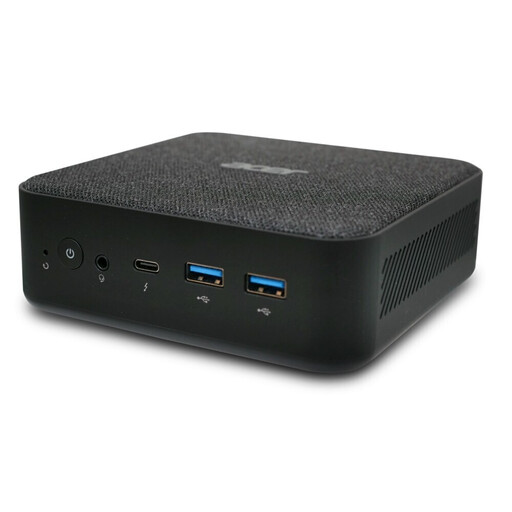 Image unavailable
This mini PC could be a good fit if you’re looking for a compact Windows configuration for an editor, browser and preview.
This version is listed with 16 GB RAM, a 512 GB SSD and Windows 11 Pro.
The development sources cited don’t say that a dedicated graphics card is essential. First check that the computer and its ports suit your monitors and tools, then test important views on real mobile devices too: desktop simulation is only an approximation.
Check the exact version for a pre-installed operating system, RAM, SSD, the ports you need and included accessories. ASUS lists the PN64 without a pre-installed operating system; you can’t assume the same applies to other models.
No. For a consumer purchase from a business seller in the EU, there is generally a minimum two-year legal guarantee from the date you receive the goods. Any additional commercial warranty is separate; check what it covers and don’t confuse it with your statutory rights.
According to the German Federal Ministry for the Environment, old electrical equipment must be handed in at an authorised collection point. Remove your personal data and back up any files you need before handing it in.