Editing long recordings
If you review hours of footage, you’ll need space for your original files and working files, and should plan for a separate backup.


For long dialect interviews, choose a desktop with storage and specifications suited to your editing software, codec and volume of original footage. For Premiere on Windows, Adobe recommends 32 GB of RAM or more and 8 GB of graphics memory for 4K and higher. Proxies can also make demanding video footage easier to work with. Automatic transcripts can help you find clips, but you should check important dialect passages against the original audio.
If you review hours of footage, you’ll need space for your original files and working files, and should plan for a separate backup.
For high-resolution or hard-to-play footage, your editing software, codec and potential proxy workflow will determine which specifications best suit the way you work.
Searchable transcripts can help you find specific statements. Even so, check important quotes and tricky dialect passages against the recording.
When working with long dialect interviews, consider storage, playback requirements, transcription and how you handle recordings together.
| Criterion | What to check before buying | Who it matters most to |
|---|---|---|
| Project and backup storage | Allow space for original files, cache and working files, and plan a separate backup option. Adobe recommends separate drives for the system, cache and media in Premiere. | If you review hours of raw footage, you’ll want reliable space for your original files, cache and backups. That’s why around 39% of consumers put having enough storage first. |
| Smooth playback | Check the codec, resolution and software version against the specific configuration. For Premiere on Windows, Adobe recommends 32 GB of RAM or more and 8 GB of graphics memory for 4K and higher. Proxies are another option. | If you work with high-resolution or hard-to-play interviews, you’ll want smooth previews without paying for graphics performance you don’t need. Around 31% of consumers put smooth reviewing and editing first. |
| Dialect transcripts | Test the transcription workflow with your own recordings, and check important names, quotes and tricky passages against the original audio. | If you need to find specific dialect passages, searchable transcripts can help, but you’ll still want to verify key statements. Around 15% of consumers prioritise finding and checking spoken statements. |
| Protecting recordings | Clarify the purpose of the interviews and who should have access to them. Plan separate backups and consider whether encryption is appropriate for the level of protection your recordings need. | If interviewees can be identified, you’ll want to manage access and backups in a way that suits how the recordings will be used. Around 15% of consumers prioritise protecting their recordings and backing up their data. |
As well as the original media, cache and working files can take up space during editing. A larger working SSD is no substitute for a separate backup.
Estimate the size of a typical project and your largest one, then plan your working and backup storage separately.
Adobe’s RAM and graphics memory recommendations for Premiere on Windows are not directly comparable with Apple’s unified memory.
Check the requirements for your editing software on the relevant operating system and for the exact device configuration.
Premiere’s transcription features don’t confirm how accurately it recognises a particular dialect.
Test your own recordings and check important statements against the original audio.
Mac mini for a compact macOS editing setup; Mac Studio as a more powerful desktop range.
The Z1 Tower G1i and Z2 Tower G1i are Windows towers, with specifications that vary by model.
The ThinkStation P3 Tower Gen 2 is a configurable tower workstation.
The Precision 5860 Tower is a configurable Windows workstation for buyers considering expanding their system.
The compact desktops and mini PCs listed here could suit a space-saving editing setup. For long interviews, check the internal storage and connectivity options against the size of your projects, and plan a separate backup.
 No image available
A compact editing setup, if you also allow for the storage needs of long raw recordings.
16 GB unified memory; 256 GB SSD; Thunderbolt 4.
 No image available
A compact macOS option if you’re planning for more internal storage than the 256 GB version offers.
24 GB unified memory; 512 GB SSD; Thunderbolt 4.
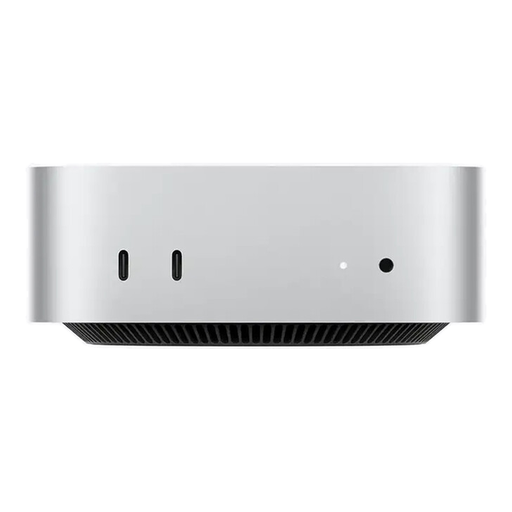 No image available
A compact macOS editing setup, if this specific M5 Pro configuration suits your software and footage.
24 GB unified memory; 512 GB SSD; Thunderbolt 5.
 No image available
A compact Windows option, if the exact configuration meets the requirements of your editing software.
2 × M.2-2280 slots; stated upgrade capacity up to 4 TB; Windows 11 Pro.
 No image available
A compact macOS editing setup, if the stated memory and processor configuration suits the way you work.
48 GB unified memory; 1 TB SSD; 2.5 Gbit/s Ethernet.
Not just because the recordings are long. First check the codec, resolution, effects and requirements of your editing software. For Premiere on Windows, Adobe recommends 32 GB of RAM or more and 8 GB of graphics memory for 4K and higher. Proxies can also help with demanding footage.
Adobe recommends fast media drives for Premiere and describes using separate drives for the system, cache and media. With two drives, cache and media can share a drive. Keep a backup separate from your active project drive, and allow for the storage needs of your original and working files.
Premiere offers transcription and speaker labelling, but accuracy for a particular dialect depends on the audio. Check names, key quotes and tricky passages against the original recording.
No, not without adjustment: Adobe’s recommendations for Premiere on Windows and Apple’s unified memory refer to different configurations. Compare the requirements of your software with the exact Mac model.
Clarify the specific purpose of processing and which legal basis applies. Germany’s Federal Commissioner for Data Protection and Freedom of Information explains that processing must meet the requirements of Article 6 of the GDPR. Whether consent or another legal basis applies depends on the circumstances.