Developers testing iOS apps
If you test apps locally with Xcode or Apple simulators and want to use two monitors at the same time, choosing the right host platform comes first. Apple Developer describes the simulators as part of Xcode on macOS.


If you need to simulate iOS apps locally with Xcode, you’ll need a compatible Mac. For Android testing without local Xcode, a suitably equipped Windows desktop is also an option. Apple Developer describes iOS simulators as part of Xcode on macOS. Whichever route you choose, check the video outputs, RAM, storage and emulator workflow requirements for the specific model. A mini PC takes up less space, but ports and specifications vary by configuration.
If you test apps locally with Xcode or Apple simulators and want to use two monitors at the same time, choosing the right host platform comes first. Apple Developer describes the simulators as part of Xcode on macOS.
If you use your IDE, emulator and test logs side by side, you’ll need the right video outputs as well as specifications suited to your emulator workflow. Google documents the Android emulator’s system requirements, while MSI lists two HDMI outputs for the Cubi NUC 1M.
If you switch between projects and virtual devices, it’s worth checking the actual installed specifications and potential for future upgrades. Lenovo, HP and GEEKOM offer different configurations, so the exact model number and what’s included in the box matter.
Start by deciding which platforms you need to test locally. Then compare the ports and specifications with your workflow.
| Priority | What to check before buying | Who it matters most to |
|---|---|---|
| Test platform | Identify the operating systems you need, along with the required versions of Xcode, simulators and Android Studio. | If I need to test iOS apps locally with Xcode, I don’t want to have to change host platform after buying. Around 31% of consumers would make platform compatibility their main priority in this selection. |
| Two monitors | Check the specific model’s support for simultaneous displays, its video outputs and the inputs on both monitors. | I want both of my existing monitors to work at the same time, so I can have my IDE and emulator side by side. Around 31% of consumers would make connecting two monitors their main priority. |
| Android emulator | Check the installed RAM, available SSD space and support for the right VM acceleration. Google recommends at least 16 GB of RAM and 16 GB of storage for a good emulator experience. Higher API levels or larger virtual displays may require more. | If I use several virtual devices or larger projects, the installed specifications matter more to me than the possibility of upgrading later. Around 25% of consumers would prioritise emulator performance. |
| Specifications and upgrades | Compare the full model number, installed RAM and SSD, what’s included in the box and potential upgrade options. | I want to know what else I need for a ready-to-use two-monitor setup, and which components I can upgrade later. Around 13% of consumers would name specifications and upgradeability as their top priority. |
The computer’s video outputs, the monitors’ inputs and the features of the mobile test device are separate considerations.
Check the connections on both monitors against the specific PC configuration, and choose your target mobile device separately.
COMPUTER BILD tested the HP Pro Mini 400 G9 D6B240EA; HP offers a different configuration, the 937U0EA#ABD. The assessment of one device doesn’t automatically apply to the other.
Compare the full model number and installed components of the device that was tested with the specific offer you’re considering.
A stated upgrade limit doesn’t tell you how much memory is already installed in the device you’ve chosen.
Check the installed RAM and SSD storage for the specific configuration, and make sure they suit your Android Studio and emulator workflow.
A relevant choice if you want to use Xcode and Apple simulators locally and connect external monitors.
The Cubi NUC 1M is a compact Windows PC range for an Android-focused workspace with two monitors.
The ThinkCentre M70q Gen 5 Tiny is worth considering if you want a compact Windows desktop with easy-to-access components.
The Pro Mini 400 G9 is a compact Windows option where the full model number is essential when comparing configurations.
The A5 Pro is a compact Windows option. Check that its specifications and model variant suit your testing workflow.
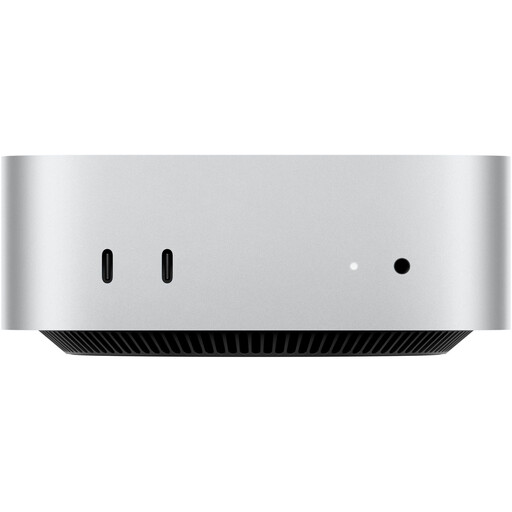
This Joybuy selection includes Mac mini configurations for local Xcode simulators and a two-monitor workspace. Check the ports and the number of displays supported simultaneously by the specific configuration to make sure it suits your setup.
 No image available
For local Xcode simulators and a two-monitor workspace, provided the specific display configuration suits your monitors.
 No image available
For local Xcode simulators if 32 GB Unified Memory and a 512 GB SSD suit the size of your projects.
 No image available
For local Xcode simulators if 24 GB Unified Memory and a 512 GB SSD are enough for your projects.
No. Two connected monitors describe a desktop workspace. To test features on a mobile target device, you’ll need a suitable virtual device profile or a compatible physical test device. The number of PC monitors doesn’t tell you anything about that.
Set up Android Studio with the emulator, check the system requirements, create a suitable Android Virtual Device and launch your app in it. Google documents graphics and VM acceleration separately; whether and how you can enable them depends on your host configuration.
You can’t tell from the product range name alone. Lenovo explicitly states that the monitor for the ThinkCentre M70q Gen 5 Tiny is sold separately. Check what’s included with the specific configuration and whether it comes with suitable cables for the connections on both your monitors.
No. The German Environment Agency advises against disposing of electrical waste in household waste, packaging waste, bulky waste or scrap metal. Find out about separate collection and local take-back options.