
Lieferung heute & morgen

Qualitätsgarantie

Willkommens-Angebote freischalten: KOSTENLOSE Lieferung | Bis zu 80 % RABATT | Kostenlose 30-Tage-JoyPlus-Testphase
App herunterladen
Buying a new desktop PC can quickly become overwhelming. The market is filled with a multitude of configurations advertised for different purposes—from high-performance Gaming PCs to compact Mini PCs. As a Joybuy Product Recommendation Officer, I'll help you find objective criteria for your decision and avoid common pitfalls. Often, three specific problems lead to an unsatisfying purchase:
To avoid buyer's remorse, you should focus on the fundamental technical parameters that determine the performance and longevity of your system.
The CPU is the brain of the computer. For an Office PC, modern processors with 4 to 6 cores are often sufficient. For demanding applications like video editing or a Gaming PC, models with 8 or more cores, such as an AMD Ryzen 7, provide a solid foundation.
A new, important aspect is the NPU (Neural Processing Unit), which is integrated into processors like the Intel Core Ultra series. This specialized unit accelerates artificial intelligence (AI) tasks directly on the device without relying on cloud servers. This is relevant for users who want to use a PC for AI applications like image generation or running local language models.
The choice of graphics card depends entirely on your use case:
The form factor determines the size of your PC and its expansion possibilities.
Here are some configurations tailored to specific user profiles that purposefully avoid the pitfalls mentioned earlier.
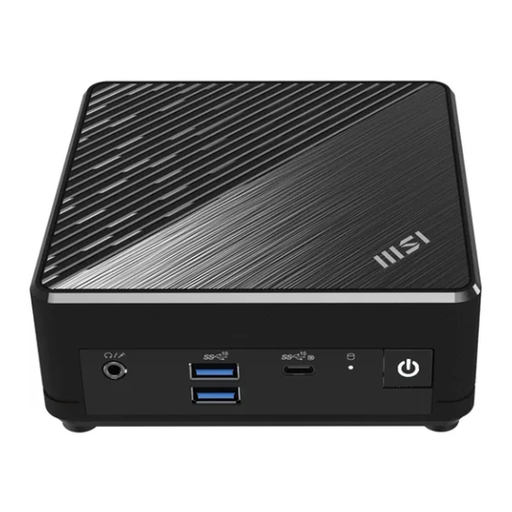
Why This Fits Their Persona: This system is designed for users who need a reliable and extremely space-saving computer for office applications, email, and web browsing. With Windows 11 Pro and a VESA mount, it's ready to use out of the box and can be discreetly mounted behind a monitor.
It doesn't pretend to be a gaming PC. Its strength lies in its efficiency and compact form factor, which is optimized for its intended use case and won't cause thermal issues.
Very low power consumption and quiet operation. Comprehensive connectivity with 2x Gigabit LAN, Wi-Fi 5, and support for up to three monitors.
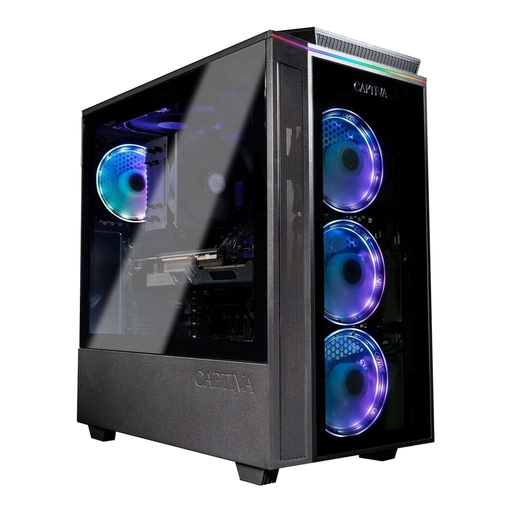
Why This Fits Their Persona: This system is aimed at demanding gamers who want to play the latest titles at high resolutions with maximum details. The combination of the gaming-optimized AMD Ryzen 7 7800X3D and the powerful RTX 5070 Ti delivers high and stable frame rates.
This isn't just marketing with flashy looks; it's packed with genuine high-end hardware. The case is designed for high airflow to prevent thermal throttling and ensure the full performance of the components.
Balanced component selection for maximum gaming performance. Uses standard parts (mATX motherboard), which facilitates future upgrades.
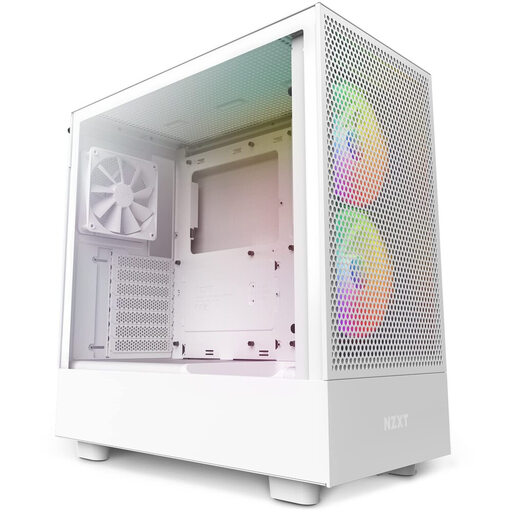
Why This Fits Their Persona: For enthusiasts who want to build their own PC, the case is the foundation. This model provides an excellent basis for a clean and cool-running system. It gives the user full control over component choice and aesthetics.
This case is the direct solution to the problems of poor cooling and lack of upgradability. It is designed for standard ATX components and offers optimized airflow through perforated panels.
Dedicated, angled fan for direct cooling of the graphics card. Generous cable management channels for a tidy interior and better airflow.
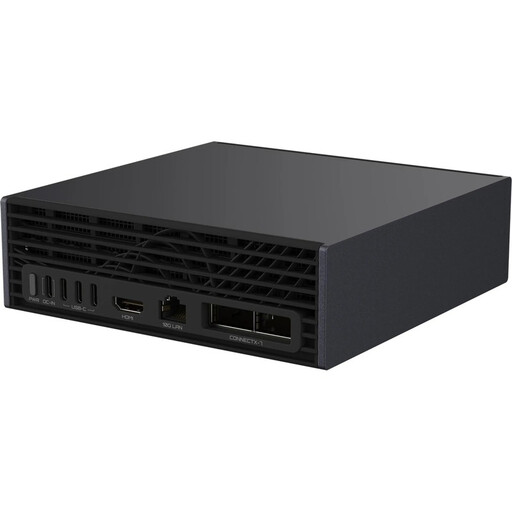
Why This Fits Their Persona: This is a highly specialized tool for developers and researchers who need to train and run large AI models locally. The NVIDIA Grace Blackwell Superchip offers enormous computing power in a compact, desktop-friendly format.
This system is the opposite of a marketing gimmick. It is a purpose-built professional device whose entire design—from CPU architecture to cooling—is focused on a single task: maximum AI performance.
Enables the development and fine-tuning of large AI models without cloud dependency. Provides the necessary infrastructure for data-intensive workloads with 128 GB of unified memory and 10GbE LAN.
We have compiled a complete, real-time updated list of products that fully meet these strict selection criteria and German safety regulations.
The lifespan of a desktop PC heavily depends on its components and usage. A well-maintained Office PC can easily be used for its tasks for 5-7 years. A Gaming PC might need a new graphics card after 3-4 years to play current games at high quality. Core components like the CPU and motherboard often last much longer with good cooling.
A good cooling concept is crucial. Look for a PC case with a mesh front for good air intake, at least two case fans (one in the front for intake, one in the back for exhaust), and a sufficiently sized CPU cooler. For high-end processors like an AMD Ryzen 7 or powerful Intel models, an All-in-One (AIO) water cooler can be useful to keep temperatures low even under load.