PDF plan reviewers
You read and annotate architectural plans at a fixed desk, without editing CAD models yourself. Look for a screen that’s easy to read, suitable video connections and a clear idea of what’s actually included with the PC.


If you mainly view and annotate architectural plans as PDFs, choose a PC based on its monitor, suitable connections and what’s included in the box. Reader minimum requirements aren’t enough to determine what you need from a CAD workstation. If you edit DWG drawings or BIM models, first check the configuration against the requirements for your specific software version and project size. A compact mini PC saves desk space, while a larger desktop may offer more scope for future upgrades, depending on the model.
You read and annotate architectural plans at a fixed desk, without editing CAD models yourself. Look for a screen that’s easy to read, suitable video connections and a clear idea of what’s actually included with the PC.
You edit DWG drawings, so check that the configuration suits the CAD version you use and your monitor. Autodesk’s requirements for AutoCAD 2026 distinguish between minimum and recommended specifications.
If you open or edit building models, the software version, project size, memory and graphics all become important factors in your choice. Autodesk lists different configurations for Revit 2026 depending on how it’s used and the size of the model.
First, decide whether you only need to view plans or edit them too. Then you can choose a screen, PC performance and box contents to suit your desk.
| Consideration | What to check when buying | Who it matters most to |
|---|---|---|
| Reviewing PDF plans on screen | Check the monitor size and native resolution, and make sure it connects to the PC. TU Dresden recommends a screen of at least 21 inches with native Full HD resolution for desktop CAD work. | If I want to read plans and annotations clearly at a fixed desk, the screen matters just as much as the computer. Around 33 % of consumers prioritise the PDF view and monitor. |
| Editing 2D CAD | Check the CAD programme and version, along with the specific processor, RAM and graphics configuration. For AutoCAD 2026, Autodesk lists 8 GB RAM as the minimum and recommends 32 GB. | If you edit DWG drawings yourself, choose a PC based on the version you use rather than PDF requirements. Around 25 % of consumers prioritise 2D CAD editing. |
| Editing BIM models | Consider the model size and software version. For Revit 2026, Autodesk lists 16 GB RAM for typical work on a single model of up to around 300 MB, and at least 32 GB for a balanced configuration. Individual models may differ. | If I edit building models, I want to choose a configuration suited to my actual projects, rather than one for PDF use alone. Around 25 % of consumers prioritise working with BIM models. |
| Space and everything you need | For the exact version on offer, check the RAM, SSD and operating system, as well as whether a monitor and input devices are included. With a mini PC, also check the specific upgrade options. | If you’re setting up a small desk, you need a device that fits the space and lets you get started in the way you want. Around 17 % of consumers prioritise a compact footprint and a complete setup. |
A PC that’s suitable for reading an exported PDF isn’t automatically right for editing a BIM model. Adobe lists requirements for Acrobat Reader, while Autodesk has separate requirements for CAD and BIM software.
Before comparing PCs, note whether you’ll be reviewing PDFs or editing files with a specific CAD or BIM programme.
For the GMKtec NucBox K12, the manufacturer distinguishes between equipped versions and a barebone model without RAM, an SSD or pre-installed Windows 11 Pro. The product name alone doesn’t tell you what’s included with every version.
Check each component included with the version you’ve chosen, and whether your preferred operating system is already installed.
A suitable computer can’t replace a screen that’s right for viewing plans. TU Dresden recommends a screen size and native resolution for desktop CAD work.
First, check your current monitor, its connections and the desk space available. Then compare these with the video outputs on the specific PC version.
The examples below refer to specific product ranges or versions. Check the specification and suitability for CAD or BIM for the exact configuration you’re considering.
The ThinkCentre M75q Gen 5 Tiny is a compact desktop option for a workspace where desk space is limited.
The Pro Mini 400 G9 is an example of a compact office PC; HP also has separate Z workstation ranges.
The ExpertCenter PN54 is a compact mini PC range that could suit a workspace with multiple screens.
The Dell Pro Micro QCM1250 is a configurable compact desktop.
The NucBox K12 is available in equipped versions and as a barebone.
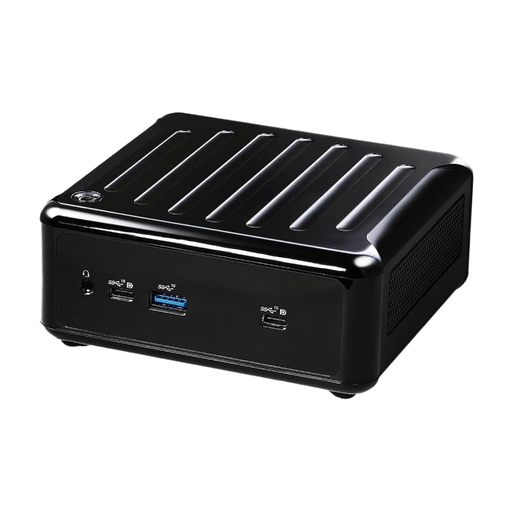
The products below are compact mini PCs for a space-saving workspace. Before buying, check that the connections and included components suit your monitor and how you plan to use the PC.
 No image available
The mini PC form factor could suit a desk with limited space; check that the video outputs listed are compatible with your monitor.
Intel Core i3-8109U up to 3.6 GHz, 12 GB RAM and 256 GB SSD.
HDMI and DisplayPort.
 No image available
This compact mini PC could be an option for a space-saving workspace. Before setting it up, check which operating system is included with the version you’ve chosen.
AMD Ryzen 5600U.
No operating system is listed for this SKU.
For viewing PDFs only, first check your current monitor, the video output you need and what’s included in the box. Adobe lists different minimum requirements for Acrobat Reader from those Autodesk sets for CAD and BIM programmes; meeting Reader’s minimum requirements doesn’t guarantee a particular speed with every large file.
Check that your monitor’s input matches the outputs on the specific PC version, and confirm whether RAM, an SSD and an operating system are included. For the GMKtec NucBox K12, the barebone version specifically doesn’t include these components or pre-installed Windows 11 Pro.
No. When a consumer buys from a trader in the EU, they’re generally entitled to a statutory guarantee of at least two years from the date they receive the goods. A voluntary warranty has its own terms and conditions. Online purchases generally come with a 14-day right to cancel, although exceptions may apply.
No. In Germany, electrical and electronic waste is collected separately. The German Environment Agency lists municipal recycling centres as free drop-off points. If you want to return a device to a retailer, check the returns policy that applies there.