What should you look for when buying?
First, work out which programmes and files you use. Then check that the computer is suitable for a shared workspace, and confirm the operating system, connections and what’s included against the full model number.
| Buying priority |
What to look for |
Who it matters most to |
| Performance for your data |
Consider file sizes and the programmes you use; check the RAM and upgrade options for the specific model. |
If I’m analysing large observation files, I want enough RAM and don’t want to choose based solely on the number of processor cores. Around 33% of consumers put data volume first. |
| Shared use and data backup |
Plan for an installed operating system that supports separate accounts, and a backup location separate from the PC. The German Federal Office for Information Security recommends individual accounts; an external backup can help if the computer breaks or files are accidentally deleted. |
If several people use the same computer, I need separate logins and a clear way to restore work. Around 27% of consumers prioritise shared use and backups. |
| Desk space and connections |
Check the video and USB connections on the specific model against your monitors and input devices; check the case size and included accessories. |
If my desk also needs to accommodate paperwork and input devices, I look for a suitable form factor and compatible connections. Around 20% of consumers prioritise space requirements and connectivity. |
| Complete setup |
For the exact model number, check the operating system, RAM, SSD and included input devices. |
If I want to set up my workspace without unexpected extras, I compare what’s actually included rather than relying on the product range name. Around 20% of consumers focus on having everything included and avoiding potential extra costs. |
Desktop PCs at Joybuy
This selection includes tower, slim and mini PCs for working with observation data at a shared desk.
 No image available
HP Z1 Tower G1i A40T1ET#ABD Ultra 9 285
The listed specification includes plenty of RAM and SSD storage for anyone working with larger local files.
It lists a Core Ultra 9 285, 64 GB DDR5-5600 RAM, a 1 TB M.2 SSD, integrated graphics and Windows 11 Pro. What you need will depend on your dataset and analysis software.
Joybuy
 No image available
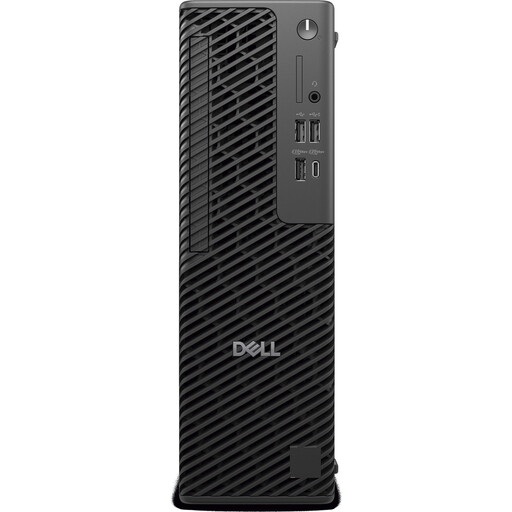
Dell Pro Max Slim FCS1250 Core Ultra 5 245 21RGG
The slim design could suit a desk with limited space; check that its connections match the devices you already own.
This version is listed with 16 GB RAM, a 512 GB SSD and Windows 11 Pro. The product description also mentions three DisplayPort outputs and USB connections.
Joybuy
 No image available
Thunderobot Mini PC Workstation AI Max+ 395
The mini PC form factor is worth considering if you’re looking for a small computer for a shared desk.
The product name lists 128 GB LPDDR5X RAM and a 1 TB SSD. Before buying, also check which operating system and peripherals are included with the specific version.
Joybuy
 No image available
SOYO S5Air Mini PC Ryzen 5 7535HS
Its compact mini PC design can help save space on a crowded desk.
The product details list Windows 11 Pro, 16 GB LPDDR5 RAM, a 512 GB NVMe SSD and dimensions of 128 × 128 × 47,6 mm. HDMI, DisplayPort and Type-C with video output are also listed.
Joybuy
 No image available
SOYO M5 Mini PC Ryzen 3 4300U
If you plan to connect several devices to your desk, compare the listed connections with your existing setup.
The listed specification includes Windows 11, 16 GB LPDDR4 RAM and a 512 GB SSD. The product description lists six USB 3.0 connections, as well as HDMI, DisplayPort and Type-C with video output.
Joybuy
Frequently asked questions
Do I need lots of processor cores for large birdwatching files?
Not just because of the file size. According to Posit Support, the value of extra cores depends on whether the task can be parallelised; more RAM may be useful with larger datasets. Check what you need based on your files and analysis methods. The Cornell Lab of Ornithology’s eBird Help Center recommends programmes such as R for larger datasets or more demanding analyses.
How do I set up a PC for people who take turns using it?
Set up a separate password-protected account with appropriate permissions for each person, and decide who will manage programmes and check backups. The German Federal Office for Information Security recommends separate accounts on shared devices; external backups can help if the computer breaks or files are accidentally deleted.
Are statutory consumer rights and a manufacturer’s warranty the same thing?
No. For a consumer purchase, statutory rights apply against the seller; a warranty is a voluntary additional promise with its own terms. If an organisation is buying the computer, check the specific contract and service terms separately. The German consumer advice centre explains the difference.
Can you put an old computer in household rubbish in Germany?
No. The German Environment Agency advises taking old electrical equipment to a separate collection point, such as a recycling centre or a suitable take-back point at a retailer. Check the collection point’s requirements, and back up or erase your data before handing the computer in.
Is a PC with Windows 10 still a sensible new purchase in November 2026?
For a regularly used, internet-connected workspace, check whether updates are available: Microsoft ended standard support for Windows 10 on 14 October 2025. Factor any transition options and their terms into your decision rather than assuming standard support will continue.


